Forms Add-On
This
AddOnPackage provides enhancements to TWiki forms:
- Provide manual control over the appearance (layout and content)of the form.
- Allow field values to be supplied for select, radio, and checkbox fields through both a referenced topic or an embedded search.
- Allow the same field value definition to be referenced multiple times.
- Allow field names to be independent from the topic that defines their values.
- Fully support initialization of topics from forms.
- Support mandatory form fields.
 Most of the enhancements supported by this plugin have been migrated into the Dakar core, and thus this plugin is not needed for TWiki4. Most of the enhancements supported by this plugin have been migrated into the Dakar core, and thus this plugin is not needed for TWiki4. |
Usage
Manual control over the appearance of the form
If there is a topic in the current web with the name of the form attached to a topic postfixed by "Template", the form will be rendered using that topic rather than constructed in the standard way. In other words...
- Assume your topic has a form
XXX associated.
- Create a topic
XXXTemplate that defines how the form should be laid out. The topic will be rendered where normally the form would be shown. This gives complete control over both the appearance of the form as well as the fields displayed.
- Typically that template will contain a wiki or HTML table with the precise apprearance that is desired.
- All form fields are stored with the topic, but only those referenced through %META{"formfield=..."}% constructs will be shown.
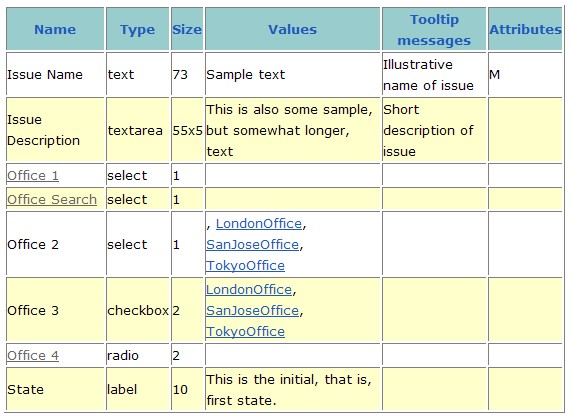
Example: Consider the following form definition:
Given the template
%META{"formfield" name="IssueDescription"}%
<p />
%TABLE{tableborder="0" cellpadding="1" cellspacing="3" headerbg="#000099" headercolor="#FFFFCC" databg="#C8CB8F"}%
|*Office 1*|*<nop>OfficeSearch*|*Office 2*|*Office 3*|*Office 4*|
|%META{"formfield" name="Office1"}%|%META{"formfield" name="OfficeSearch"}%|%META{"formfield" name="Office2"}%|%META{"formfield" name="Office3"}%|%META{"formfield" name="Office4"}%|
|%META{"formfield" name="IssueDescription"}%|||||
<p />
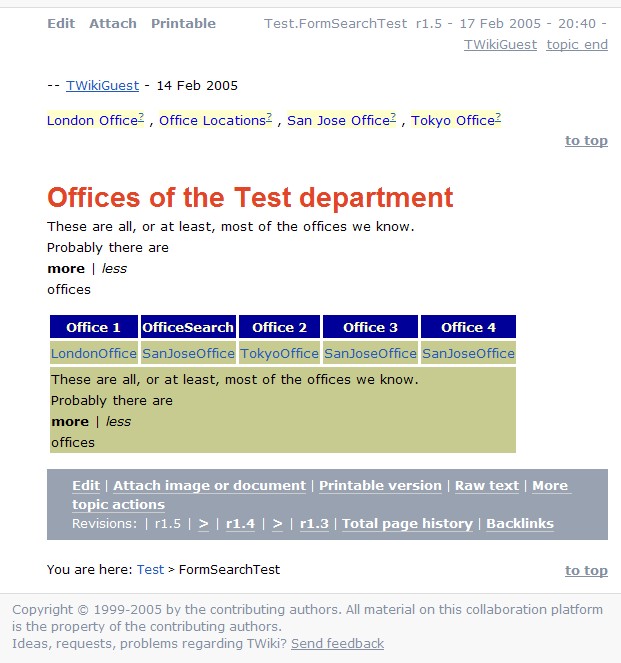
the form will render as follows:
Everything from "Offices of the ..." to the action bar is the form rendered as prescribed above.
Definition of possible field values through referenced topic
TWikiForms allow the possible values for fields to be defined in a table on a referenced topic, in which case the name of the field must be the referenced topic. This Add-On allows the field name to be defined using the syntax for specific links
[[...][...]]:
- The item in the first pair of brackets is a reference to another topic defining the possible field values for this field
- The item in the second pair of brackets is the field name
Using this syntax, the user can choose a descriptive fieldname, where the name of the topic referenced might not be as appropriate. More importantly, where the field values are the same for several fields, the same defining topic can be referenced multiple times (by giving them different names).
For example, the form above was defined as follows:
| *Name* | *Type* | *Size* | *Values* | *Tooltip messages* | *Attributes* |
| Issue Name | text | 73 |  Sample text   | Illustrative name of issue | M |
| Issue Description | textarea | 55x5 | This is also some sample, but somewhat longer, text    | Short description of issue |  |
| [[OfficeSearch][Office 1]] | select | 1 |  |  |  |
| OfficeSearch | select | 1 |  |  |  |
| Office 2 | select | 1 | , %SEARCH{"Office$" scope="topic" web="Main" nototal="on" nosummary="on" nosearch="on" regex="on" format="Main.$topic" separator=", " }%  |  |  |
| Office 3 | checkbox | 2 | %SEARCH{"Office$" scope="topic" web="Main" nototal="on" nosummary="on" nosearch="on" regex="on" format="Main.$topic" separator=", " }%  |  |  |
| [[OfficeSearch][Office 4]] | radio | 2 |  |  |  |
| State  | label | 10  | This is the initial, that is, first state. |  | |
The possible values for the fields defined in rows 3, 4, and 7 are all given by reference to the topic
OfficeSearch. However, when rendered, the fields will have the names
Office 1,
OfficeSearch, and
Office 4, respectively.
Definition of possible field values through searches
The possible values for the fields of a form can also be given through a search, either by placing the search directly in the fourth column of the field definition, or by generating the rows of the referenced topic by a search.
In the example above, the possible field values for rows 5 and 6 are both obtained by searching through the
Main web for occurrences of topics ending in
Office. Similarly, the
OfficeSearch topic leveraged in the previous section can be defined by a search:
| *Name*          | *Type* | *Tooltip message* |
|                 |        |                   |
%SEARCH{"Office$" regex="on" scope="topic" web="Main" nototal="on" nosummary="on" nosearch="on" format="| Main.$topic | option | |"}%
Initialization of field values from the form definition
All form fields can be initialized from the values given in the fourth column of the form template.
The initial values in the form for text and text area fields may contain commas; for other fields the individual values are separated by commas. Checkbox fields cannot be initialized.
Fields are initialized in the following order (note that the form definition is not used if the body text is passed as a query parameter (per TWiki spec):
-
- Field values passed as query parameters
- Field values in a template topic
- Field values in the form definition
Mandatory fields in forms
If the attribute column (the sixth column) in a form definition contains an
M for a field, that field cannot be left blank. If the field is found empty during topic save, an error is raised and the user is redirected to an oops page.
Mandatory fields are indicated by an asteriks next to the field name.
In the example above, the first field (
Issue Name) is mandatory and must always be provided.
Other
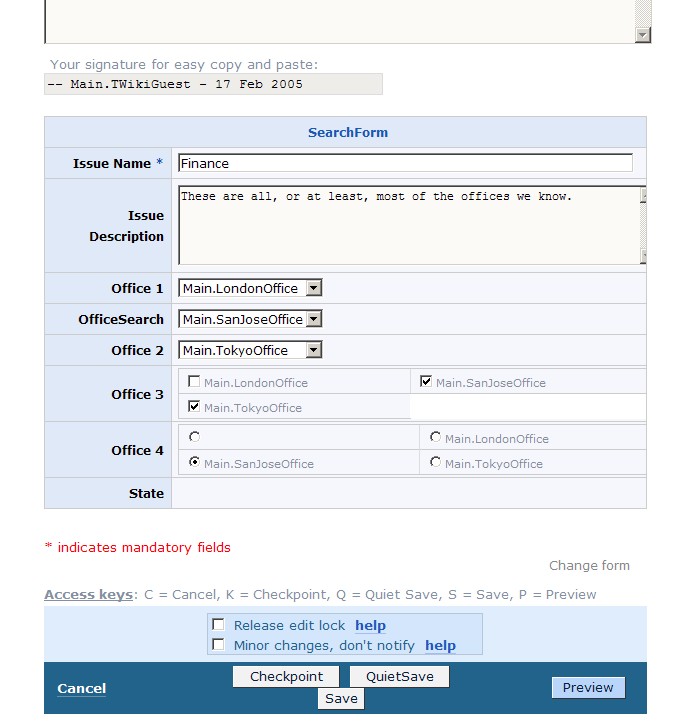
In order to improve the appearance of the form during editing, the field definitions are not linked, where the values are obtained from a referenced topic. Note that this topic is still accessible via the form definition, which is linked at the top of the form.
The example form during edit renders as follows:
Acknowledgement
This Add-On leverages code contributions and ideas by
TWiki:Main/PeterKlausner
and
TWiki:Main/SvenDowedit (see also
TWiki:Codev/DynamicFormOptionDefinitions).
Add-On Installation Instructions
Note: You do not need to install anything on the browser to use this add-on. The following instructions are for the administrator who installs the add-on on the server where TWiki is running.
- Download the ZIP file from the Add-on Home (see below)
- Unzip
FormsAddOn.zip in your twiki installation directory. Content: | File: | Description: |
data/TWiki/FormsAddOn.txt | Add-on topic |
data/TWiki/FormsAddOn.txt,v | Add-on topic repository |
templates/oopsfielderror.tmpl | Error template |
FormsAddOn.patch | Patch |
data/Sandbox/SearchForm.txt | Example form |
data/Sandbox/SearchFormTemplate.txt | Template for example form |
data/Sandbox/OfficeSearch.txt | Topic defining field values |
data/Sandbox/SearchFormTest.txt | Example topic |
- Patch the following files with
FormsAddOn.patch: lib/TWiki/Form.pm, lib/TWiki/UI/Preview.pm, lib/TWiki/UI/Save.pm, lib/TWiki/Render.pm
- Test if the installation was successful:
Add-On Info
- Set SHORTDESCRIPTION = Enhance TWiki forms with control over layout, support for initial form field values, support for mandatory form fields
Related Topic: TWikiAddOns
--
TWiki:Main/ThomasWeigert - 15 Feb 2005


 zip
zip 


 Site map
 Blog web

 Index
Index Search
 Search extensions
 Search by tags
 Changes
 Notifications
 RSS Feed
 Statistics
 Preferences
 Community
  Readme first!
 Rate extensions!
 Add-Ons
  Development topics
 Idea topics
 Plugins
  Development topics
 Idea topics
 Skins
Skins  Development topics
 Idea topics
 Code Contribs
  Development topics
 Idea topics


 Account


 Ideas, requests, problems regarding TWiki? Send feedback. Ask community in the support forum.