SID-00587: PDF-Output with real cover-sheet / first-page
| Status: |  Answered Answered |
TWiki version: | 4.3.2 | Perl version: | |
| Category: | GenPDFAddOn | Server OS: | Last update: | 16 years ago |
Discussion and Answer
You can do title pages with this version too. See GENPDFADDON_TITLETOPIC in the documentation at Plugins.GenPDFAddOn. For the detailed example, see myGenPdfForm.zip attached to Plugins.GenPDFAddOnDev for an easy way to add title pages (for some reason, that archive needs to be renamed as .rar to work on Windows)
-- SeanCMorgan - 2009-10-26
I've downloaded the zip/rar-file and set-up as described. Where do I find the "PDF-button". I thought, that this is a new menu-point at the bottom of the topic? Sorry for my question ...
-- NorbertKress - 2009-10-26
Yes, it will appear in the menu at the bottom of every topic. You have to add it yourself, as per the instructions section in the text file of that archive:
Add a toolbar button that points to the form by editingBTW, here's what it looks like:TWiki/templates/viewtopicactionbuttons.tmpl:
- Insert the PDF button in this line:
%TMPL:DEF{"topicactionbuttons"}%%TMPL:P{"action_activatable_edit_or_create"}%%TMPL:P{"action_activatable_attach"}%TMPL:P{"action_printable"}%%TMPL:P{"action_PDF"}%%TMPL:P{"action_revisions"}%%TMPL:P{"action_backlinks_simple"}%%TMPL:P{"action_raw_or_view"}%%TMPL:P{"action_activatable_raw_edit"}%%TMPL:P{"activatable_more"}%%TMPL:END%- Add these two lines:
%TMPL:DEF{"action_PDF"}%%TMPL:P{"PDF"}%%TMPL:P{"sep"}%%TMPL:END%
%TMPL:DEF{"PDF"}%<span><a href='%SCRIPTURLPATH{"view"}%/%TWIKIWEB%/GenPdfForm?baseweb=%WEB%&basetopic=%TOPIC%' %MAKETEXT{"title='PDF version of this topic' accesskey='d'>P&DF"}%</a></span>%TMPL:END%
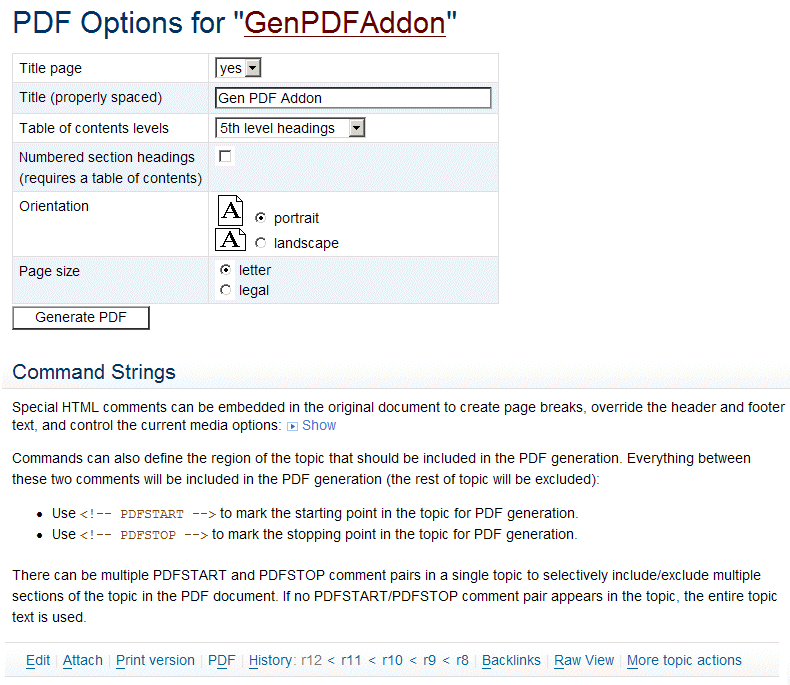 -- SeanCMorgan - 2009-10-27
Ok, that's fine and I had done so! Problem is/was, that I have installed the SmartEditAddOn and this has put itself in TWikiPreferences with
-- SeanCMorgan - 2009-10-27
Ok, that's fine and I had done so! Problem is/was, that I have installed the SmartEditAddOn and this has put itself in TWikiPreferences with * Set SKIN ... , smartedit, pattern= into "front". So I have to make the changes there, or do you have a better idea, to get the GenPDF-Button working with %TMPL:DEF{"topicactionbuttons"}%...
All good hints are welcome!!
-- NorbertKress - 2009-10-27
I'm not sure (I don't use SmartEdit). But I'm using the preference setting for the add-on: * Set GENPDFADDON_SKIN = print,pattern in Main/TWikiPreferences. Perhaps that will help. Otherwise, you could try overloading the skin with a hidden field in the GenPdfForm (name=skin, value=genpdf). -- SeanCMorgan - 2009-10-28 Closing this question after more than 30 days of inactivity. Feel free to reopen if needed. Consider engaging one of the TWiki consultants if you need timely help. We invite you to get involved with the community, it is more likely you get community support if you support the open source project! -- PeterThoeny - 2009-12-03
 If you answer a question - or someone answered one of your questions - please remember to edit the page and set the status to answered. The status selector is below the edit box.
 | SupportForm | |
|---|---|
| Status | Answered |
| Title | PDF-Output with real cover-sheet / first-page |
| SupportCategory | GenPDFAddOn |
| TWiki version | 4.3.2 |
| Server OS | |
| Web server | |
| Perl version | |

Topic revision: r9 - 2009-12-03 - PeterThoeny


 Site map
 Blog web

 Search
 Changes
 RSS Feed
 Notifications
 Statistics
 Preferences
 Register new user
 Support Forum
  Ask a question
 Open questions
  My recent questions
 Get quick help in #twiki IRC channel





 Ideas, requests, problems regarding TWiki? Send feedback. Ask community in the support forum.
Copyright © 1999-2026 by the contributing authors. All material on this collaboration platform is the property of the contributing authors.