SID-01016: Slow installation - what details to check
| Status: |  Answered Answered |
TWiki version: | 5.0.1 | Perl version: | unknown |
| Category: | CategoryInstallation | Server OS: | Linux - kernel version 2.6.18-194.3.1.el5 | Last update: | 15 years ago |
 - It's running on a CPanel installation at register.com, if that tells you anything. (p.s. Why can't I just point to http://www.p3cg.com/twiki/ ?)
Some details
- It's running on a CPanel installation at register.com, if that tells you anything. (p.s. Why can't I just point to http://www.p3cg.com/twiki/ ?)
Some details - Had to change all scripts in twiki/bin to *.pl extension
- Had to set execution permission to perl scripts (744) and the bin directory
- Question: What permission do all the other directories need? (The Twiki installation page http://twiki.org/cgi-bin/view/TWiki.SettingFileAccessRightsLinuxUnix doesn't address 5.0. Why not just do this in the Configure script?)
- Perl is in /user/bin/perl as standard (don't know version number)
- LocalLib.cfg created and in the bin/ directory
- I have no idea if I need to install CPAN modules
- Aha! I screwed up the .htaccess for the bin directory! (Directions in the comments are NOT clear) I fixed it, but it doesn't seem to be any better. Still painfully slow.
- .htaccess files copied as appropriate to other directories as indicated in installation info.
- As a data point: The configuration script appears to be fast, so there is probably a setting somewhere that I messed up.
Discussion and Answer
Hello. The images in TWikiDocGraphics are not there. Inhttp://www.p3cg.com/twiki/pub/TWiki/TWikiDocGraphics/menu-down.gif the server says
Error - Page Not Found
The page or post you were looking for does not exist or has been moved to another location.
Check file access rights in pub directory.
-- EnriqueCadalso - 2010-11-05
Besides images, no files in twiki/pub are delivered. For example, the Javascript file http://www.p3cg.com/twiki/pub/TWiki/PatternSkin/pattern.js referenced in the TWiki topic returns "Error - Page Not Found". As Enrique stated, check the permission in the pub directory. Check also if /twiki/pub is really the proper URL path of your twiki/pub directory.
Page load times should be in 1 to 3 sec range for pages that have no or little dynamic content. In your case, the actual HTML page loads reasonably fast, but non-existing attachments load extremely slow (some DNS lookups are extremely slow too). Sscreenshot of Firebug (FF extension) on your TWiki page:
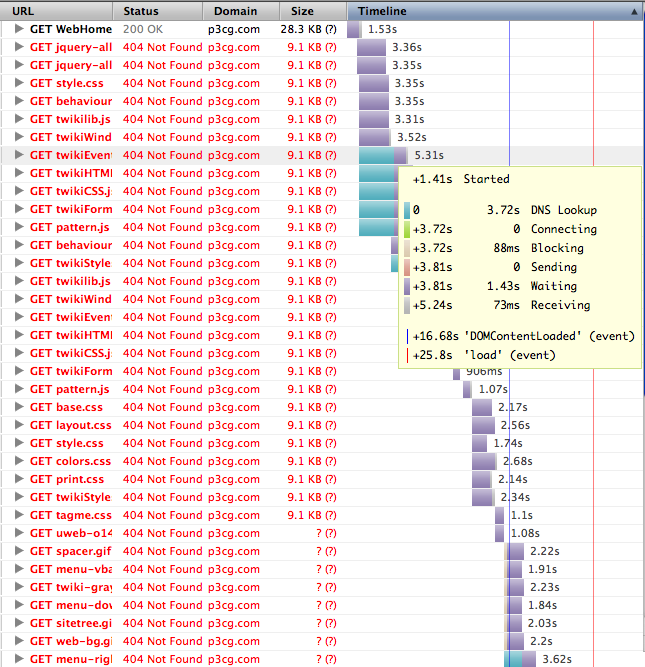 -- PeterThoeny - 2010-11-05
Strange. The twiki/pub directory is certainly there and it seems to have access (744) - as do all the subdirectories. And the files are all there.
Again: what permissions does that stack need to have? I copied everything over via FTP, which seems to keep permissions (usually).
-- JackVinson - 2010-11-06
The physical directory does not necessarily map to the URL path. Check your Apache settings.
As for permissions, make directories below twiki/data and twiki/pub 755, files 644. Directory and files need to be owned by the webserver user.
-- PeterThoeny - 2010-11-06
Okay. Thanks for all your help. Turns out I could not resolve this one.
-- JackVinson - 2010-11-06
-- PeterThoeny - 2010-11-05
Strange. The twiki/pub directory is certainly there and it seems to have access (744) - as do all the subdirectories. And the files are all there.
Again: what permissions does that stack need to have? I copied everything over via FTP, which seems to keep permissions (usually).
-- JackVinson - 2010-11-06
The physical directory does not necessarily map to the URL path. Check your Apache settings.
As for permissions, make directories below twiki/data and twiki/pub 755, files 644. Directory and files need to be owned by the webserver user.
-- PeterThoeny - 2010-11-06
Okay. Thanks for all your help. Turns out I could not resolve this one.
-- JackVinson - 2010-11-06
 If you answer a question - or someone answered one of your questions - please remember to edit the page and set the status to answered. The status selector is below the edit box.
 | SupportForm | |
|---|---|
| Status | Answered |
| Title | Slow installation - what details to check |
| SupportCategory | CategoryInstallation |
| TWiki version | 5.0.1 |
| Server OS | Linux - kernel version 2.6.18-194.3.1.el5 |
| Web server | Apache 2.2.11 |
| Perl version | unknown |


Topic revision: r6 - 2010-11-06 - JackVinson


 Site map
 Blog web

 Search
 Changes
 RSS Feed
 Notifications
 Statistics
 Preferences
 Register new user
 Support Forum
  Ask a question
 Open questions
  My recent questions
 Get quick help in #twiki IRC channel





 Ideas, requests, problems regarding TWiki? Send feedback. Ask community in the support forum.
Copyright © 1999-2026 by the contributing authors. All material on this collaboration platform is the property of the contributing authors.