Usability and Purpose of User Homepage
There are two primary purposes of user home pages:- Contact info: Other people can find out who I am and can contact me
- Personal portal: I can use it as a portal to access content I am interested in
Use User Homepage for Contact Info
For easy access, vital info such as name, phone and e-mail should be at a visible place.Use User Homepage as Personal Portal
Wikis at the workplace are often used as an intranet and team portal. Members in an organization need to be able to access common, but personalized content, such as, but not limited to:- Projects I am currently involved in
- Headline news of my department
- My favorite topics (my tag cloud)
Home page Design and Layout
CairoRelease had a simple layout that served both purposes in a rudimentary way:- Top: Bullet list with contact info
- Below: My favorite links
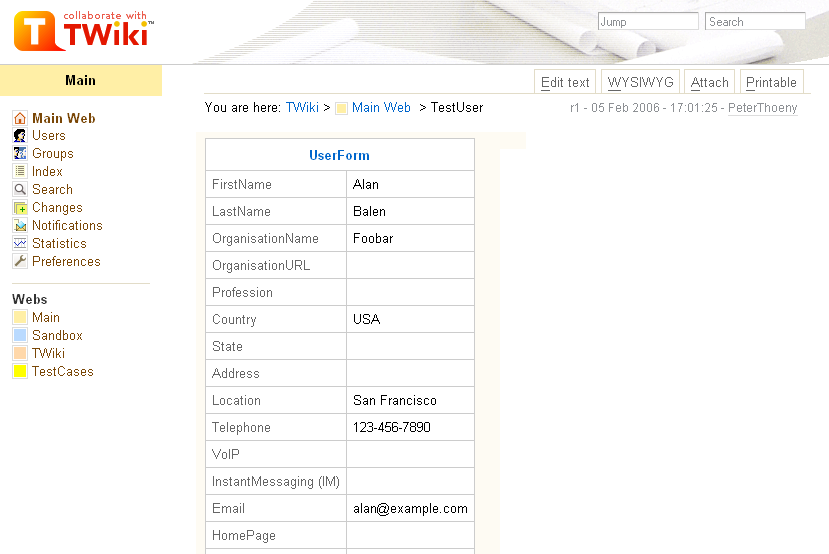
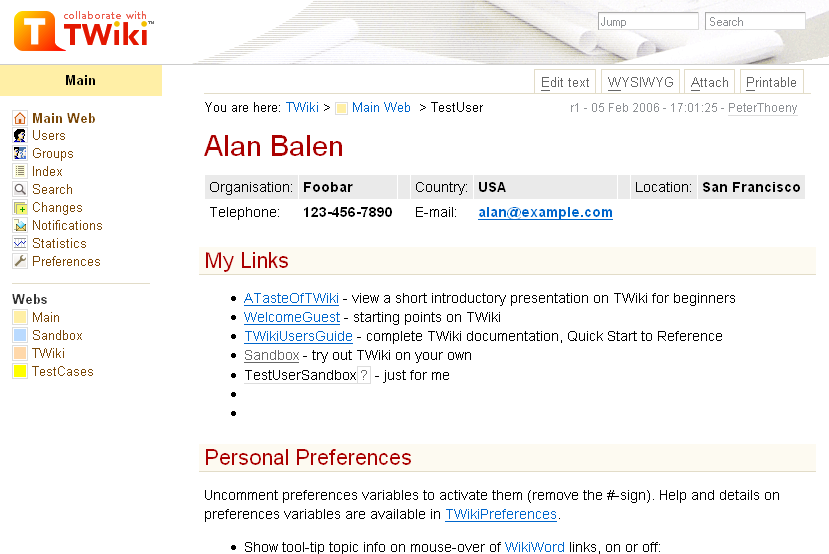
Illustrating Default Homepage Before & After Change
The following screenshots illustrate the use of screen real estate before and after the change.
|
|
Example "Above the Fold" View with Contact Info & Personal Portal
This is best shown in a screen mockup: (click to enlarge)
Further Enhancements
We could introduce TWikiPortlets and a PortletFramework where protal components can be packaged and placed on the homepages in a convenient way. Portlets can behave like applets but are server side. They have a certain width and height, and can accept input parameters. The "my action items", "my projects", "my news", "projections" can be portlets. -- Contributors: PeterThoenyDiscussion
We had some back and forth e-mails on twiki-dev. I am listing here feedback that is relevant after the last change, namely, the header topic is included from the view template, not anymore from the user homepages. 1. For public TWiki sites it does not make sense to show a phone number and e-mail on top, e-mail is actually hidden.- Absolutely agree, it does not make sense for a public TWiki. It does though for a wiki at the workplace. TWiki serves both, the current setting is for deployments as defined in the TWikiMission. May be it helps to find a middle ground, e.g. add some fields used by public wikis? The admin can customize of topic to get the desired output, as documented in the UserHomepageHeader help text and in the UserHomepageSupplement. -- PTh
- I just added additional fields to the header table to make a balance between public wikis and wikis at the workplace: Organization, Country & Location -- PTh
- Users do not need to modify that. Actually it is a good thing to hide this from the user. This gives a consistent look, and a consistent user interaction. -- PTh
- The stuff the "system" wants to know about:
- Name, Email and the other stuff in the present FORM
- The per user settings such as
LINKTOOLTIPINFO, EDITBOXWIDTH, EDITBOXHEIGHT, EDITBOXSTYLE. These could also eventually be implemented as a form.
%META{"form"}% construct.
Firstly, we need to be able to supress empty fields:
%META{"form" supressemptyfields="on" }%
That is probably not a severe change to TWiki::Form::renderForDisplay().
Next, we need to be able to format better. In this case two or three columns. Perhaps we can invent something akin to VIEW_TEMPLATE for forms ... FORMVIEW_TEMPLATE ? (as well as FORMEDIT_TEMPLATE)
The problem as I see it now is this: the current way of rendering forms is independant of the form and number of form fields. We now want soemthing where rendering - the layout - is depenndant on the fields. Something that either builds balanced columns or builds by putting fields in alternate columns will produce some odd looking things. More thought is required here.
-- AntonAylward - 27 Mar 2006
Currently TWiki forms are, essentially, sets of key-value pairs and are displayed as such in the existing %META{"form"}% implementation. HTML forms, OTOH, are usually displayed in a much nicer manner (unless someone is horribly lazy).
So, yes, I agree. If one needs to display the data from the attached form as a form, there needs to be better ways of rendering it. And if the form is being used merely as a structured way of associating data with a page, then it shouldn't be displayed at all, or at least hidden by a twisty.
-- MeredithLesly - 27 Mar 2006
What we need is to be able to specify a form ... like the form Peter is
building as a topic using the INCLUDE, but treat it as a template.
Peter's solution is SPECIFIC. This is one reason I don't like it.
I'd rather have a general tool.
That being said, I realise that I'm also advocating code-bloat.
-- AntonAylward - 27 Mar 2006
Since TWiki 4.x we have %FORMFIELD% which can (and should) be used for presenting values from within formfields to the unaware user. You can use this together with %BASETOPIC% (or %INCLUDINGTOPIC%) to predefine the layout in which the collected user info should be presented to the user. A simple %INCLUDE% in the users home topic will do the trick. This could even be made switchable resp. dependent on the rights of a potential topic viewer.
-- FranzJosefSilli - 27 Mar 2006
Since TWikiRelease04x00 (where user's Email addresses have been moved to .htpasswd) TWiki itself has no need at all for the contents of user home pages. I can't see any necessity to make more than a mere suggestion how user home pages should look like, and leave it up to the admins to customize the NewUserTemplate (which should be in the Main web). In an int*ra*net, pulling contact info from LDAP might be more reliable than requiring users to keep their data up to date, and in an int*er*net many users will prefer to hide contact data completely. The developers might supply a couple of suitable user home page templates, so that an admin just needs to either /bin/configure or %INCLUDE% his choice.
What remains to be defined is a decent interface between the registration form, where the initial information is collected, to the contents of the user home page.
-- HaraldJoerg - 28 Mar 2006
Not to mention that fact that different kinds of users may need different starter home pages. "One size fits all" doesn't work here.
-- MeredithLesly - 29 Mar 2006

Topic revision: r19 - 2006-12-11 - MikkoLaakso


 Site map
 Blog web

 Create New Topic
 Index
Index Search
 Advanced search
 My topics of interest
 Changes
 Major changes only
 All tags
 Notifications
 RSS Feed
 Statistics
 Preferences
 Community
  Readme first
 Developers News
 How you can help
 Community roles
 #twiki IRC
 Lima Release
 Feature Proposals
 Bugs Changes
 Categories


 Account


 Ideas, requests, problems regarding TWiki? Send feedback. Ask community in the support forum.
Copyright © 1999-2026 by the contributing authors. All material on this collaboration platform is the property of the contributing authors.