After scrolling up and down that blasted edit letterbox, looking for settings, I finally cracked and moved all the TWikiPreferences into a form. To get it right involved a bit of fancy footwork with labels in forms, but I think it is worth it; it makes preference editing an awful lot easier!
I think it is good enough for Dakar.
-- CrawfordCurrie - 07 Apr 2005
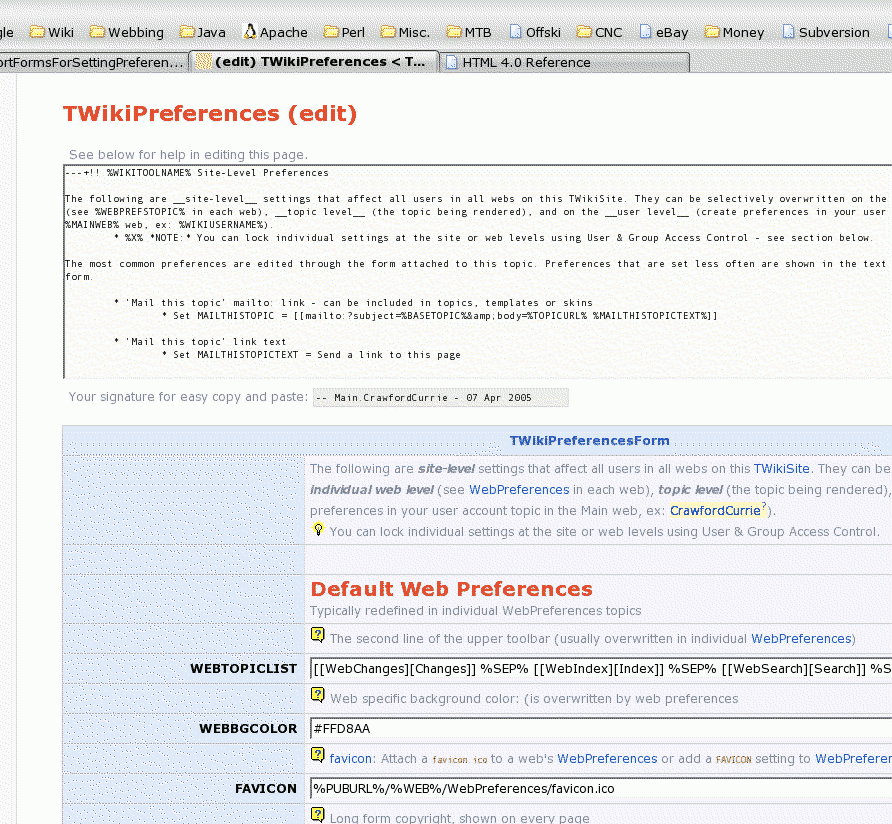 Excellent, but why is there preferences set in the old fashioned style in the edit box of the form?
By the way, this is a perfect example of when we want to edit the page and the form separately, which one of the patches that I submitted recently would support.
Or alternatively, this is an example where we would like a topic specific template which does not have an edit box.
Either way, great step forward....
How did you resolve the issue that the settings are not known ahead of time (in a sense, the form should be extendable during the edit, when a new setting is added)? Did you just make a form containing all settings possible in this context?
-- ThomasWeigert - 07 Apr 2005
There are still preferences in the old style box because adding them to the form is just clutter; AFAIK they are never changed (I'm not sure what some of them are even for).
Yes, the form should extendable during the edit; but as you have perceived, it isn't - another reason for needing the edit box.
Two things I encountered when doing this; first, we need a good way of doing validators (such as a URL validator) and maybe some other types (such as a color chooser). Second, as you noted, we need to be able to extend forms dynamically. I can envision an "add field" button that would coach the user through the process.
-- CrawfordCurrie - 08 Apr 2005
Looks interesting and is a step forward.
Nevertheless, I am not so fond of using TWikiForms for settings because I see some disadvantages:
Excellent, but why is there preferences set in the old fashioned style in the edit box of the form?
By the way, this is a perfect example of when we want to edit the page and the form separately, which one of the patches that I submitted recently would support.
Or alternatively, this is an example where we would like a topic specific template which does not have an edit box.
Either way, great step forward....
How did you resolve the issue that the settings are not known ahead of time (in a sense, the form should be extendable during the edit, when a new setting is added)? Did you just make a form containing all settings possible in this context?
-- ThomasWeigert - 07 Apr 2005
There are still preferences in the old style box because adding them to the form is just clutter; AFAIK they are never changed (I'm not sure what some of them are even for).
Yes, the form should extendable during the edit; but as you have perceived, it isn't - another reason for needing the edit box.
Two things I encountered when doing this; first, we need a good way of doing validators (such as a URL validator) and maybe some other types (such as a color chooser). Second, as you noted, we need to be able to extend forms dynamically. I can envision an "add field" button that would coach the user through the process.
-- CrawfordCurrie - 08 Apr 2005
Looks interesting and is a step forward.
Nevertheless, I am not so fond of using TWikiForms for settings because I see some disadvantages:  and for the edit view, http://develop.twiki.org/~develop/cgi-bin/edit/TWiki/TWikiPreferences (don't save, please). The or TWikiPreferences. User is TWikiGuest, password is the name of the leading wiki site, no http. (Saving is disabled.)
-- ThomasWeigert - 07 May 2005
You do not have permission to change topic TWikiPreferences - for WebPreferences too.
and for the edit view, http://develop.twiki.org/~develop/cgi-bin/edit/TWiki/TWikiPreferences (don't save, please). The or TWikiPreferences. User is TWikiGuest, password is the name of the leading wiki site, no http. (Saving is disabled.)
-- ThomasWeigert - 07 May 2005
You do not have permission to change topic TWikiPreferences - for WebPreferences too. 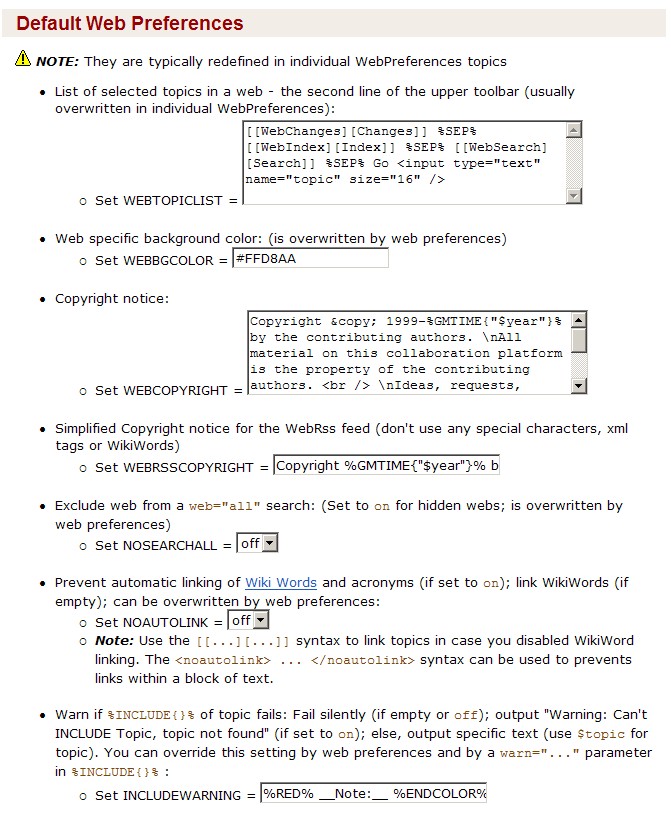 -- ThomasWeigert - 07 May 2005
That looks good, Thomas. I really don't to go back to the old way of doing preferences; the reason I changed in the first place was sheer frustration with the editing paradigm, and I wanted to do something without writing any code. If you can do what you show above, I'd be quite happy with it - it addresses all my concerns. I'm marking this as "needs a rethink" pending your alternative implementation.
-- CrawfordCurrie - 08 May 2005
Crawford, what you see above is already availabe as PreferencesPlugin under Cairo. (As usual, I had to cheat, but I'll move it to Dakar immanently.)
All that said, I like neither solution. I believe settings do not belong in text, nor do they belong in the form. In the long run, there should be TWikiApplication which handles preferences and settings. But in the meantime, I think the plugin is the lighter weight approach.
-- ThomasWeigert - 08 May 2005
For that plugin, I used your TWikiPreferencesForm from DevelopBranch. This form should be updated to include all known preferences and should be reviewed to have the "best" input type for each.
-- ThomasWeigert - 08 May 2005
OK, then let's add the plugin to Dakar. If you could check it in to SVN I can give it the once-over for efficiency (which is usually a cosmetic check only)
-- CrawfordCurrie - 08 May 2005
PreferencesPlugin (updated to Dakar) now in SVN 4279.
-- ThomasWeigert - 09 May 2005
TWikiPreferences reverted to original style, but included changes to preferences which have happened since. In SVN 4281
If viewauth was present on ethermage this could actually be tried out there...
-- ThomasWeigert - 10 May 2005
Thomas' solution works superbly; much nicer than mine. Marking this as done.
-- CrawfordCurrie - 20 Jun 2005
Updated doco to remove old references to "S" setting... Bug Item139, in SVN 5895
-- ThomasWeigert - 24 Jul 2005
Was a colour picker ever made for preferences? This would be very useful for PalettablePatternSkin as it would allow the colours being used be both shown and then picked from a palette
-- MartinCleaver - 23 Jul 2006
As we had decided earlier (see UsingFormsForSettings) to retire the feature that one can use forms for settings, we should now execute that decision. There is a much nicer solution available now, via the PreferencesPlugin. I don't see why we should be maintaining code that probably nobody uses any longer (and even before had only one known user).
JohnTalintyre, could you please advise whether you are still using this feature?
-- ThomasWeigert - 28 Oct 2006
You have your answer on this topic: Bugs:Item2302
It was restored very recently in release 4.0.3. It is only a few months ago that Crawford had to add the code that had been deleted.
The only thing we can do is declare it deprecated in the release note for 4.1 and in the documentation. But we need to wait years before we can remove this feature.
Bugs:Item2302 was raised because someone had silently removed the feature which had caused major problems for a customer and prevented them from upgrading. We only hear from less than 1% of our customers. We have no way of telling that noone uses features that we have documented and released in earlier versions of TWiki.
I seem to be repeating this almost daily the most important TWikiMission statement: "Protect corporate investment (topic contents) from data corruption and incompatible changes".
And if the feature has been there - it is obvious that many TWiki installations have used it. And often the admin does not even know.
Deprecation of features that affects topic contents - which this one does - must be avoided when possible. And when not possible - we have to phase out a feature over several years.
But why deprecate this feature? Who says that PreferencesPlugin is a valid replacement for misc. TWikiApplications. I have learned to accept that my users are much more innovative and creative with the TWiki features than I ever dreamt of and if there is a feature that enables setting variables in forms, you can bet many it is being used my many of our users - even if they do not tell us here on TWiki.org.
-- KennethLavrsen - 28 Oct 2006
OK. By the way, in Bugs:Item2302 it says that I removed this feature silently. We had taken this out when implementing Dakar as was discussed in UsingFormsForSettings. I don't understand how it suddenly came back to live... but either way...
-- ThomasWeigert - 29 Oct 2006
-- ThomasWeigert - 07 May 2005
That looks good, Thomas. I really don't to go back to the old way of doing preferences; the reason I changed in the first place was sheer frustration with the editing paradigm, and I wanted to do something without writing any code. If you can do what you show above, I'd be quite happy with it - it addresses all my concerns. I'm marking this as "needs a rethink" pending your alternative implementation.
-- CrawfordCurrie - 08 May 2005
Crawford, what you see above is already availabe as PreferencesPlugin under Cairo. (As usual, I had to cheat, but I'll move it to Dakar immanently.)
All that said, I like neither solution. I believe settings do not belong in text, nor do they belong in the form. In the long run, there should be TWikiApplication which handles preferences and settings. But in the meantime, I think the plugin is the lighter weight approach.
-- ThomasWeigert - 08 May 2005
For that plugin, I used your TWikiPreferencesForm from DevelopBranch. This form should be updated to include all known preferences and should be reviewed to have the "best" input type for each.
-- ThomasWeigert - 08 May 2005
OK, then let's add the plugin to Dakar. If you could check it in to SVN I can give it the once-over for efficiency (which is usually a cosmetic check only)
-- CrawfordCurrie - 08 May 2005
PreferencesPlugin (updated to Dakar) now in SVN 4279.
-- ThomasWeigert - 09 May 2005
TWikiPreferences reverted to original style, but included changes to preferences which have happened since. In SVN 4281
If viewauth was present on ethermage this could actually be tried out there...
-- ThomasWeigert - 10 May 2005
Thomas' solution works superbly; much nicer than mine. Marking this as done.
-- CrawfordCurrie - 20 Jun 2005
Updated doco to remove old references to "S" setting... Bug Item139, in SVN 5895
-- ThomasWeigert - 24 Jul 2005
Was a colour picker ever made for preferences? This would be very useful for PalettablePatternSkin as it would allow the colours being used be both shown and then picked from a palette
-- MartinCleaver - 23 Jul 2006
As we had decided earlier (see UsingFormsForSettings) to retire the feature that one can use forms for settings, we should now execute that decision. There is a much nicer solution available now, via the PreferencesPlugin. I don't see why we should be maintaining code that probably nobody uses any longer (and even before had only one known user).
JohnTalintyre, could you please advise whether you are still using this feature?
-- ThomasWeigert - 28 Oct 2006
You have your answer on this topic: Bugs:Item2302
It was restored very recently in release 4.0.3. It is only a few months ago that Crawford had to add the code that had been deleted.
The only thing we can do is declare it deprecated in the release note for 4.1 and in the documentation. But we need to wait years before we can remove this feature.
Bugs:Item2302 was raised because someone had silently removed the feature which had caused major problems for a customer and prevented them from upgrading. We only hear from less than 1% of our customers. We have no way of telling that noone uses features that we have documented and released in earlier versions of TWiki.
I seem to be repeating this almost daily the most important TWikiMission statement: "Protect corporate investment (topic contents) from data corruption and incompatible changes".
And if the feature has been there - it is obvious that many TWiki installations have used it. And often the admin does not even know.
Deprecation of features that affects topic contents - which this one does - must be avoided when possible. And when not possible - we have to phase out a feature over several years.
But why deprecate this feature? Who says that PreferencesPlugin is a valid replacement for misc. TWikiApplications. I have learned to accept that my users are much more innovative and creative with the TWiki features than I ever dreamt of and if there is a feature that enables setting variables in forms, you can bet many it is being used my many of our users - even if they do not tell us here on TWiki.org.
-- KennethLavrsen - 28 Oct 2006
OK. By the way, in Bugs:Item2302 it says that I removed this feature silently. We had taken this out when implementing Dakar as was discussed in UsingFormsForSettings. I don't understand how it suddenly came back to live... but either way...
-- ThomasWeigert - 29 Oct 2006
Excellent, but why is there preferences set in the old fashioned style in the edit box of the form?
By the way, this is a perfect example of when we want to edit the page and the form separately, which one of the patches that I submitted recently would support.
Or alternatively, this is an example where we would like a topic specific template which does not have an edit box.
Either way, great step forward....
How did you resolve the issue that the settings are not known ahead of time (in a sense, the form should be extendable during the edit, when a new setting is added)? Did you just make a form containing all settings possible in this context?
-- ThomasWeigert - 07 Apr 2005
There are still preferences in the old style box because adding them to the form is just clutter; AFAIK they are never changed (I'm not sure what some of them are even for).
Yes, the form should extendable during the edit; but as you have perceived, it isn't - another reason for needing the edit box.
Two things I encountered when doing this; first, we need a good way of doing validators (such as a URL validator) and maybe some other types (such as a color chooser). Second, as you noted, we need to be able to extend forms dynamically. I can envision an "add field" button that would coach the user through the process.
-- CrawfordCurrie - 08 Apr 2005
Looks interesting and is a step forward.
Nevertheless, I am not so fond of using TWikiForms for settings because I see some disadvantages: - Can't be extended easily (per user; per web), which is done frequently.
- Workaround is to extend with bullets, but then it is not clear to the user what happens if the same setting exists in the form and in a bullet.
- Documentation and settings are on a dense space in the form / can't freely organize doc
- Keep the documentation and bullets as they are
- Add a
%EDITPREFERENCES%at the top and bottom of the preferences page, which expands to a[Edit preferences]button - Clicking the button changes the button to
[Save preferences], - and changes just the preferences value text next to the equal signs into edit fields, check boxes, date pickers, color choosers, etc.
[Edit] button next to each setting value so that each setting can be changed individually. However I think that editing all settings on topic at once is more useful.
Crawford, I feel bad. You are the most active developer, and I gave you a lot of critical feedback lately. It is all about usability.
-- PeterThoeny - 08 Apr 2005
Peter, I don't think that keeping the documentation and the bullets together as they are is in any way usable.
-- MichaelDaum - 08 Apr 2005
I like PeterThoeny's suggestion, as it keeps the best of both worlds. I think we could implement that relatively straightforwardly by using the style of RenderListPlugin or ThreadedDiscussionPlugin. If I would not be so busy right now I'd take a crack at it...
-- ThomasWeigert - 08 Apr 2005
Hey, I'm not afraid of criticism; but what drove me to this change was user unfriendliness - specifically, editing the body text and then not being able to move quickly to the thing I wanted to edit. I did this in the spirit of an experiment, so feedback is good; but I think you have to try it to give valid feedback.
http://develop.twiki.org/~develop/cgi-bin/view/TWiki/TWikiPreferences and for the edit view, http://develop.twiki.org/~develop/cgi-bin/edit/TWiki/TWikiPreferences (don't save, please). The EDITPREFERENCES solution sounds OK, but I wasn't about to put the work in to implement something like that. What I have done is 99% based on the existing forms implementation (KISS).
The point about extending the set of "preferences" is valid; I never imagined this would apply for anything other than the must have preferences in TWikiPreferences and possibly the common preferences in WebPreferences.
Of course it can't be used for all preferences anyway - access control settings in forms are not properly supported. On the issue of extension; yes, bullets is the way to extend. And on evaluation order? Sorry, but that problem already exists; there is no difference between a bullet and a form entry defining the same value, and two bullets defining the same value. At least you can't have two form entries defining the same value! The evaluation order is actually very natural; body text before form. This should be in the docs, but probably isn't.
-- CrawfordCurrie - 08 Apr 2005
Michael, why do you say that having documentation and settings together in one place is not user friendly? To me it seems that is the most friendly to new users... experienced users might prefer to see things more condensed, I admit...
-- ThomasWeigert - 08 Apr 2005
Here's another possible approach: - Use formated tables in conjunction with EditTablePlugin.
- Use several tables for separate sections of the preferences. This would allow quicker navigation to the particular settings to be edited.
- There's a demo of how it looks and feels
- Peter's new suggestion (Already discussed in UsingFormsForSettings also--TW)
- But somehow you need to show that a new window will open/a layer will be shown, that is: the current data will not be lost.
A small sidestep: I am for the ability to add small icons to links (outgoing links, pop-up window links, etc.) - they are called qbullets. This can probably be done with css, as you can assign a class to a link type - if you can discern the type of link from the url, I am not sure if we can. -- ArthurClemens - 09 Apr 2005
or TWikiPreferences. User is TWikiGuest, password is the name of the leading wiki site, no http. (Saving is disabled.)
-- ThomasWeigert - 07 May 2005
You do not have permission to change topic TWikiPreferences - for WebPreferences too. - Arthur, you need to log in using the user/password above.
[Save Preferences] link to highlight it's availability) it would then be very quick to go into preference edit mode, navigate to the preference you want to change, and then save.
(Aside: navigating to the preference you want to edit wouldn't be such a chore currently if SectionalEditPlugin was installed)
However instead of using a tag I'd say just stick an [Edit Preferences] next to the [Edit] button in the top and bottom action bars if there is a variable defined anywhere in the topic.
You might want a NOEDITPREFERENCES setting to stop that happening on some topics.
A way of commenting out a setting in edit mode might be useful too.
The only downside I see is that there is no way to specify the variable type so you are stuck with a standard text input box.
(How hard would it be to do it using XMLHttpRequest to stop the page reloading? (still need reload method though for when scripting is disabled))
-- SamHasler - 07 May 2005
Sam, on your first suggestion, that would be easy to do, albeit that could only be done by putting it into core or, at least, relying on SupportTopicSpecificTemplates.
I have one usability question, though. When clicking on the [Edit Preferences] link, it would open up preferences for edit. Now we need to somewhere have a save and cancel link. Are you envisioning that these are also dynamically expanded in the action and top bars based on the edit state? Otherwise it might be confusing if you start editing on the action/top bars, but you save by a button in the text area.
Regarding XMLHttpRequest, this seems like a lot of work, and a lot of javascript....
-- ThomasWeigert - 07 May 2005
A screen dump of part of TWikiPreferences being edited is shown below:
-- ThomasWeigert - 07 May 2005
That looks good, Thomas. I really don't to go back to the old way of doing preferences; the reason I changed in the first place was sheer frustration with the editing paradigm, and I wanted to do something without writing any code. If you can do what you show above, I'd be quite happy with it - it addresses all my concerns. I'm marking this as "needs a rethink" pending your alternative implementation.
-- CrawfordCurrie - 08 May 2005
Crawford, what you see above is already availabe as PreferencesPlugin under Cairo. (As usual, I had to cheat, but I'll move it to Dakar immanently.)
All that said, I like neither solution. I believe settings do not belong in text, nor do they belong in the form. In the long run, there should be TWikiApplication which handles preferences and settings. But in the meantime, I think the plugin is the lighter weight approach.
-- ThomasWeigert - 08 May 2005
For that plugin, I used your TWikiPreferencesForm from DevelopBranch. This form should be updated to include all known preferences and should be reviewed to have the "best" input type for each.
-- ThomasWeigert - 08 May 2005
OK, then let's add the plugin to Dakar. If you could check it in to SVN I can give it the once-over for efficiency (which is usually a cosmetic check only)
-- CrawfordCurrie - 08 May 2005
PreferencesPlugin (updated to Dakar) now in SVN 4279.
-- ThomasWeigert - 09 May 2005
TWikiPreferences reverted to original style, but included changes to preferences which have happened since. In SVN 4281
If viewauth was present on ethermage this could actually be tried out there...
-- ThomasWeigert - 10 May 2005
Thomas' solution works superbly; much nicer than mine. Marking this as done.
-- CrawfordCurrie - 20 Jun 2005
Updated doco to remove old references to "S" setting... Bug Item139, in SVN 5895
-- ThomasWeigert - 24 Jul 2005
Was a colour picker ever made for preferences? This would be very useful for PalettablePatternSkin as it would allow the colours being used be both shown and then picked from a palette
-- MartinCleaver - 23 Jul 2006
As we had decided earlier (see UsingFormsForSettings) to retire the feature that one can use forms for settings, we should now execute that decision. There is a much nicer solution available now, via the PreferencesPlugin. I don't see why we should be maintaining code that probably nobody uses any longer (and even before had only one known user).
JohnTalintyre, could you please advise whether you are still using this feature?
-- ThomasWeigert - 28 Oct 2006
You have your answer on this topic: Bugs:Item2302
It was restored very recently in release 4.0.3. It is only a few months ago that Crawford had to add the code that had been deleted.
The only thing we can do is declare it deprecated in the release note for 4.1 and in the documentation. But we need to wait years before we can remove this feature.
Bugs:Item2302 was raised because someone had silently removed the feature which had caused major problems for a customer and prevented them from upgrading. We only hear from less than 1% of our customers. We have no way of telling that noone uses features that we have documented and released in earlier versions of TWiki.
I seem to be repeating this almost daily the most important TWikiMission statement: "Protect corporate investment (topic contents) from data corruption and incompatible changes".
And if the feature has been there - it is obvious that many TWiki installations have used it. And often the admin does not even know.
Deprecation of features that affects topic contents - which this one does - must be avoided when possible. And when not possible - we have to phase out a feature over several years.
But why deprecate this feature? Who says that PreferencesPlugin is a valid replacement for misc. TWikiApplications. I have learned to accept that my users are much more innovative and creative with the TWiki features than I ever dreamt of and if there is a feature that enables setting variables in forms, you can bet many it is being used my many of our users - even if they do not tell us here on TWiki.org.
-- KennethLavrsen - 28 Oct 2006
OK. By the way, in Bugs:Item2302 it says that I removed this feature silently. We had taken this out when implementing Dakar as was discussed in UsingFormsForSettings. I don't understand how it suddenly came back to live... but either way...
-- ThomasWeigert - 29 Oct 2006
| ChangeProposalForm | |
|---|---|
| TopicClassification | FeatureRequest |
| TopicSummary | More userfriendly way of setting preferences |
| CurrentState | ReadyForMerge |
| BugTracking | |
| OutstandingIssues | |
| RelatedTopics | |
| InterestedParties | |
| ProposedFor | DakarRelease |
| TWikiContributors | CrawfordCurrie, ThomasWeigert |


| I | Attachment | History | Action | Size | Date | Who | Comment |
|---|---|---|---|---|---|---|---|
 png png |
blah.png | r1 | manage | 88.5 K | 2005-04-07 - 18:48 | UnknownUser | |
 jpg jpg |
prefs.jpg | r1 | manage | 163.6 K | 2005-05-07 - 21:41 | UnknownUser |

Topic revision: r44 - 2006-10-29 - ThomasWeigert


 Site map
 Blog web

 Create New Topic
 Index
Index Search
 Advanced search
 My topics of interest
 Changes
 Major changes only
 All tags
 Notifications
 RSS Feed
 Statistics
 Preferences
 Community
  Readme first
 Developers News
 How you can help
 Community roles
 #twiki IRC
 Lima Release
 Feature Proposals
 Bugs Changes
 Categories


 Account







 Ideas, requests, problems regarding TWiki? Send feedback. Ask community in the support forum.
Copyright © 1999-2026 by the contributing authors. All material on this collaboration platform is the property of the contributing authors.