
|

|
Jan Dobbelsteen | |||||||||||||
Info:
|
|
Watchlist Changes of Jan:
| |||||||||||||
 Change
  disabled on twiki.org
 disabled on twiki.org
 None (empty watchlist)
Interesting Links
On Architecture- Bredemeyer resources for software architects

- Gerrit Muller system architecture pages
- INCOSE Nederland
- Project Technology (Shlaer - Mellor)
- TU Delft Systeemkunde (Dutch page)
- World Wide Insttitute of Software Architecture
Color Scan
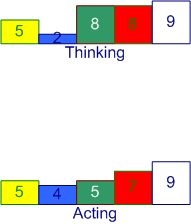
There's a Dutch management site where you can perform a color scan. When changing an organization, this can be done in different ways with the focus on different aspects of how people and organizations change. Each of these aspects is given a color: yellow for the political aspect, blue for the structured aspect, red for the human centered aspect (HRM), green for the learning centered aspect, white for the complete freedom aspect. If you want to perform this test, click here. I've also performed the test and below you find my scores.
Visual representation of my results:
My TWiki Links
- WelcomeGuest - starting points on TWiki
- TWikiUsersGuide - complete TWiki documentation, Quick Start to Reference
- Sandbox - try out TWiki on your own
- JanDobbelsteenSandbox - just for me
My Personal Preferences
- Preference for the editor, default is the WYSIWYG editor. The options are raw, wysiwyg:
- Set EDITMETHOD = wysiwyg
- Fixed pulldown menu-bar, on or off. The menu-bar hides automatically if off.
- Set FIXEDTOPMENU = off
- Show tool-tip topic info on mouse-over of WikiWord links, on or off:
- Set LINKTOOLTIPINFO = off
- More preferences

 TWiki has system wide preferences settings defined in TWikiPreferences. You can customize preferences settings to your needs: To overload a system setting, (1) do a "raw view" on TWikiPreferences, (2) copy a
 Set VARIABLE = valuebullet, (3) do a "raw edit" of your user profile page, (4) add the bullet to the bullet list above, and (5) customize the value as needed. Make sure the settings render as real bullets (in "raw edit", a bullet requires 3 or 6 spaces before the asterisk).
Related Topics
- ChangePassword for changing your password
- ResetPassword for changing your password
- ChangeEmailAddress for changing your email address
- UserDocumentationCategory is a list of TWiki user documentation
- UserToolsCategory lists all TWiki user tools

Topic revision: r5 - 2014-10-06 - PeterThoeny


 Site map
 Blog web

 Users
Users Groups
 Index
Index Search
 Changes
 Notifications
 RSS Feed
 Statistics
 Preferences


 Ideas, requests, problems regarding TWiki? Send feedback. Ask community in the support forum.
Copyright © 1999-2026 by the contributing authors. All material on this collaboration platform is the property of the contributing authors.