Anchor Link Plugin
Show anchor links on hover over headings, to copy anchor link address
Description
This plugin shows an

anchor link icon when hovering over headings. When clicked, the browser URL bar will show the anchor link of the heading, useful to copy and paste a deep link. In addition, anchor links can be added using an
%ANCHORLINK{}% variable.
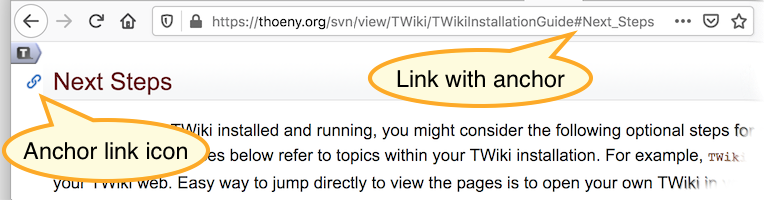
Screenshot when hovering over a heading, and clicking on the anchor link:
ANCHORLINK Variable
- Add an anchor link to topic text, such as
%ANCHORLINK{"AnchorExample"}%. When hovering over text where an anchor link has been added, a  icon will appear on the left side. Clicking on it will show the
 #AnchorExample in the browser URL bar for easy copy & paste.
- Anchor links can be added to bullets, tables, etc, as in this example. %ANCHORLINK{"AnchorExample"}% However, they currently cannot be added to top level paragraphs. Anchor link IDs must be unique per page.
- Anchor links are added automatically to headers by the AnchorLinkPlugin.
- Syntax:
%ANCHORLINK{"id"}%
- Parameters:
- Example:
%ANCHORLINK{"AnchorExample"}%
- Expands to embedded HTML:
<a name="AnchorExample"></a>, along with logic to show/hide the anchor link icon
- Category: LinkingAndNavigationVariables, UIAndVisualizationVariables
Settings
The
{Plugins}{AnchorLinkPlugin}{Headings} configure setting defines the headers that show an anchor link on hover, default:
h2, h3, h4, h5, h6
This configure setting can be redefined by a
ANCHORLINKHEADINGS preferences setting at the site level (
Main.TWikiPreferences), any web (
WebPreferences), and topic level. Example:
- Set ANCHORLINKHEADINGS = h1, h2, h3, h4
Plugin Installation & Configuration
You do not need to install anything on the browser to use this plugin. These instructions are for the administrator who installs the plugin on the TWiki server.
- For an automated installation, run the configure script and follow "Find More Extensions" in the in the Extensions section.
- Or, follow these manual installation steps:
- Download the ZIP file from the Plugins home (see below).
- Unzip
AnchorLinkPlugin.zip in your twiki installation directory. Content: | File: | Description: |
data/TWiki/AnchorLinkPlugin.txt | Plugin topic |
lib/TWiki/Plugins/AnchorLinkPlugin.pm | Plugin Perl module |
lib/TWiki/Plugins/AnchorLinkPlugin/Config.spec | Configuration spec file |
pub/TWiki/AnchorLinkPlugin/anchor-bg.gif | Anchor link icon |
- Set the ownership of the extracted directories and files to the webserver user.
- Plugin configuration:
- Run the configure script and enable the plugin in the Plugins section.
- Test if the configuration is successful:
- Hover over a heading, and click on a
 anchor link icon
Plugin Info
- Set SHORTDESCRIPTION = Show anchor links on hover over headings, to copy anchor link address
| 2020-12-20: |
TWikibug:Item7919 : Add ANCHORLINK variable; fix name clash with existing : Add ANCHORLINK variable; fix name clash with existing twikiAnchorLink class name in TWiki |
| 2020-10-24: |
TWikibug:Item7919: Initial version of AnchorLinkPlugin |
,
LinkingAndNavigationVariables,
UIAndVisualizationVariables,
TWikiPlugins


 md5
md5  tgz
tgz 


 Site map
 Blog web

 Index
Index Search
 Search extensions
 Search by tags
 Changes
 Notifications
 RSS Feed
 Statistics
 Preferences
 Community
  Readme first!
 Rate extensions!
 Add-Ons
  Development topics
 Idea topics
 Plugins
  Development topics
 Idea topics
 Skins
Skins  Development topics
 Idea topics
 Code Contribs
  Development topics
 Idea topics


 Account


 Ideas, requests, problems regarding TWiki? Send feedback. Ask community in the support forum.