AutoCompletePlugin
Auto-complete input field type for TWiki Forms (NO LONGER MAINTAINED, replaced by
AutocompletePlugin)
Overview
This plugin provides
autocomplete
functionality for input field with select options as you type. It is based on Yahoo's User Interface Library.
All this plugin does is implement Arthur Clemens'
TWiki:Plugins/AutoCompleteAddOn as a plugin, which allows users to provide an autocomplete text box using the
%AUTOCOMPLETE% syntax, and also in
TWikiForms (shown below).
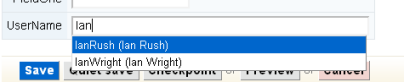 Note:
Note: This plugin is no longer maintained, it is replaced by the
TWiki:Plugins.AutocompletePlugin (with lowercase "c").
Usage
Before you can use this plugin, you need to set up some data for the autocomplete. Examples can be found at
AutoCompletePluginTestData.
In Topics and Templates
This plugin expands the
%AUTOCOMPLETE{...}% variable, which takes the parameters described in
AutoCompletePlugin.
In TWikiForms
To use this plugin in
TWikiForms, create a form template as descibed in
TWikiForms. This plugin adds the
autocomplete type of field. To pass the parameters required by the plugin, place them in the
Values column. An example is shown below:
You can use many of same attributes as you would in topics, except the following:
-
name
-
size
-
value
-
class
-
formname
Parameters
| Parameter |
Comment |
Default |
Example |
name |
A unique name for the textfield |
required |
name="users" |
datatopic |
The topic with data. Should be formatted as comma-separated string, or as an array of arrays (see AutoCompletePluginTestData for an example). Use with datasection. |
required |
datatopic="Sandbox.AutoCompletePluginTestData" |
datasection |
The topic section with data. Use with datatopic. |
required |
datasection="usernames" |
size |
The width of the input field in em or px. |
20em |
size="20em" or size="200px" |
value |
Default value of the input field |
none |
value="AutoCompletePlugin" |
tabindex |
The tabindex of the textfield |
none |
tabindex="2" |
class |
Name of css class to add to the input field |
none |
class="twikiInputField" |
formname |
Name of the form which the input field is part of |
none |
form="userlist" |
itemformat |
The format of an item string in the autocomplete list. Use if the autocomplete list should display different names than the input field - for instance with full person names. The javascript input argument is item. |
item |
itemformat="item[0] + ' (' + item[1] + ')'" |
delimchar |
Used to accept multiple delimeted queries. |
none |
delimchar="," |
onblur, onfocus, onchange, onselect, onmouseover, onmouseout |
Javascript parameters for the textfield. |
none |
onfocus="twiki.Form.clearBeforeFocusText(this);" |
itemselecthandler |
Defines a javascript function to be executed when an item is selected. See http://developer.yahoo.com/yui/autocomplete/#customevents. |
none |
itemselecthandler="submitJumpForm" |
Example
If installed, the following should create an jump box (TWiki 4.2):
Source:
<script type="text/javascript">
var SubmitJump = function(sType, aArgs) {
    document.myJumpForm.submit();
}
</script>
<form name="myJumpForm" action="%SCRIPTURLPATH{"view"}%/%BASEWEB%/%BASETOPIC%">%AUTOCOMPLETE{name="topic" datatopic="Sandbox.AutoCompletePluginTestData" onfocus="twiki.Form.clearBeforeFocusText(this);" onblur="twiki.Form.restoreBeforeFocusText(this);" datasection="topiclist" value="Jump" formname="myJumpForm" class="twikiInputField twikiInputFieldBeforeFocus"  itemselecthandler="SubmitJump" size="128px" }%</form>
Rendered:
Installation Instructions
- For an automated installation, run the configure script and follow "Find More Extensions" in the in the Extensions section.
- Or, follow these manual installation steps:
- Download the ZIP file from the extension home on twiki.org (see below).
- Unzip
AutoCompletePlugin.zip in your twiki installation directory.
- Set the ownership of the extracted directories and files to the webserver user.
- Install the dependencies (if any).
- Plugin configuration and testing:
- Run the configure script and enable the plugin in the Plugins section.
- Configure additional plugin settings in the Extensions section if needed.
- Test if the installation was successful using the examples provided.
Plugin Files
| File: |
Description: |
data/TWiki/AutoCompletePlugin.txt |
Documentation |
data/TWiki/VarAUTOCOMPLETE.txt |
Documentation |
lib/TWiki/Plugins/AutoCompletePlugin.pm |
Perl module |
data/Sandbox/AutoCompletePluginTestData.txt |
Test Data |
pub/TWiki/AutoCompletePlugin/AutoCompletePluginScreenshot.png |
Screenshot |
lib/TWiki/Plugins/AutoCompletePlugin/Config.spec |
Spec file for configure |
Plugin Info
Related Topics: VarAUTOCOMPLETE,
AutoCompletePluginTestData,
TWikiPlugins,
DeveloperDocumentationCategory,
AdminDocumentationCategory,
TWikiPreferences


 md5
md5  tgz
tgz 


 Site map
 Blog web

 Index
Index Search
 Search extensions
 Search by tags
 Changes
 Notifications
 RSS Feed
 Statistics
 Preferences
 Community
  Readme first!
 Rate extensions!
 Add-Ons
  Development topics
 Idea topics
 Plugins
  Development topics
 Idea topics
 Skins
Skins  Development topics
 Idea topics
 Code Contribs
  Development topics
 Idea topics


 Account


 Ideas, requests, problems regarding TWiki? Send feedback. Ask community in the support forum.