Easy Timeline Plugin
Generate graphical timeline diagrams from markup text
Introduction
As the saying goes: a picture is worth a thousand words. This is certainly true for graphical timelines. A detailed listing of events and dates in tabular form may offer the reader a lot of specifics, but may fail to provide an overview, a grand perspective.
This plugin allows one to use a
%TIMELINE% variable to generate a timeline on the fly. This plugin is equal in function to the
EasyTimeline Plugin for MediaWiki
by Erik Zachte, on which this is based.
For first time users EasyTimelinePlugin may not seem that easy at all. As with all script languages it takes some getting used to. Also the syntax description may be a bit bewildering due to its sheer size. Fortunately many elements of the script language are optional.
The 'Easy' in EasyTimelinePlugin conveys the message that once a timeline exists it is not that hard to understand, enhance or correct.
Full syntax and markup description is available at
http://www.mediawiki.org/wiki/Extension:EasyTimeline/syntax.
Note that sometimes the WYSIWYG editor can break the timelines, by removing white space and the macros. To prevent the WYSIWYG editor from being used on a topic with the timelines, you can use the following setting:
Syntax
%TIMELINE%
Timeline markup
%ENDTIMELINE%
Examples
Icelandic Heritage Example
Pretty standard timeline, easy to extend.
Pre-rendered sample:

|
Plugin (if installed):
%TIMELINE%
ImageSize = width:270 height:300
PlotArea  = left:45 right:0 bottom:20 top:20
AlignBars = early

DateFormat = yyyy
Period     = from:1944 till:2005
TimeAxis   = orientation:vertical
ScaleMajor = unit:year increment:4 start:1944

Colors=
  id:1   value:rgb(1,0.4,0.2)
  id:2   value:rgb(0.8,0.6,0)
  id:3   value:rgb(1,0.8,0)
  id:4   value:rgb(1,0.6,0.2)
  id:5   value:rgb(0.6,0.2,0.2)

PlotData=
  bar:Leaders width:25 mark:(line,black) align:left fontsize:S shift:(25,-5) anchor:middle

  from:start  till:1952 color:1  text:"1944-1952_Sveinn Bjoernsson"
  from:1952   till:1968 color:2  text:"1952-1968_Asgeir Asgeirsson"
  from:1968   till:1980 color:3  text:"1968-1980_Kristjan Eldjarn"
  from:1980   till:1996 color:4  text:"1980-1996_Vigdis Finnbogadottir"
  from:1996   till:end  color:5  text:"1996-_Olafur Ragnar Grimsson"
%ENDTIMELINE%
|
Verbatim:
%TIMELINE%
ImageSize = width:270 height:300
PlotArea = left:45 right:0 bottom:20 top:20
AlignBars = early
DateFormat = yyyy
Period = from:1944 till:2005
TimeAxis = orientation:vertical
ScaleMajor = unit:year increment:4 start:1944
Colors=
id:1 value:rgb(1,0.4,0.2)
id:2 value:rgb(0.8,0.6,0)
id:3 value:rgb(1,0.8,0)
id:4 value:rgb(1,0.6,0.2)
id:5 value:rgb(0.6,0.2,0.2)
PlotData=
bar:Leaders width:25 mark:(line,black) align:left fontsize:S shift:(25,-5) anchor:middle
from:start till:1952 color:1 text:"1944-1952_Sveinn Bjoernsson"
from:1952 till:1968 color:2 text:"1952-1968_Asgeir Asgeirsson"
from:1968 till:1980 color:3 text:"1968-1980_Kristjan Eldjarn"
from:1980 till:1996 color:4 text:"1980-1996_Vigdis Finnbogadottir"
from:1996 till:end color:5 text:"1996-_Olafur Ragnar Grimsson"
%ENDTIMELINE%
|
Windows Versions Example
An example of multiple parallel timelines. View Raw Text of this topic to see source.

Binary Logic Example
This plugin might be of help in descriping binary logic execution patterns, as for instance a figure like the one below is not too hard to produce. View Raw Text of this topic to see source.

UNIX Versions Example
Information dense graphic, heavy use of mouseover areas. View Raw Text of this topic to see source.
This example also shows how to use hyperlinks in the timeline. Although this only uses external links, you can also use internal TWiki links such as [[Main.WebHome][Home]]. Note that the links need to be in the longhand form as shown. Links such as [[WebHome]] and
WikiWords are not currently supported.

Kurdistan Workers Party Example
Very condensed timeline. Not taking up much space, but very informative in it's layered telling. View Raw Text of this topic to see source.

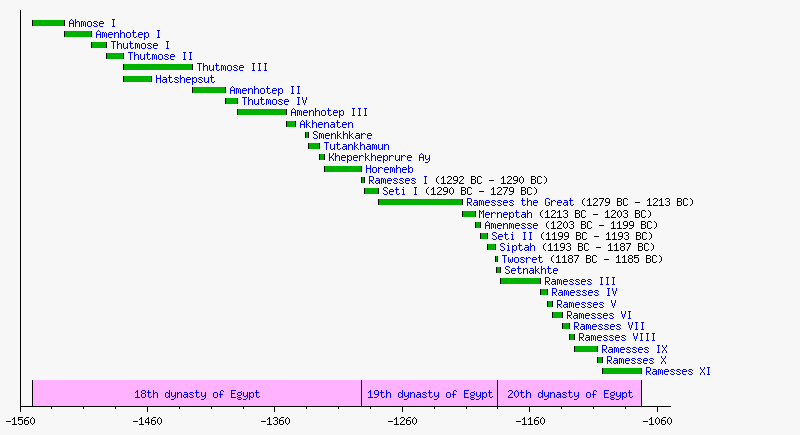
New Kingdom Example
Typical chronological "Microsoft Project" look. View Raw Text of this topic to see source.
Btw: There's no hinderance to having the bars overlap if wanted. (I guess that's not how the Kingdom preferred it to be, though)

View Raw Text of this topic to see source.
Freeciv Timeline Example
Very spartanic look, only a few colours used. View Raw Text of this topic to see source.

Vocal and Instrumental Pitch Ranges
An example on displaying something that is not chronological at all. View Raw Text of this topic to see source.

Timeline of Conquests of the Ottoman Empire
A somewhat dense and graphic timeline; could probably be lightened with good effect :-). View Raw Text of this topic to see source.

Upgrading from Earlier Plugin Versions
If you are using plugin version 20 Jul 2006 or older you will need to be aware that the syntax of this plugin has changed. Previous syntax:
<easytimeline>
...
<easytimeline>
This syntax has been changed to the %VARIABLE% syntax because the old syntax can cause problems when using a WYSIWYG editor. New syntax:
%TIMELINE%
...
%ENDTIMELINE%
The included script
tools/EasyTimelinePlugin_convert.pl can convert topics using the old syntax to the new. Always test on a copy of your data first!
Installation Instructions
You do not need to install anything in the browser to use this plugin. The following instructions are for the administrator who installs the plugin on the TWiki server.
- For an automated installation, run the configure script and follow "Find More Extensions" in the in the Extensions section.
- Or, follow these manual installation steps:
- Download the ZIP file from the extension home on twiki.org (see below).
- Unzip
EasyTimelinePlugin.zip in your twiki installation directory.
- Set the ownership of the extracted directories and files to the webserver user.
- Install the dependencies (if any).
- Plugin configuration and testing:
- Run the configure script and enable the plugin in the Plugins section.
- Configure additional plugin settings in the Extensions section if needed.
- Test if the installation was successful using the examples provided.
Once you have installed the plugin you should visit
configure and check that the paths for Ploticus and the EasyTimeline.pl script are correct.
Plugin Info
Related Topics: TWikiPlugins,
DeveloperDocumentationCategory,
AdminDocumentationCategory,
TWikiPreferences,
TWikiPreferences


 md5
md5  tgz
tgz 


 Site map
 Blog web

 Index
Index Search
 Search extensions
 Search by tags
 Changes
 Notifications
 RSS Feed
 Statistics
 Preferences
 Community
  Readme first!
 Rate extensions!
 Add-Ons
  Development topics
 Idea topics
 Plugins
  Development topics
 Idea topics
 Skins
Skins  Development topics
 Idea topics
 Code Contribs
  Development topics
 Idea topics


 Account


 Ideas, requests, problems regarding TWiki? Send feedback. Ask community in the support forum.