This is the skin used at my company, Fotón (an small IT Spanish company). We've
focused in ease of use (for technical people) and what we think is DWIM
(DoWhatIMean).
 ).
Once you have all that installed, unpack the skin:
(Go to the appropriate directory, which should be something like /var/www/twiki or /home/httpd/twiki; in Debian, it's probably /var/lib/twiki)
).
Once you have all that installed, unpack the skin:
(Go to the appropriate directory, which should be something like /var/www/twiki or /home/httpd/twiki; in Debian, it's probably /var/lib/twiki)
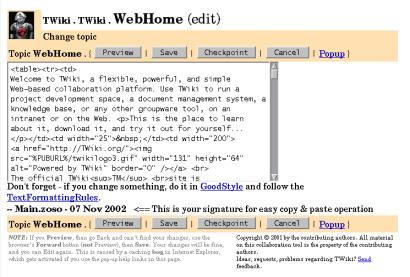
 Edit mode (note that the buttons are also at top) |
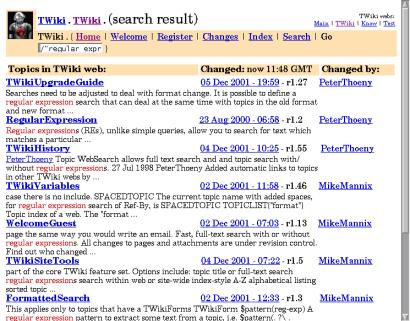
 Search keywords color highlight |
Features
The PhotonSkin features:- A powerful yet easy to use new search, the PhotonSearch.
- Search options and some actions integrated in the Go box.
- Color highlighting for search results.
- Checkpoint save and direct save from the KoalaSkin.
- Buttons and top and bottom of the page for quicker access.
- Special syntax to add a quick changes notification.
Installation
To install PhotonSkin, you need the following Perl modules:-
Text::Soundex -
URI::Escape
).
Once you have all that installed, unpack the skin:
(Go to the appropriate directory, which should be something like /var/www/twiki or /home/httpd/twiki; in Debian, it's probably /var/lib/twiki)
# unzip /home/zoso/tmp/photonskin/twiki/photonskin.zipYou'll have to patch your
TWiki::Prefs module with the patch provided (twiki-prefs-pm.patch). Don't worry, the patch will only add one function. The patching should be as simple as:
cd $TWIKIDIR/lib/TWiki
patch <$PATCHDIR/twiki-prefs-pm.patch
Set the SKIN to "photon" (in TWikiPreferences, *.WebPreferences o in your own user topic). Be sure you have email addresses in all your user topics, for the notifications to work right, and that you have WIKIWEBMASTER and SMTPSENDERHOST set correctly, just in case. Optionally, you can also set variables ALIAS and VALID_DOMAIN_ACCOUNTS (see notifications, below). Customize the file lib/TWiki/Notifications.pm with your message template in line 35, if you want to use notifications (see the notification syntax in the next section).
Notifications
The save CGI recognizes a syntax for notifications. The idea is being able to notify someone about a change, remarking some text. That is, you mark some text and specify a list of recipients to send a notification to. The syntax is:##My important text. Will be saved with the node##(recip1, recip2)The notifications will be sent by e-mail to the specified users. You can use as recipients for the "regular" notifications the login names in the
.htpasswd file. The address used is the one in their user topic (Email "property"). As a convenience, you can:
- Define aliases in an ALIAS variable (in TWikiPreferences, for example), so the alias is converted to a username.
- Use email addresses directly if you want to send the notification to someone not in your email domain.
- Use an account listed in the VALID_DOMAIN_ACCOUNTS special variable. When one of these is used, the complete email address will be the parameter plus an at sign and the domain specified in SMTPSENDERHOST (defaulting to
localhost.localdomainif none is specified).
##My important text. Will be saved but possibly modified##(tag: param1, param2; othertag: param1, param2)Of course you can mix both styles, but the default (empty) tag must be the first one:
##My important text. Will be saved but possibly modified##(recip1, recip2; othertag: param1, param2)When tags are used, a plugin is called and the meaning of the parameters vary from plugin to plugin.
Plugins
Since the June 2003 version, you can write plugins for the notifications. You just have to write a Perl module with the same name as the tag you want to implement, and put it underlib/TWiki/Notifications/. The module will have the first letter uppercase and the rest, downcase. The tag, in the notification, is converted accordingly, so it's case-insensitive.
The interface you have to provide is simply a function called notify. The parameters are $theNotificationParams, an array ref with the parameters; $theText, the notification text; $theWeb; $theTopic; and the $theUser, the notificating user's login name. THE VALUE RETURNED IS THE TEXT THAT WILL BE SUBSTITUTED BY THE ORIGINAL TEXT. That is, if you return 1, the notification text will be changed by the string 1.
In the distribution, a plugin called Test is provided for demonstration purposes.
PhotonSearch
PhotonSearch is the Google-like search for PhotonSkin. It's used directly through the "Go" box in every page, and follows these rules:- If the contents of the box begin with an uppercase, its behaviour is the same as the standard Go box (you can also use the Web.TopicName notation).
- If the contents of the box begin with
/, it performs a full text search, using the DirectSearch method.- If the contents of the box begin with
/, and there is another/in the box, make a text contents search only in the nodes whose names have the final words in theirs, e.g.:/curses/perlsearches for the text "curses" in the pages with "perl" in their names, for example, PerlTutorial, PerlTools, PHPVsPerl, etc.
- If the contents of the box begin with
- Else, it performs a search in the node names. Basically, it searches the words typed in the node names (AND operation).
Advanced usage
PhotonSearch understands some options. They go before the search expression, separated by a colon (:). By now, the list of possible options is:
-
lto search locally (only current web). By default, PhotonSearch does a global search, although that behaviour can be changed passinglocalas the CGI parameterscope. -
ato search globally (all webs exceptTrash). This is the default unless you pass the valuelocalin the parameterscope. -
uto respect case. By default, searches ignore case. -
nto open a new window. This is a Javascript feature in the template rather than a PhotonSearch one. -
eto open the edit window instead of the view one. Note that this only happens if there is only one result. -
ccolorizes the current node with the given words. For example, you typec:one two threeand the topic is reloaded, highlighting the wordsone,twoandthree. The words can in fact be regular expressions. For this to work, you need to installviewCGI from PhotonTWikiMods. -
vswitches to BookView in the results, that is, shows the complete topic text for each result.
ne:per bookm
to edit directly his personal bookmarks (for example) without losing the current window, supposing only that topic had «per» and «bookm» in its name.
Special search modes
The sidebar and popup modes are achieved by simply adding the appropriate value to thetype parameter in the PhotonSearch CGI call. The type can be search for regular search, popup for the popup mode, and sidebar for the sidebar mode. The special modes use Javascript, but should work in IE, Mozilla and Opera. If you use other browsers and have problems, please report them.
To install them, simply copy searchpopup.tmpl and searchsidebar.tmpl to your templates directory.
Sidebar
To add the sidebar to Mozilla, copy and paste this text into your address bar and press enter. You'll have to changeyourtwikiURL with the URL of the (PhotonSearch-powered) TWiki you want to search on.
javascript:window.sidebar.addPanel ('PhotonSearch','http://yourtwikiURL/bin/photonsearch?type=sidebar', '');
To add it to Opera, add a new panel and put http://yourtwikiURL/bin/photonsearch?type=sidebar in its URL.
Popup mode
You can add a link like the following in your view template to access the Popup mode:
<a onClick="javascript:w = window.open('/twiki/bin/photonsearch?type=popup', \
'photonsearch', 'location=no,menubar=no,width=300,height=400,scrollbars=yes'); \
w.focus(); return false" href="#">Popup</a>
-- EstebanManchado - 06 Nov 2002
ChangeLog
- 13 Jun 2003 (version-1_0): Added v: option to PhotonSearch, added TWiki::Prefs patch, updated documentation, added "lurker" script.
- 11 Jun 2003: Added missing file
Colorize.pm(thanks, Lynnwood) - 4 Jun 2003: Some bugfixes, added security and new syntax for PhotonSearch, generalized notifications syntax.
- 27 Feb 2003: Added
templates/directory (doh!) - 20 Nov: Updated notifications module (clean-ups) and dropped
Mail::Senddependency. - 7 Nov: Corrected some undocumented Perl dependencies
- 6 Nov: First upload
Discuss
Discussion moved to PhotonSkinDev. -- EstebanManchado - 20 Nov 2002

| I | Attachment | History | Action | Size | Date | Who | Comment |
|---|---|---|---|---|---|---|---|
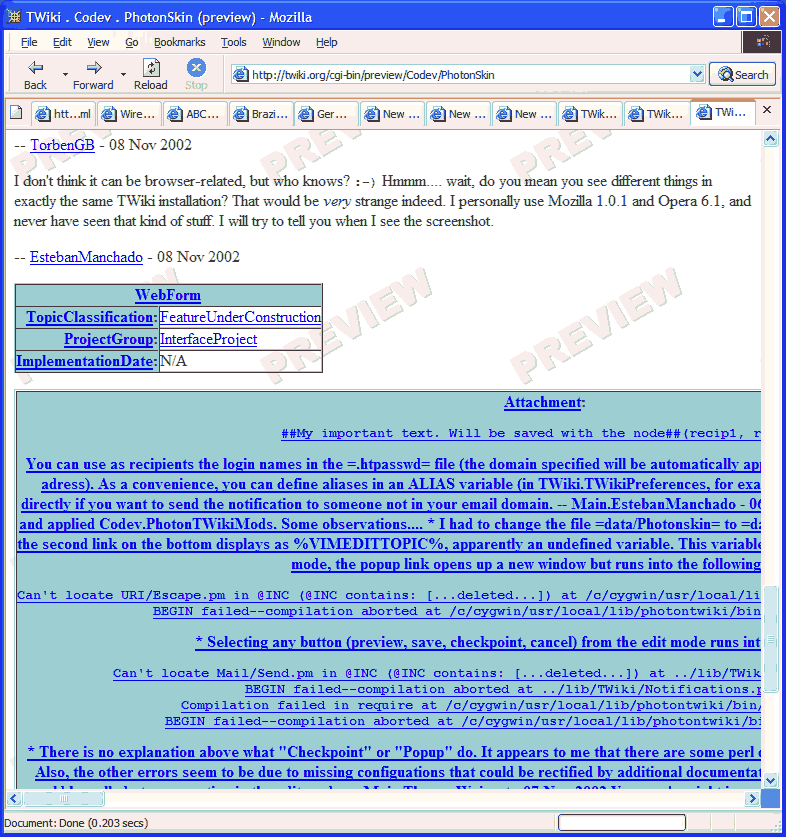
 gif gif |
browser_junk.gif | r1 | manage | 48.3 K | 2002-11-08 - 12:02 | UnknownUser | Previewing with Mozilla1.1/WinXP shows junk. |
 htm htm |
browser_junk.htm | r1 | manage | 56.2 K | 2002-11-08 - 15:27 | UnknownUser | HTML listing of junk in Mozilla1.1/WinXP. |
 jpg jpg |
photonskin-1.jpg | r1 | manage | 27.9 K | 2002-11-07 - 12:22 | UnknownUser | Edit mode (note that the buttons are also at top) |
| jpg |
photonskin-2.jpg | r1 | manage | 41.0 K | 2002-11-07 - 12:31 | UnknownUser | Search keywords color highlight |
 zip zip |
photonskin.zip | r7 r6 r5 r4 r3 | manage | 31.4 K | 2003-06-13 - 15:25 | UnknownUser | The skin |

Topic revision: r25 - 2006-03-16 - PeterThoeny


 Site map
 Blog web

 Index
Index Search
 Search extensions
 Search by tags
 Changes
 Notifications
 RSS Feed
 Statistics
 Preferences
 Community
  Readme first!
 Rate extensions!
 Add-Ons
  Development topics
 Idea topics
 Plugins
  Development topics
 Idea topics
 Skins
Skins  Development topics
 Idea topics
 Code Contribs
  Development topics
 Idea topics


 Account







 Ideas, requests, problems regarding TWiki? Send feedback. Ask community in the support forum.
Copyright © 1999-2026 by the contributing authors. All material on this collaboration platform is the property of the contributing authors.