Timeline TWiki Plugin
 Timeline
 is a DHTML-based AJAXy widget for visualizing time-based events. It can be used to show a WebChanges timeline with the query below.
Syntax Rules
The %TIMELINE% variable handles the following parameters:- DEFAULT - the url of the datasource
- urltype - XML or JSON (defaults to JSON)
- interval - (DAY, MONTH, YEAR, DECADE)
- date - the initial date that the timeline will be centered on
- height - height in pixels that the timeline area will use
- width - width in pixels that the timeline area will use
- orientation - horizontal or vertical (horizontal by default)
Plugin Settings
Plugin settings are stored as preferences variables. To reference a plugin setting write%<plugin>_<setting>%, i.e. %TIMELINEPLUGIN_SHORTDESCRIPTION%
- One line description, is shown in the TextFormattingRules topic:
- Set SHORTDESCRIPTION = Show a scrolling Timeline from a TWiki SEARCH
- Debug plugin: (See output in
data/debug.txt)- Set DEBUG = 0
Example (shows when Plugin is installed and running successfully)
Note that the JSON based output is much more reliable cross browsers, so only use xml is you really need to.Static file
The first example shows a timeline based on a pre-existing JSON file (https://twiki.org/p/pub/TWiki06x01/TimelinePlugin/cubism.js) %TIMELINE{ urltype="JSON" "https://twiki.org/p/pub/TWiki06x01/TimelinePlugin/cubism.js" interval="DECADE" height="200px" width="700px" date="1890" }% To use data from a twiki topic, you need to set the SKIN=text and add?contenttype=text/xml (to trick IE's XHTTPRequest into working) to the url
"http://10.10.10.20/trunk/bin/view/TWiki/TimeLineSearchJSON?contenttype=text/xml"
urltype="JSON"
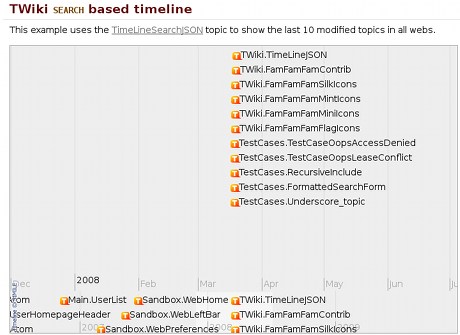
TWiki SEARCH based timeline
This example uses the TimeLineSearchJSON topic to show the last 10 modified topics in all webs.
%TIMELINE{
urltype="JSON"
"https://twiki.org/cgi-bin/view/TWiki06x01/TimeLineSearchJSON?contenttype=text/xml"
interval="YEAR"
height="450px"
width="700px"
date="23 Sep 2026"
}%
The example is made up of the the %TIMELINE% variable that is converted into the client side javascript, and a TWiki %SEARCH% statement that formats the results into the XML data format that the javascript requires.
%TIMELINE{
urltype="JSON"
"%SCRIPTURL{view}%/%SYSTEMWEB%/TimeLineSearchJSON?contenttype=text/xml"
interval="YEAR"
height="450px"
width="700px"
date="%DISPLAYTIME{"$day $month $year"}%"
}%
where TimeLineSearch contains
<data>
<!--
   * Set <nop>SKIN = xml

the format of and event:
   start="May 28 2006 09:00:00 GMT"
   end="Jun 15 2006 09:00:00 GMT"
   isDuration="true"
   title="Writing Timeline documentation"
   image="http://simile.mit.edu/images/csail-logo.gif"
-->
%SEARCH{
".*" web="all" regex="on" nototal="on" noheader="on" nosearch="on" order="modified" reverse="on" limit="10"
format="<event start='$date' title='$topic' link='%SCRIPTURL{"view"}%/$web/$topic' >$summary(noheader)</event>"}%
</data>
Plugin Installation Instructions
You do not need to install anything in the browser to use this extension. The following instructions are for the administrator who installs the extension on the server where TWiki is running. Like many other TWiki extensions, this module is shipped with a fully automatic installer script written using the BuildContrib.- If you have TWiki 4.2 or later, you can install from the
configureinterface (Go to Plugins->Find More Extensions)- See the installation supplement on TWiki.org for more information.
- See the installation supplement
- If you have any problems, then you can still install manually from the command-line:
- Download one of the
.zipor.tgzarchives - Unpack the archive in the root directory of your TWiki installation.
- Run the installer script (
perl <module>_installer) - Run
configureand enable the module, if it is a plugin. - Repeat for any missing dependencies.
- Download one of the
- If you are still having problems, then instead of running the installer script:
- Make sure that the file permissions allow the webserver user to access all files.
- Check in any installed files that have existing
,vfiles in your existing install (take care not to lock the files when you check in) - Manually edit LocalSite.cfg to set any configuration variables.
Plugin Info
| Plugin Author: | TWiki:Main.SvenDowideit - http://WikiRing.com |
| Copyright: | TWiki Plugin © 2006-2008, TWiki:Main/SvenDowideit; © 2006-2010 TWiki:TWiki/TWikiContributor |
| The SIMILE Timeline software is sponsored by The Andrew W. Mellon Foundation and is maintained by the SIMILE project, in particular: David Francois Huynh, dfhuynh at csail.mit.edu | |
| Plugin License: | GPL (GNU General Public License) |
| SIMILE Timeline License: | BSD license |
| Plugin Version: | 18537 (2010-04-26) - 2010-04-26 23:15:22 |
| Change History: | |
| 2010-04-26: | TWikibug:Item6433 - doc improvements |
| 19 March 2008: | updated to Revision 9234: http://simile.mit.edu/repository/timeline/trunk/src/webapp/api and http://simile.mit.edu/repository/ajax/trunk/src/webapp/api/ , updated Plugin to add features. |
| 22 July 2006: | Initial version |
| TWiki Dependency: | $TWiki::Plugins::VERSION 1.1 |
| CPAN Dependencies: | none |
| Other Dependencies: | none |
| Perl Version: | 5.005 |
| Bug reports: | http://develop.twiki.org/~twiki4/cgi-bin/view/Bugs |
| Plugin Home: | http://TWiki.org/cgi-bin/view/Plugins/TimelinePlugin |
| Feedback: | http://TWiki.org/cgi-bin/view/Plugins/TimelinePluginDev |
| Appraisal: | http://TWiki.org/cgi-bin/view/Plugins/TimelinePluginAppraisal |


| I | Attachment | History | Action | Size | Date | Who | Comment |
|---|---|---|---|---|---|---|---|
 md5 md5 |
TimelinePlugin.md5 | r14 r13 r12 r11 r10 | manage | 0.2 K | 2010-04-27 - 06:16 | PeterThoeny | |
 tgz tgz |
TimelinePlugin.tgz | r14 r13 r12 r11 r10 | manage | 209.7 K | 2010-04-27 - 06:16 | PeterThoeny | |
| zip |
TimelinePlugin.zip | r15 r14 r13 r12 r11 | manage | 256.6 K | 2010-04-27 - 06:16 | PeterThoeny | |
| ext |
TimelinePlugin_installer | r6 r5 r4 r3 r2 | manage | 10.7 K | 2010-04-27 - 06:16 | PeterThoeny |

Topic revision: r19 - 2018-07-17 - PeterThoeny


 Site map
 Blog web

 Index
Index Search
 Search extensions
 Search by tags
 Changes
 Notifications
 RSS Feed
 Statistics
 Preferences
 Community
  Readme first!
 Rate extensions!
 Add-Ons
  Development topics
 Idea topics
 Plugins
  Development topics
 Idea topics
 Skins
Skins  Development topics
 Idea topics
 Code Contribs
  Development topics
 Idea topics


 Account


 Ideas, requests, problems regarding TWiki? Send feedback. Ask community in the support forum.
Copyright © 1999-2026 by the contributing authors. All material on this collaboration platform is the property of the contributing authors.