Question
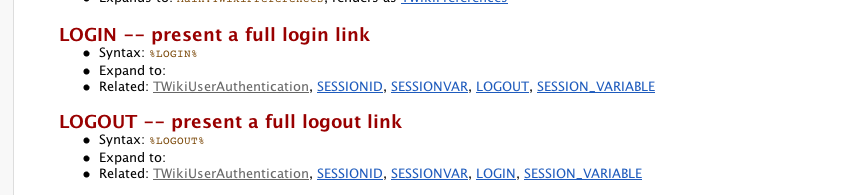
What have I done? My LOGIN and LOGOUT vars are both empty. I tried to use the TWiki "Login Template" configuratgion but it was failing, thi8ngs got screwed up badly, and I've backed out to what has worked before (Apache htpasswd Basic Auth). Now my LOGIN and LOGOUT var5s are both empty. Gaaaah. Help?? What did I break?- empty vars:
Environment
Answer
 If you answer a question - or someone answered one of your questions - please remember to edit the page and set the status to answered. The status selector is below the edit box.
 configure.
-- CrawfordCurrie - 13 Mar 2006
Nope, I have definitely set ApacheLogin. For a short while I had this set to TemplateLogin but that didn't play nice with the .htaccess file.  I'm using .htaccess.
- Security settings:

Log Inis blank? -- VickiBrown - 14 Mar 2006 What else did you change, Vicki? As described in the documentation, TemplateLogin is not used with
require valid-user in .htaccess; that's for ApacheLogin (which you now have selected) ONLY.
-- CrawfordCurrie - 14 Mar 2006
Come again?
I'm using Apache Login and .htaccess (require valid user). The Log In variable is empty. This is silly because it means the pages says
or RegisterWhat do you ,mean by "what else did I change"? If I knew, I wouldn't be asking. Why is this variable empty? is it expected to be empty? If so, the resulting nonsentence is a bug. -- VickiBrown - 24 Mar 2006 LOGIN is always empty if the current user is authenticated. Conversely, LOGOUT is always empty if the user is not authenticated. They can never be both empty if the code is allowed to run it's course. Therefore, the only way you could get them both empty is if you (1) * Set one or other in a topic (2) changed the code or (3) are running a plugin that has overridden one or other variable. -- CrawfordCurrie - 28 Mar 2006


| I | Attachment | History | Action | Size | Date | Who | Comment |
|---|---|---|---|---|---|---|---|
 png png |
vlb20060312c.png | r1 | manage | 26.7 K | 2006-03-12 - 23:08 | UnknownUser | empty vars |
| png |
vlb20060314a.png | r1 | manage | 11.0 K | 2006-03-14 - 18:20 | UnknownUser | Security settings |

Topic revision: r7 - 2006-04-11 - WillNorris


 Site map
 Blog web

 Search
 Changes
 RSS Feed
 Notifications
 Statistics
 Preferences
 Register new user
 Support Forum
  Ask a question
 Open questions
  My recent questions
 Get quick help in #twiki IRC channel







 Ideas, requests, problems regarding TWiki? Send feedback. Ask community in the support forum.
Copyright © 1999-2026 by the contributing authors. All material on this collaboration platform is the property of the contributing authors.