Question
I noticed that when I preview some pages after making changes, the preview page is not "left justified". Sometimes its in the center or the right. Anyone know what causes this to happen or better yet, how to fix it? thanksEnvironment
Answer
 If you answer a question - or someone answered one of your questions - please remember to edit the page and set the status to answered. The status selector is below the edit box.
  . Copy the html source in the field "Validate by Direct Input" to see if it is caused by invalid markup.
-- ArthurClemens - 25 Nov 2006
I just realized that the preview page "auto fills" from the right with the content on the page. Does anyone know how to change this?
-- DonStenson - 27 Nov 2006
It would be better if the content will fill from the left.
-- DonStenson - 27 Nov 2006
Your problem description is too cryptic. Let's go through this step by step. Did you check the html source?
-- ArthurClemens - 27 Nov 2006
Yes, it verified. When you preview a page, there is a lot of white space to the left when there are only a few characters per line on the page. When there are a lot of characters on one line, as in the case of a word wrap, then there is no white space on the preview page. The preview page is then full screen with no white space.
-- DonStenson - 27 Nov 2006
Yes, it verified. When you preview a page, there is a lot of white space to the left when there are only a few characters per line on the page. When there are a lot of characters on one line, as in the case of a word wrap, then there is no white space on the preview page. The preview page is then full screen with no white space.
-- DonStenson - 27 Nov 2006
What happens if you append
. Copy the html source in the field "Validate by Direct Input" to see if it is caused by invalid markup.
-- ArthurClemens - 25 Nov 2006
I just realized that the preview page "auto fills" from the right with the content on the page. Does anyone know how to change this?
-- DonStenson - 27 Nov 2006
It would be better if the content will fill from the left.
-- DonStenson - 27 Nov 2006
Your problem description is too cryptic. Let's go through this step by step. Did you check the html source?
-- ArthurClemens - 27 Nov 2006
Yes, it verified. When you preview a page, there is a lot of white space to the left when there are only a few characters per line on the page. When there are a lot of characters on one line, as in the case of a word wrap, then there is no white space on the preview page. The preview page is then full screen with no white space.
-- DonStenson - 27 Nov 2006
Yes, it verified. When you preview a page, there is a lot of white space to the left when there are only a few characters per line on the page. When there are a lot of characters on one line, as in the case of a word wrap, then there is no white space on the preview page. The preview page is then full screen with no white space.
-- DonStenson - 27 Nov 2006
What happens if you append ;skin=classic to the preview page?
-- ArthurClemens - 27 Nov 2006
I get the error below:
Attention
Incorrect parameters to the save script
If you received a link to this topic in an e-mail or just want to look at the topic, cancel save? to go to SL8Redesignskin=classic.
If you are developing a TWikiApplication, see TWikiScripts for a description of the correct parameters.
-- DonStenson - 28 Nov 2006
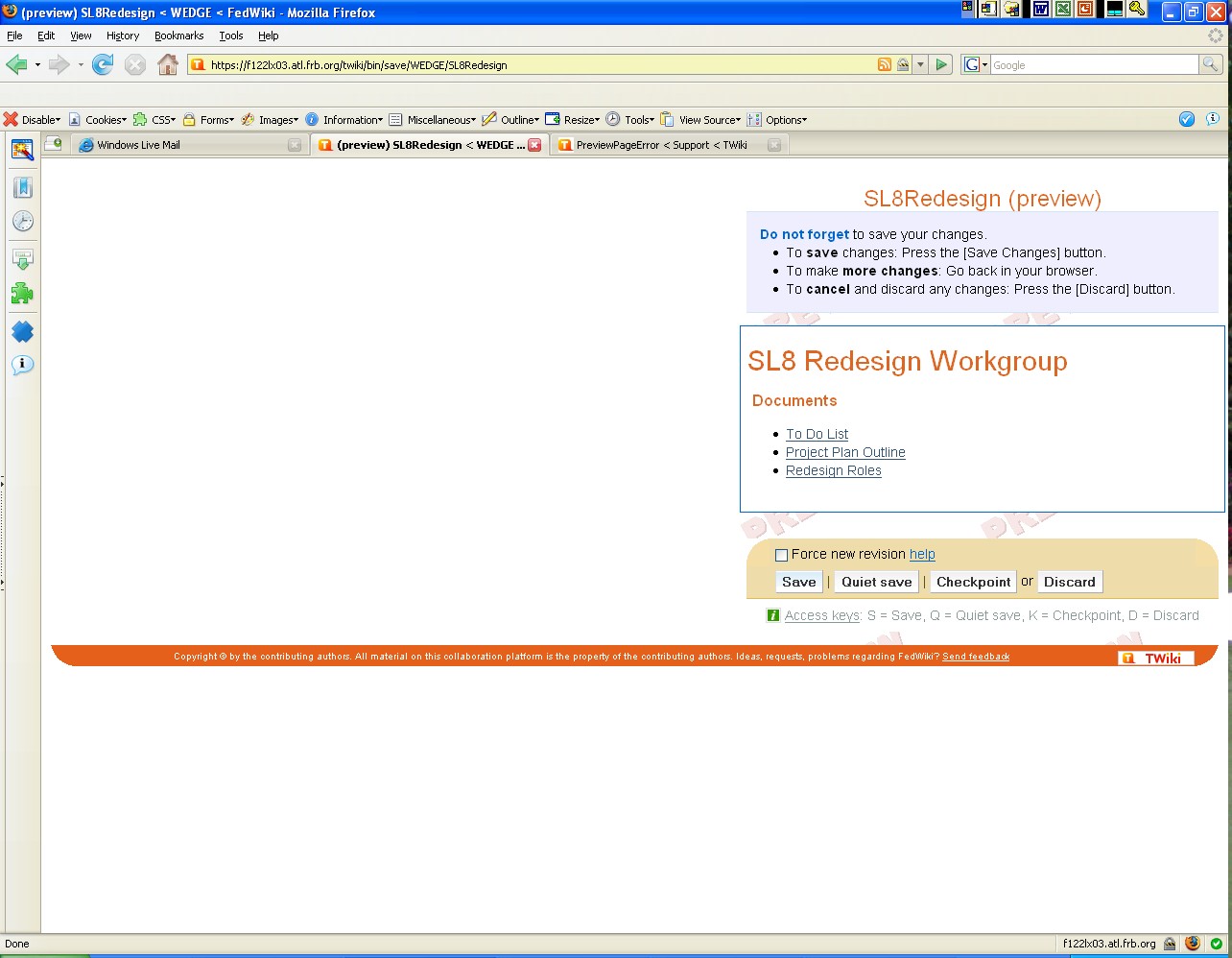
OK, it is not possible to append a url parameter to a save page. Could you then please post a screen shot of your problem? Erase any sensitive information.
-- ArthurClemens - 28 Nov 2006
I attached a screen shot
-- DonStenson - 28 Nov 2006
I see you have made a small change to the preview page: the rounded corners of the box around the Save button. There is a chance something went wrong with customization. You could try first to the set the skin to the original pattern skin and see it the problem persists.
-- ArthurClemens - 28 Nov 2006


| I | Attachment | History | Action | Size | Date | Who | Comment |
|---|---|---|---|---|---|---|---|
 jpg jpg |
preview.jpg | r1 | manage | 173.9 K | 2006-11-28 - 21:09 | UnknownUser | Screen shot of the preview page error |

Topic revision: r13 - 2007-02-01 - PeterThoeny


 Site map
 Blog web

 Search
 Changes
 RSS Feed
 Notifications
 Statistics
 Preferences
 Register new user
 Support Forum
  Ask a question
 Open questions
  My recent questions
 Get quick help in #twiki IRC channel




 Ideas, requests, problems regarding TWiki? Send feedback. Ask community in the support forum.
Copyright © 1999-2026 by the contributing authors. All material on this collaboration platform is the property of the contributing authors.