SID-00029: Multiple input columns
| Status: |
 Answered Answered |
TWiki version: |
4.2.3 |
Perl version: |
|
| Category: |
CategoryForms |
Server OS: |
|
Last update: |
17 years ago |
Hey everybody,
Some time ago, back in 2002,
JasonPark uploaded the following question:
"I have a question on making a form with multiple column values. For ex.
I can only get a 1 column of selectable values in my form. Is there a way to have more than 1 column of inputs per row? Thanks."
The response was that it wasn't supported at the time... Now, I'm interested in the same idea, is it supported now?
I want to be able to build a form with several "Selects" and "Textareas" arranged in a horizontal way, instead of the customed vertical one.
Example:
| Type |
Select |
Select |
Textarea |
| Values |
SEARCH variable |
SEARCH variable |
Role within that project |
Thanks...
--
JoseDavila - 13 Jan 2009
Discussion and Answer
You can't do that with the standard edit feature of
TWikiForms.
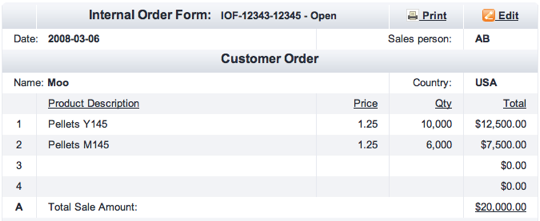
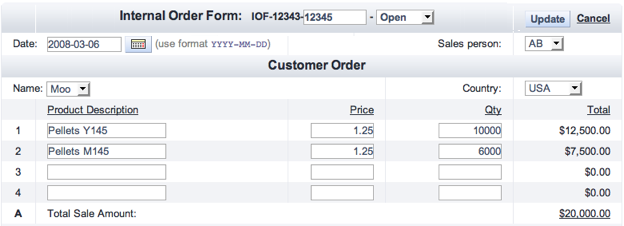
It is however possible to create custom views and edit form of form data. Here are two screenshots of a TWiki application I did for a client:
- Custom view of a sales order form:
- Sales order form in edit mode:
It's a bit more involved to create this application. Basic steps:
- Create a form with all fields hidden, such as SalesOrderForm
- Create template page with attached form, such as SalesOrderTemplate
- The template pages includes a header that shows the form data, such as
%INCLUDE{SalesOrderHeader}%
- Create a header page that pulls form field values from the including page, such as SalesOrderHeader.
- Sample query:
%FORMFIELD{ "Date" topic="%INCLUDINGTOPIC%" }%
- Create a page that has an HTML form to edit the form fields, such as ModifySalesOrder. The form action points to TWiki's
save script.
- Sample input field:
<input type='text' name='Date' value='%FORMFIELD{ "Date" topic="%INCLUDINGTOPIC%" }%' size='12' />
--
PeterThoeny - 14 Jan 2009
Hey, thank you for your time...
However, I had some troubles applying your ideas. I tried a simulation an apparently it didn't work
I will list the activities:
1) Created the form "SalesOrderForm" in which you could find the field <input type=hidden name=date VALUE=""/>
2) Created the Template "SalesOrderTemplate" and included this line %INCLUDE{SalesOrderHeader}%
3) Created the topic "SalesOrderHeader" which first line is : Sample query: %FORMFIELD{ "Date" topic="%INCLUDINGTOPIC%" }%
4) At last I created the topic "ModifySalesOrder" with the following text: <input type='text' name='Date' value='%FORMFIELD{ "Date" topic="%INCLUDINGTOPIC%" }%' size='12' />
The questions that arouse during this process where:
When talking about “hidden” fields, did I handle them correctly? If correct, how can I make them visible? Or is there a need to create them and then in the “style” of each button, mark them as visible?
Are all the topics necessary? What’s the relation between them?
How do I add the “save” script? Where do I find it? Is it html or wiki code?
--
JoseDavila - 22 Jan 2009
- Is SalesOrderTemplate a VIEW_TEMPLATE?
- Does SalesOrderHeader or ModifySalesOrder use SalesOrderTemplate as a VIEW_TEMPLATE?
* Set VIEW_TEMPLATE = SalesOrderTemplate
--
BurtWelsh - 19 Feb 2009
After reading those steps more carefully, I have different questions
- Is SalesOrderTemplate the template used to initialize all the SalesOrder topics?
- Does SalesOrderTemplate include both the SalesOrderHeader and ModifySalesOrder and only activate ModifySalesOrder when the Edit form button is pressed?
- Could I use %IFDEFINED{}% and test a %URLPARAM to select between SalesOrderHeader and ModifySalesOrder
--
BurtWelsh - 19 Feb 2009
SalesOrderTemplate is used as the template for new sales order pages. It includes only the SalesOrderHeader. The
ModifySalesOrder is linked to from the header, it is a standalone page. VIEW_TEMPLATE is not used.
--
PeterThoeny - 19 Feb 2009
 If you answer a question - or someone answered one of your questions - please remember to edit the page and set the status to answered. The status selector is below the edit box.


 Site map
 Blog web

 Search
 Changes
 RSS Feed
 Notifications
 Statistics
 Preferences
 Register new user
 Support Forum
  Ask a question
 Open questions
  My recent questions
 Get quick help in #twiki IRC channel





 Ideas, requests, problems regarding TWiki? Send feedback. Ask community in the support forum.