SID-00541: Error on home page
| Status: |  Answered Answered |
TWiki version: | 4.3.2 | Perl version: | Not sure |
| Category: | CategoryInstallation | Server OS: | Linux | Last update: | 17 years ago |
Access Denied Attention The "bin/view" web does not exist A TWikiSite is divided into webs; each one represents one subject, one area of collaboration. You are trying to 'view' in a web that does not exist.http://www.xxxx.xxx/bin/oops.pl/bin/view/Pl?template=oopsaccessdenied;def=no_such_web;param1=view;template=oopsaccessdenied;def=no_such_web;param1=view
 This is where it redirects the home page. On click of OK it takes me to:
http://www.xxx.xxx/bin/view.pl/Main/WebHome
-- JordanKoppole - 2009-09-25
This is where it redirects the home page. On click of OK it takes me to:
http://www.xxx.xxx/bin/view.pl/Main/WebHome
-- JordanKoppole - 2009-09-25
Discussion and Answer
Something is wrong with your TWiki configuration. Theview is a script, not a web. I suggest to use the ApacheConfigGenerator to create the Apache config file for TWiki, rename twiki/lib/LocalSite.cfg and re-run the configure script to configure TWiki.
-- PeterThoeny - 2009-09-28
Dear Peter,
It is still the same. ApacheConfigGenerator is this the same a configure or is available on some other path? Actually I have renamed all the bin scripts to .pl as the hosting needs it, and in configure.pl I gave .pl as script extension
-- JordanKoppole - 2009-09-28
The ApacheConfigGenerator helps you configure Apache for TWiki. There is a separate step, the configure script helps you configure TWiki. See TWikiInstallationGuide.
-- PeterThoeny - 2009-09-28
It is a shared hosting, so I don't have direct access to apache config.
-- JordanKoppole - 2009-09-28
Also I have to remove the perl options for it to work so now my scripts have
#!/usr/bin/perl
Is this a problem
-- JordanKoppole - 2009-09-28
It is safe to remove the Perl options from the shebang line. Your problem is likely with TWiki configure. Rename LocalSite.cfg and re-run configure.
-- PeterThoeny - 2009-09-28
I have ran configure.pl nearly 25 times with various options, but no luck. I can share the actual site address if you are interested in having a look at it.
-- JordanKoppole - 2009-09-28
What is the output of the data directory
ls -al twiki/data
-- PeterJones - 2009-09-28
Normally you would only see that with a bad URL, e.g., http://twiki.org/cgi-bin/bin/view/bin/view/Support/SID-00541
So it looks like the location of your bin directory is misconfigured in Apache.
What does your http.conf file have for this entry: # The ScriptAlias defines the bin directory as a directory where CGI # scripts are allowed. # The first parameter will be part of the URL to your installation e.g. # http://my.co.uk/twiki/bin/view/... # The second parameter must point to the physical path on your disc. ScriptAlias /twiki/bin "/var/www/twiki/bin"-- SeanCMorgan - 2009-09-28 Not sure as I said it is a shared hosting, I don't have the access. but any .pl is considered as a cgi script, that is what the information given by the hosting provider. -- JordanKoppole - 2009-09-29 Peter as far as I understand, the default home page has to be redirected to /bin/view.pl where as it is currently redirecting to /bin/view/Pl. Not sure if this is the reason. This is just my observation. -- JordanKoppole - 2009-09-29
- The dir structure as Peter Requested:
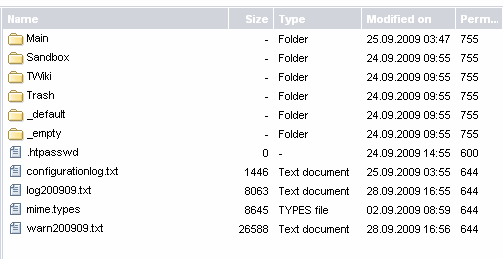
.
Now it shows the main page. Thanks for your help and support.
-- JordanKoppole - 2009-09-29
Ah, a redirect issue, not a TWiki config issue after all. I am glad it worked out. Happy TWiki collaboration!
-- PeterThoeny - 2009-09-29
 If you answer a question - or someone answered one of your questions - please remember to edit the page and set the status to answered. The status selector is below the edit box.
 | SupportForm | |
|---|---|
| Status | Answered |
| Title | Error on home page |
| SupportCategory | CategoryInstallation |
| TWiki version | 4.3.2 |
| Server OS | Linux |
| Web server | Apache |
| Perl version | Not sure |


Topic revision: r12 - 2009-09-29 - PeterThoeny


 Site map
 Blog web

 Search
 Changes
 RSS Feed
 Notifications
 Statistics
 Preferences
 Register new user
 Support Forum
  Ask a question
 Open questions
  My recent questions
 Get quick help in #twiki IRC channel





 Ideas, requests, problems regarding TWiki? Send feedback. Ask community in the support forum.
Copyright © 1999-2026 by the contributing authors. All material on this collaboration platform is the property of the contributing authors.