SID-00832: Editing breaks the TreeBrowser View
| Status: |
 Answered Answered |
TWiki version: |
4.2.4 |
Perl version: |
5.8.8 |
| Category: |
TreeBrowserPlugin |
Server OS: |
Windows Server 2003 |
Last update: |
16 years ago |
Im using the below code on a page
%TREEBROWSER{"file" title="---+ New Releases"}%
%TREEVIEW{web="%WEB%" topic="%TOPIC%" formatting="outline" format="   * $topic" levelprefix="   "}%
This would inturn shows me a tree browser structure on the child topics like the below picture....
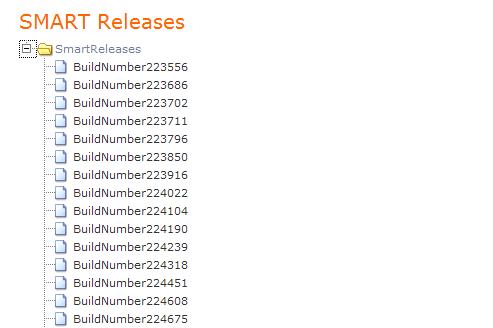
Everything works normal when Im just using RAW EDIT mode to edit the data, when I use the normal EDIT mode to edit the page that contains the above code, the tree browser view disappears and it just shows be a
TreeView structure like the below picture....

Any idea on what could be the reason for this happening ???
--
RajeshN - 2010-05-11
Discussion and Answer
Seems like the WYSIWYG editor is eating/munging some content. What text in raw view do you get after editing the topic in WYSIWYG?
You can prevent that if you enclose block of text with
<sticky> ... </sticky> tags.
--
PeterThoeny - 2010-05-11
There is really no change after in the text after editing the topic in WYSIWYG.... It looks the same... (100% exact)
%TREEBROWSER{"file" title="---+ New Releases"}%
%TREEVIEW{web="%WEB%" topic="%TOPIC%" formatting="outline" format=" * $topic" levelprefix=" "}%
btw., Thanks for the sticky tag suggestion, it helped to preserve the treebrowser view !!!
--
RajeshN - 2010-05-11
 If you answer a question - or someone answered one of your questions - please remember to edit the page and set the status to answered. The status selector is below the edit box.
Topic revision: r3 - 2010-05-11
- RajeshN

 jpg
jpg 


 Site map
 Blog web

 Search
 Changes
 RSS Feed
 Notifications
 Statistics
 Preferences
 Register new user
 Support Forum
  Ask a question
 Open questions
  My recent questions
 Get quick help in #twiki IRC channel







 Ideas, requests, problems regarding TWiki? Send feedback. Ask community in the support forum.