SID-01801: Delayed template login for users
| Status: |  Answered Answered |
TWiki version: | 5.1.4 | Perl version: | v5.8.8 built for x86_64-linux-thread-multi |
| Category: | CategoryAuthentication | Server OS: | RHEL 4.1 | Last update: | 12 years ago |
 Jordan Hoffman - 2013-09-24
Discussion and Answer
I restored the .htaccess file from a fresh build of the latest TWiki and I no longer experience a delayed authentication window, however, I have no authentication window at all (despite what I believed was the correct configuration). Just to be clear, what I desire is Template Authentication requiring a registered user login occurring as someone accesses the TWiki, and otherwise being denied access to Main.# Authentication type (htpasswd file) (comment out this if you configure htpasswd / LDAP support) AuthUserFile /distro/twiki/data/.htpasswd AuthName 'Enter your WikiName: (First name and last name, no space, no dots, capitalized, e.g. JohnSmith). Cancel to register if you do not have one.' AuthType Basic
ErrorDocument 401 {ScriptUrlPath}/view/TWiki/TWikiRegistration # Alternatively if your users are all known to be registered you may want # to redirect them to the ResetPassword page. # ErrorDocument 401 {ScriptUrlPath}/view/TWiki/ResetPassword # Set options for excuting CGI and allow symlinks for e.g. viewauth # This also unsets any options allowing directory indexing etc. Options ExecCGI FollowSymLinks # Limit access to configure to specific IP addresses and or users. # Make sure configure is not open to the general public. # The configure script is designed for administrators only. # The script itself and the information it reveals can be abused by # attackers if not properly protected against public access. <FilesMatch "configure.*"> SetHandler cgi-script Order Deny,Allow Deny from all Allow from 127.0.0.1, 192.168.1.10 Require user {Administrators} Satisfy Any </FilesMatch>
<FilesMatch "(attach|edit|manage|rename|save|upload|mail|logon|rest|.*auth).*"> require valid-user </FilesMatch> --
Jordan Hoffman - 2013-09-24
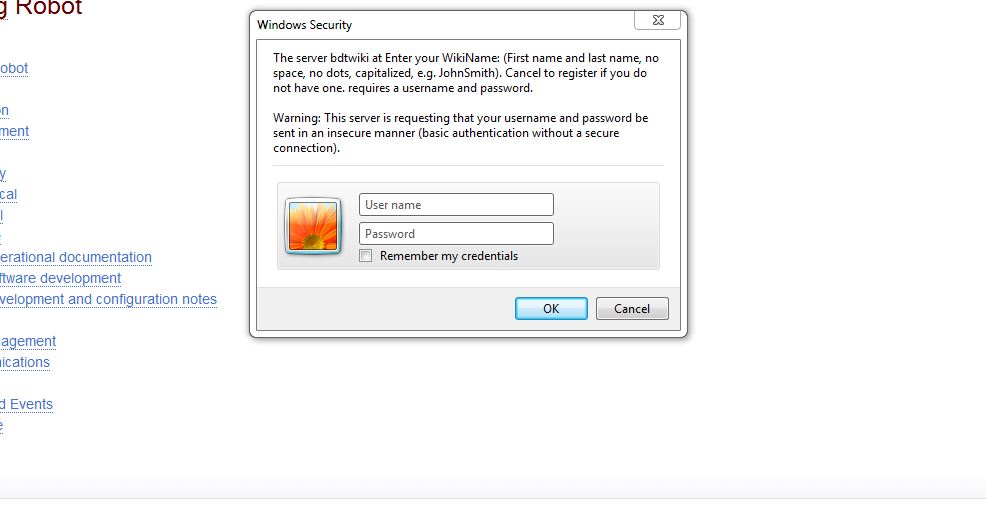
After further testing, when clicking on a Web off of Main the template authentication window appears. At which point any user can simply X out of it and make TWiki edits (not logged in).
-- Jordan Hoffman - 2013-09-24
Don't use apache login if you want to use template login to restrict access, e.g. don't use require valid user - you would get double authentication.
If you want to restrict all access to registered users using template login you need to set this in configure or twiki/lib/LocalSite.cfg:
$TWiki::cfg{AuthScripts} = 'attach, changes, edit, manage, oops, preview, rdiff, rdiffauth, register, rename, rest, save, search, upload, statistics, twiki_cgi, view, viewauth, viewfile';
With this all TWiki scripts are authenticated.
This causes a problem for password reset because the password reset screen is a TWiki page. You need to create a static HTML page based on the content of the password reset page. You need also to change the "forgot password" link in the login page to point to the unauthenticated password reset html page.
You also need to make sure that the attachments are secured.
--  Peter Thoeny - 2013-09-26
 If you answer a question - or someone answered one of your questions - please remember to edit the page and set the status to answered. The status selector is below the edit box.
 - Template Login authentication kicking in after anonymous users are connected and browsing the TWiki.:
| SupportForm | |
|---|---|
| Status | Answered |
| Title | Delayed template login for users |
| SupportCategory | CategoryAuthentication |
| TWiki version | 5.1.4 |
| Server OS | RHEL 4.1 |
| Web server | Apache/2.2.3 |
| Perl version | v5.8.8 built for x86_64-linux-thread-multi |
| Browser & version | various, latest version |


| I | Attachment | History | Action | Size | Date | Who | Comment |
|---|---|---|---|---|---|---|---|
 jpg jpg |
delayed_password_authentication.JPG | r1 | manage | 56.2 K | 2013-09-24 - 14:56 | UnknownUser | Template Login authentication kicking in after anonymous users are connected and browsing the TWiki. |

Topic revision: r3 - 2013-09-26 - PeterThoeny


 Site map
 Blog web

 Search
 Changes
 RSS Feed
 Notifications
 Statistics
 Preferences
 Register new user
 Support Forum
  Ask a question
 Open questions
  My recent questions
 Get quick help in #twiki IRC channel





 Ideas, requests, problems regarding TWiki? Send feedback. Ask community in the support forum.
Copyright © 1999-2026 by the contributing authors. All material on this collaboration platform is the property of the contributing authors.