SID-02132: BlogAddOn installed but no documentation on how to enable
| Status: |
 Answered Answered |
TWiki version: |
6.0.1 |
Perl version: |
? |
| Category: |
BlogAddOn |
Server OS: |
Debian |
Last update: |
10 years ago |
I have the
BlogAddOn installed, and have run the configure script to upgrade the version.
I enabled the {Plugins}{BlogAddOn}{ShowPersonalInfoAddOnPictures} = 1, but when I put the sample code (shown below) on a random twiki page (in raw edit mode) I throws the following error in red text:
Warning: Can't find topic BlogPost
<verbatim>
%INCLUDE{"BlogPost" sortdirection="descending" sort="created" limit="10"}%
</verbatim>
I feel like I am missing something in the configuration. Any ideas?
--
 John Mundy - 2015-12-08
Discussion and Answer
I have not sued this add-on, but if you include this topic from a web other than Blog, you need to prefix the web name, e.g.
"Blog.BlogPost". Not sure though if the app is written to work across webs. If that does not work, create a new web based using _BlogAddOn as the template web.
--
 Peter Thoeny - 2015-12-09
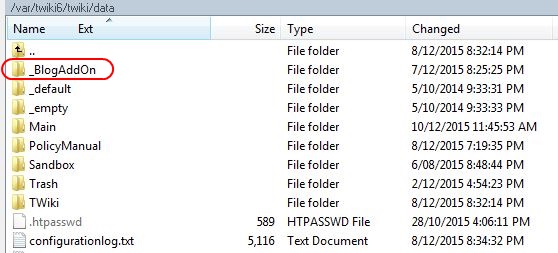
Hi Peter, I am still missing something in the setup I think. The image below
twikiSetupFolders.jpg shows the
BlogAddOn folder in my Twiki setup but I still can't seem to reference it in anyway. Using our main Twiki url like: http://lga.wiki/do/view/Main/BlogAddOn and http://lga.wiki/do/view/Main/BlogAddOnHome just returns the _This topic does not exist
 error.
What am I missing here?
John
--
John Mundy - 2015-12-10
The add-on ships with a template web called
_BlogAddOn. Create a new web based on this template web, or copy all
_BlogAddOn/Blog* topics to an existing web.
--
Peter Thoeny - 2015-12-10
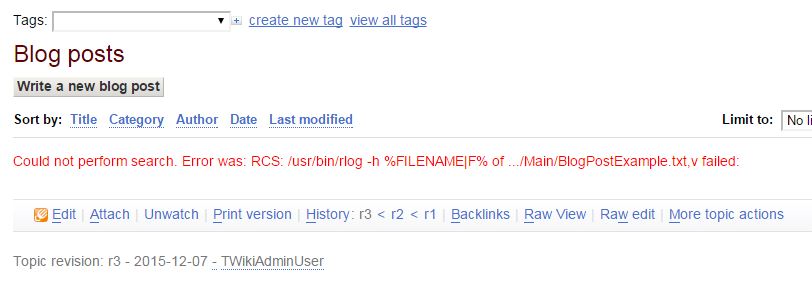
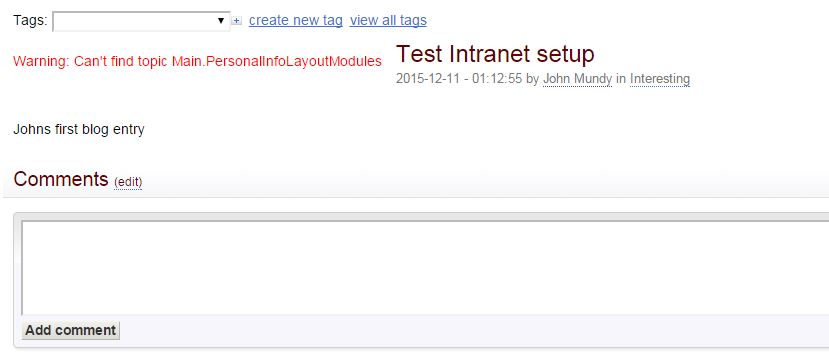
Thanks Peter, that has helped. Its still not quite right though as I am now seeing these errors when I try to kick-off a Blog. ie:
Could not perform search. Error was:
RCS: /usr/bin/rlog -h %FILENAME|F% of .../Main/BlogPostExample.txt,v failed:
Warning: Can't find topic
PersonalInfoLayoutModules
I have attached screen grabs too FYI. Seems like I have missed something in the copying over I think. I copied as you suggested only the Blog* files into the
Main web.
--
John Mundy - 2015-12-11
From the code it looks like this add-on uses a conditional include. Try setting this in
lib/LocalSite.cfg:
$TWiki::cfg{Plugins}{BlogAddOn}{ShowPersonalInfoAddOnPictures} = 0;
--
Peter Thoeny - 2015-12-11
Hi Peter, your advice has worked - thankyou. I now have the blog up and running. Another tip was I had to "sudo chown -R www-data:www-data /PATH/OF/WIKI" to ensure the files were owned by the server and then it worked. I will start a new support question to get the images from the Wiki User homepages to display nicely alongside the comments box as they do here.
--
John Mundy - 2015-12-14
 If you answer a question - or someone answered one of your questions - please remember to edit the page and set the status to answered. The status selector is below the edit box.
- twikiSetupFolders.jpg:
- blogError01.jpg:
- blogError02.jpg:


 jpg
jpg 


 Site map
 Blog web

 Search
 Changes
 RSS Feed
 Notifications
 Statistics
 Preferences
 Register new user
 Support Forum
  Ask a question
 Open questions
  My recent questions
 Get quick help in #twiki IRC channel









 Ideas, requests, problems regarding TWiki? Send feedback. Ask community in the support forum.