SID-02287: Activating Banner Produces Code Over Image
| Status: |
 Answered Answered |
TWiki version: |
5.1.1 |
Perl version: |
5.10.1 |
| Category: |
TWikiDashboardAddOn |
Server OS: |
RedHat Linux 6.7 |
Last update: |
9 years ago |
We have installed the
TWikiDashboardAddOn along with the dependencies
ScrollBoxAddOn &
ModalBoxAddOn (
SpreadSheetPlugin was already present). When we invoke a Dashboard, it all seems to work great, with one exception: If we include the
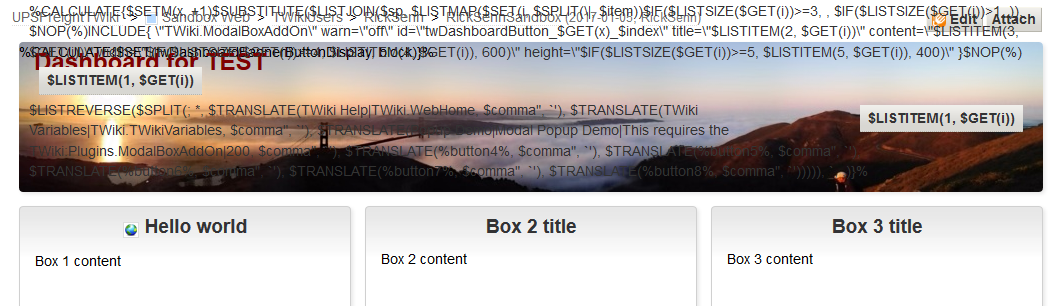
section="banner"... directive, it displays a banner image and buttons, but the buttons in the banner seem to do nothing, and then there is the following code overlaying the image:
<verbatim>%CALCULATE{$SETM(x, +1)$SUBSTITUTE($LISTJOIN($sp, $LISTMAP($SET(i, $SPLIT(\|, $item))$IF($LISTSIZE($GET(i))>=3,
$NOP(%)INCLUDE{ \"TWiki.ModalBoxAddOn\" warn=\"off\" id=\"twDashboardButton_$GET(x)_$index\" title=\"$LISTITEM(2, $GET(i))\" content=\"$LISTITEM(3, $GET(i))\" width=\"$IF($LISTSIZE($GET(i))>=4, $LISTITEM(4, $GET(i)), 600)\" height=\"$IF($LISTSIZE($GET(i))>=5, $LISTITEM(5, $GET(i)), 400)\" }$NOP(%) $LISTITEM(1, $GET(i))
, $IF($LISTSIZE($GET(i))>1,
$LISTITEM(1, $GET(i))
)), $LISTREVERSE($SPLIT(; *, $TRANSLATE(TWiki Help|TWiki.WebHome, $comma", `'), $TRANSLATE(TWiki Variables|TWiki.TWikiVariables, $comma", `'), $TRANSLATE(Popup Demo|Modal Popup Demo|This requires the TWiki:Plugins.ModalBoxAddOn|200, $comma", `'), $TRANSLATE(%button4%, $comma", `'), $TRANSLATE(%button5%, $comma", `'), $TRANSLATE(%button6%, $comma", `'), $TRANSLATE(%button7%, $comma", `'), $TRANSLATE(%button8%, $comma", `'))))), `, ,)}%</verbatim>
All boxes and content display fine. I've searched, but can find no clue as to what might be causing this. Any thoughts?
--
 Rick Senn - 2017-01-05
Discussion and Answer
Not sure. First make sure the latest version of the
SpreadSheetPlugin is installed.
--
 Peter Thoeny - 2017-01-06
Yes! That fixed it. We had a version of
SpreadSheetPlugin from 2012. Updating to the latest 2016 version fixed the issue. Thanks for the prompt assist!
--
Rick Senn - 2017-01-09
 If you answer a question - or someone answered one of your questions - please remember to edit the page and set the status to answered. The status selector is below the edit box.


 Site map
 Blog web

 Search
 Changes
 RSS Feed
 Notifications
 Statistics
 Preferences
 Register new user
 Support Forum
  Ask a question
 Open questions
  My recent questions
 Get quick help in #twiki IRC channel





 Ideas, requests, problems regarding TWiki? Send feedback. Ask community in the support forum.