SID-02365: Authentication doesn't seem to work/Can't use the TWikiAdmin
| Status: |
 Asked Asked |
TWiki version: |
6.1.0 |
Perl version: |
5.016003 (linux) |
| Category: |
CategoryAuthentication |
Server OS: |
CentOS Linux 7 (Core) |
Last update: |
8 years ago |
I just installed TWiki 6.1.0 on
CentOS 7 after having had lots of problems with an older 6.0.2 version. I'm having the same configuration issues as before, in that it doesn't seem to be authenticating properly. It seems maddeningly inconsistent.
It says I should add some admins. It starts out "Login as internal internal admin login" but I can't figure out how to do that. It's a link to
http://server/do/login?sudo=sudo;origurl=http://10.194.132.187/do/view/Main/TWikiAdminGroup
It leads to a Username & password form. If I put in "admin" and the password I'm pretty sure is right, it takes me back to the
do/view/Main/TWikiAdminGroup and nothing has apparently changed.
And there's still no edit button, and the
Edit Group Settings button just takes me back to the login form.
The config file written by the config script has this in it:
$TWiki::cfg{AdminUserLogin} = 'admin';
$TWiki::cfg{AdminUserWikiName} = 'TWikiAdminUser';
$TWiki::cfg{SuperAdminGroup} = 'TWikiAdminGroup';
$TWiki::cfg{Access}{AdminDomain} = 'site';
$TWiki::cfg{UsersTopicName} = 'TWikiUsers';</code>
I've tried using
TWikiAdminUser and all the passwords it could be. No dice. But the password it asks for at do/config allows me to update and save settings. That form never asks for a username, only the password.
Also, I can't log in as either of the two users I defined. Sometimes it just doesn't react-- just closes the form and reopens it with empty username & password fields. Sometimes it says "Ooops, we don't recognize you" and again prompts for another login.
--
 TWiki Guest - 2018-07-18
Discussion and Answer
Additional:
- {UseClientSessions} = (checked) (yes)
- {LoginManager} = TWiki::LoginManager::TemplateLogin
- {Htpasswd}{FileName} = /var/www/twiki/data/.htpasswd
I confirm that /var/www/twiki/data/.htpasswd exists and has the two usernames, encrypted passwords, email addresses, and etc in it. It was last written this morning when I did a password recover on one of the usernames.
--
TWiki Guest - 2018-07-18
Additional 2:
In the do/configure screens, there's an option under CGI Setup to list the versions of all components, e.g.<br>
- Operating system = Linux 2.6.32-573.18.1.el6.x86_64 (x86_64-linux-thread-multi)
- TWiki module in @INC path = TWiki.pm (Version: TWiki-6.1.0, Mon, 16 Jul 2018, build 30610) found
- Apache::Htpasswd = Not installed. may be required for ApacheHtpasswd password manager
Don't understand that. When I first saw that
Apache::Htpasswd wasn't installed, I went to install it into Perl and realized that this machine doesn't even have CPAN. So I installed CPAN and then
Apache::Htpasswd
But it still says it's not there. I reloaded Apache (httpd on this box) via systemctl. Still shows as not present.
Is that part of my problem here?
--
TWiki Guest - 2018-07-19
Not sure where the issue is. A few things:
- To start, make sure you have a fresh install, not mixing your existing TWiki content and configuration
- Not seeing the edit and attach buttons is an indication that old and new CSS is mixed; it might be a simple Shift-reload of a page to read the latest CSS in case you have the same URL as before; or it means that you don't have a clean install, mixing TWiki files of different versions
- Don't copy
twiki/lib/LocalSite.cfg from your existing installation, let configure create it from scratch
- The
Apache::Htpasswd is only used for Apache auth, you use the default template login, hence not needed
- To login as admin, go to login page, enter
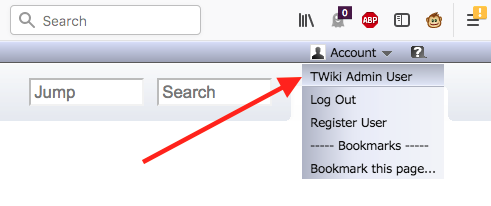
admin for user name, and the configure password you specified when running configure for the first time. After login, you should see "TWiki Admin User" in the Account pulldown menu
--
 Peter Thoeny - 2018-07-19
Ok. Thanks very much for the reply.
- I renamed /var/www/twiki and installed the 6.1.0 into the default location: /var/www/twiki which the install process created fresh. So if there's pieces of the 6.0.2 hanging around, they're not in /var/www/twiki. Where then?
- Did more than one ctrl+shift+R (reload, bypass cache) - no help
- Did not copy twiki/lib/LocalSite.cfg from existing installation, it created new one
- Apache::Htpasswd is only used for Apache auth, ok. I installed it with CPAN, but don't need it.
- go to login page, enter admin for user name, and the configure password you specified Yes, can do that, but Account pull-down still shows only "Log In" and "Register User" - does not show "TWiki Admin User"
Thanks for the help/
--
TWiki Guest - 2018-07-20
- TWiki only resides in one folder,
/var/www/twiki in your case
- Before you login you'll see "Log In" and "Register User", after login you should see "TWiki Admin User" and "Log Out" instead of the former two
- Make sure all files and directories below your TWiki folder are owned by the Apache user, which depends on the OS, apache:apache for CentOS
--
Peter Thoeny - 2018-07-23
I still cannot edit pages, except maybe in the sandbox; I haven't tried there.
I logged in as 'admin' and fat-fingered the password. It said "oops, don't recognize that username" or words to that effect. So authentication is at least partially working.
So I typed the username "admin" and the correct password, and it didn't object. But the drop-down menu at /do/view/Main/WebHome still never changes. It always looks exactly the same. I have logged in several times, and it always looks the same. See attached photo.
I looked at every directory under /var/www/twiki and all files/directories are owned by apache:apache. Then I verified by:
[root@nagios42 twiki]# pwd
/var/www/twiki
ls -Rl|grep -v 'apache apache'|grep -v 'total '|less
Apache is a valid user on this system. There are no users defined like "http" or httpd" or anything like that. /etc/httpd/conf/httpd.conf has the user and group both as apache.
Please help!
--
TWiki Guest - 2018-07-30
Is there anyone who can help me? Please?
--
TWiki Guest - 2018-08-03
 If you answer a question - or someone answered one of your questions - please remember to edit the page and set the status to answered. The status selector is below the edit box.
- Twiki6-broken-accounts-menu:


 jpg
jpg 


 Site map
 Blog web

 Search
 Changes
 RSS Feed
 Notifications
 Statistics
 Preferences
 Register new user
 Support Forum
  Ask a question
 Open questions
  My recent questions
 Get quick help in #twiki IRC channel


 Ideas, requests, problems regarding TWiki? Send feedback. Ask community in the support forum.