SID-02458: Using the number of topics from a search in an IF-statement
| Status: |
 Answered Answered |
TWiki version: |
6.1.0 |
Perl version: |
5.30.0 |
| Category: |
CategoryApplications |
Server OS: |
|
Last update: |
5 years ago |
I'm trying to use the number of topics resulting from a search in a conditional statement like
$IF... or
%CALC{$IF...
Here is an example of the search to get the number of topics:
%SEARCH{ "(StaffForm.Dept = 'Marketing' and StaffForm.DeptLeader != '--'" type="query" nosearch="on" nototal="on" format="$ntopics" }%
How would I create a conditional -- $IF... or %CALC{$IF... -- that would display a NOP if the number of topics resulting from the above search is zero?
Any help would be greatly appreciated. Thanks.
--
 Bob Mellinger - 2020-10-15
Discussion and Answer
Based on
FormattedSearch,
format="$ntopics" returns the number of topics found, and sine it's the
format parameter it's for each hit. You can use the
footer="" to get the number just once. You can specify
format="<nop>" and
separator="<nop>" to oppress any output besides the footer.
As for showing NOP if zero hits you can use a
%If{}% or a
%CALCULATE{$IF()}%. In both cases you need to delay the execution until after the SEARCH. Do that by escaping
% with
$percnt, such as
$percntIf{}$percnt.
Untested:
footer="$percntIf{ \"$ntopics > 0\" then=\"$ntopics\" else=\"NOP\" }$percnt". See docs at
IfStatements.
Alternatively, (also untested) use
%CALCULATE{$SET(num, 0)}% before SEARCH,
format="$percntCALCULATE{$SETM(num, +1)}$percnt" in the SEARCH, and
%CALCULATE{$IF($GET(num) > 0, $GET(num), NOP)}% after SEARCH. See
SpreadSheetPlugin.
--
 Peter Thoeny - 2020-10-16
What you provided worked as you intended, though it did not actually solve my problem. It appears that in trying to solve my problem, I actually asked the question in the wrong way.
Here is the table I've created. It's from a Staff Form where each staff person can be assigned to up to 3 departments (Dept1, Dept2 & Dept3). And there is a Role (leadership assignment) for each department within a given Staff Form.
We've created a table (see below) to display ONLY the staff with leadership assignments.
%TABLE{ sort="on" initsort="2" }%
| *Name* |  *Role* | *Department* |
%SEARCH{ "(StaffForm.Dept1 = 'Marketing' and StaffForm.DeptLeader1 != '--'" type="query" nosearch="on" nototal="on" format="| $formfield(FirstName) $formfield(LastName)]] | $formfield(DeptLeader1) | $formfield(Dept1) |"  }%
%SEARCH{ "(StaffForm.Dept2 = 'Marketing' and StaffForm.DeptLeader2 != '--'" type="query" nosearch="on" nototal="on" format="| $formfield(FirstName) $formfield(LastName)]] | $formfield(DeptLeader2) | $formfield(Dept2) |"  }%
%SEARCH{ "(StaffForm.Dept3 = 'Marketing' and StaffForm.DeptLeader3 != '--'" type="query" nosearch="on" nototal="on" format="| $formfield(FirstName) $formfield(LastName)]] | $formfield(DeptLeader3) | $formfield(Dept3) |  }%
Here's the issue. If the first or second search results in no topics found, a blank line is displayed and subsequent lines are not connected to the original table.
Here is an example when the second search results in no topics found:
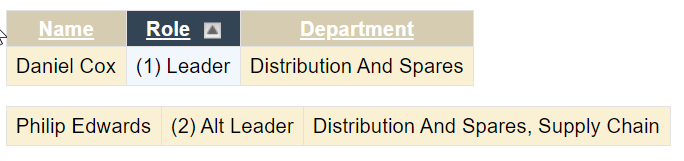
Any idea as to what I'm missing or what can be done to keep the entire table intact?
Thanks.
--
Bob Mellinger - 2020-10-16
Ah, if the SEARCH returns nothing, you get an empty line, which splits the table into two tables. To work around this, add a
<nop> directly after each SEARCH; the whole line will be removed if it contains just a
<nop>.
--
Peter Thoeny - 2020-10-17
Turns out the workaround did not work. Now trying other options like using SET/GET to save/retrieve the number of topics for each search. Then will insert a NOP only if the number of topics is 0. Will post when I have the results of the testing.
--
Bob Mellinger - 2020-10-19
 If you answer a question - or someone answered one of your questions - please remember to edit the page and set the status to answered. The status selector is below the edit box.


 jpg
jpg 


 Site map
 Blog web

 Search
 Changes
 RSS Feed
 Notifications
 Statistics
 Preferences
 Register new user
 Support Forum
  Ask a question
 Open questions
  My recent questions
 Get quick help in #twiki IRC channel





 Ideas, requests, problems regarding TWiki? Send feedback. Ask community in the support forum.