Question
I am very sorry to take your time. I have downloaded and installed the lastest version of TWiki(4.0.1), and I have set the charset of site is UTF-8 because the Chinese and Japanese must be supported on my site, now I haven't got any problems when I creating topic and writing Chinese or Japanese characters in, but I got an error when "Raw View": the several characters in the topic was wrong. I have read some topics about this problem that refer to http://www.pgsqldb.org because they use UTF-8 successfully, so I have compared the testenv from they and me, but the parameters almost same.
I have also downloaded the other versions of TWiki(old beta versions, like to http://www.pqsqldb.org/), I found they have something different result with UTF-8 supporting, some version support, and some version cannot support. However, I can't get the correct result.
What can I do? Thanks a lot.
-- Alfred Lu, GrapeCity Inc.
BTW: The copy of this topic I post at F&Q, please help me remove it, thanks.
because they use UTF-8 successfully, so I have compared the testenv from they and me, but the parameters almost same.
I have also downloaded the other versions of TWiki(old beta versions, like to http://www.pqsqldb.org/), I found they have something different result with UTF-8 supporting, some version support, and some version cannot support. However, I can't get the correct result.
What can I do? Thanks a lot.
-- Alfred Lu, GrapeCity Inc.
BTW: The copy of this topic I post at F&Q, please help me remove it, thanks.
Environment
Answer
 If you answer a question - or someone answered one of your questions - please remember to edit the page and set the status to answered. The status selector is below the edit box.
 configure - you can attach them here.
Also, please give an exact example of what is going wrong. The best way is to attach (1) the .txt file for a page showing this error and (2) a screenshot of the error. This will avoid character set translation problems.
-- RichardDonkin - 17 Feb 2006
I'm sorry.
The configure and snapshot of my problems has been upload.
-- LuJing - 20 Feb 2006
Thanks for providing the details - seems like the problem may be related to your use of SpreadSheetPlugin, which I've added to the list of plugins used. If you can do a similar TOC without this plugin that doesn't have this problem, that would localise the problem to this plugin. Maybe there's another plugin that does tables of contents that has been I18Ned?
InternationalisationGuidelines has details on how to internationalise plugins and other code - most plugins probably haven't been internationalised, so this may be the source of the problem. From a quick look at the source code, it doesn't look like it's had the I18N treatment, so maybe you could comment on SpreadSheetPluginDev to see if someone's interested in doing this work.
-- RichardDonkin - 20 Feb 2006
Thank you very much! But I can't understand why does the problem was related to my use of SpreadSheetPlugin, because of I've disabled all Plugins in Configure page.
I found that I can see the correct characters in Source of VIEW Page, but I cannot see them in Source of RAW VIEW page. What are they doing in the two functions? What's different? Thanks a lot.
-- LuJing - 22 Feb 2006
I have fixed this problem, modify the SVNget:lib/TWiki/UI/View.pm at 295 line, comment out the CGI::textarea line and following lines, replace it with following code:
"<textarea readonly wrap='virtual' rows='" . $p->getPreferencesValue('EDITBOXHEIGHT') . "' cols='" . $p->getPreferencesValue('EDITBOXWIDTH')."' style='".$p->getPreferencesValue('EDITBOXSTYLE')."'>".$text."</textarea>";
Thanks very much!
-- LuJing - 22 Feb 2006
Great that you've fixed this! It seems like the CPAN:CGI module is the cause of the problem, then. What version are you on, by the way (the configure output wasn't expanded so I couldn't see this)?
Also, it would be good if you could generate a patch as discussed in PatchGuidelines.
-- RichardDonkin - 22 Feb 2006
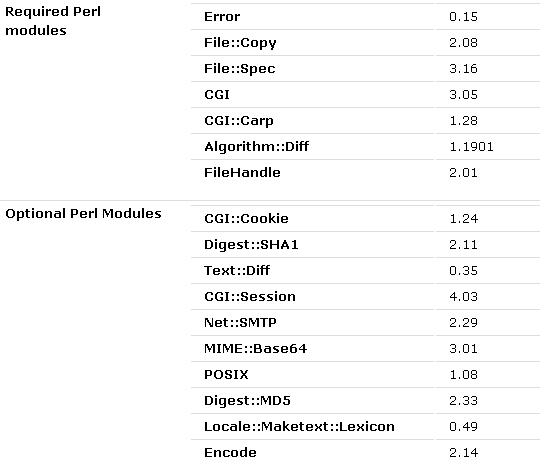
Thanks for attaching the output of configure - however, it doesn't include any parameter information. This may be an configure issue due to its use of JavaScript, in which case it might be easier just to put the CPAN:CGI version number in a comment here.
-- RichardDonkin - 23 Feb 2006
Sorry, I forget to reply after attaching the output of configure because I have a little busy at tomorrow today.
The all CPAN modules are lastest version of its released, I have downloaded and installed it before several days.
I can't sure the problem was caused by CGI module because I has try early versions of TWiki with same CGI module, some TWiki was correct.
And I have never made any patch for any unix-based opensource software, however, I will study and make it, so please give me a little of time to do that. (btw: I have uploaded the snapshot of configure page, that may contains some infomations about this.)
Thanks a lot!
-- LuJing - 23 Feb 2006
- twiki.zip: Configure and snapshots of my problems


| I | Attachment | History | Action | Size | Date | Who | Comment |
|---|---|---|---|---|---|---|---|
 htm htm |
TWikiConfiguration.htm | r1 | manage | 161.4 K | 2006-02-23 - 01:08 | UnknownUser | |
 zip zip |
twiki.zip | r1 | manage | 453.3 K | 2006-02-20 - 01:43 | UnknownUser | Configure and snapshots of my problems |
 jpg jpg |
versions.JPG | r1 | manage | 31.5 K | 2006-02-23 - 08:25 | UnknownUser |


 Site map
 Blog web

 Search
 Changes
 RSS Feed
 Notifications
 Statistics
 Preferences
 Register new user
 Support Forum
  Ask a question
 Open questions
  My recent questions
 Get quick help in #twiki IRC channel





 Ideas, requests, problems regarding TWiki? Send feedback. Ask community in the support forum.
Copyright © 1999-2026 by the contributing authors. All material on this collaboration platform is the property of the contributing authors.