Question
Hello, This is a minor issue, but I'm conducting one-on-one Wiki training sessions with our whole company and a couple of users have tried this during the training class, and it's very confusing for them when it happens (and I don't know how to get around it)- maybe someone knows a quick way to fix it: When I use the Kupu WYSIWYG editor, and insert a link to a Wiki page, in the Insert Wikiword Link dialog box, the current web is selected by default. And the topic dropdown is populated with all the topics for the current web. However, if you pull down the Web dropdown list, you actually see the current web listed twice - once at the top, and once wherever it's alphabetized in the list. If you select that second instance of the current web in the list, it makes the Topics dropdown box empty. And you can't repopulate it by selecting any other web unless you completely exit the editor and open it again. Here's what it looks like: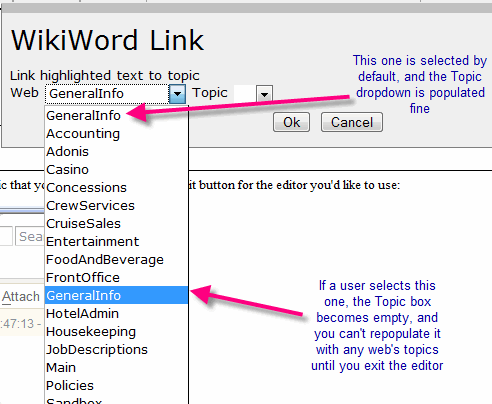
Environment
Answer
 If you answer a question - or someone answered one of your questions - please remember to edit the page and set the status to answered. The status selector is below the edit box.
  , but don't expect a fix in the near future - I am not supporting Kupu any more (WYSIWYG focus has shifted to TinyMCEPlugin in 4.2)
-- CrawfordCurrie - 03 Nov 2007
Thanks - I will check out TinyMCEPlugin
-- KathyDeLaCruz - 09 Nov 2007
, but don't expect a fix in the near future - I am not supporting Kupu any more (WYSIWYG focus has shifted to TinyMCEPlugin in 4.2)
-- CrawfordCurrie - 03 Nov 2007
Thanks - I will check out TinyMCEPlugin
-- KathyDeLaCruz - 09 Nov 2007


| I | Attachment | History | Action | Size | Date | Who | Comment |
|---|---|---|---|---|---|---|---|
 gif gif |
WikiWordLink.gif | r1 | manage | 17.9 K | 2007-10-27 - 17:00 | UnknownUser |

Topic revision: r3 - 2007-11-09 - KathyDeLaCruz


 Site map
 Blog web

 Search
 Changes
 RSS Feed
 Notifications
 Statistics
 Preferences
 Register new user
 Support Forum
  Ask a question
 Open questions
  My recent questions
 Get quick help in #twiki IRC channel





 Ideas, requests, problems regarding TWiki? Send feedback. Ask community in the support forum.
Copyright © 1999-2026 by the contributing authors. All material on this collaboration platform is the property of the contributing authors.