• This web contains the official documentation of the TWiki-6.0 Release, code named JerusalemRelease.
• It is a read-only web for reference. Please update documentation at TWiki.UserReports.
• It is a read-only web for reference. Please update documentation at TWiki.UserReports.
TWiki User Reports
This page is for TWiki application developers. Include the sections on this page to show user reports with profile pictures. Create appealing TWiki applications in a short time.On this page:
Section: user_list
Show a simple list of registered users. The output is a comma-space delimited sorted list of WikiWords of users (without web prefix), which can be used as input for other reports on this page.- Section "user_list": Show a list of users as comma-space delimited list of WikiWords.
- Parameter
search: Apply filter by searching all form fields, but not the main topic text. Optional; all users are returned if missing. - Parameter
limit: Limits the number of users returned. Optional; all users are returned if missing. - Parameter
sort: Sort the result by the topic name, topic creation date, last modified date, last editor, or named field of TWikiForms. For details seesortparameter of SEARCH. - Parameter
reverse: Reverse the direction of the search result
- Parameter
"UserReports_users" variable to the number of users found. To retrieve, write %GET{UserReports_users}%.
Usage example:
%USERREPORT{ action="user_list" search="jane" limit="5" }%
Sample output: AJAlfieriCrispin, AaronHuebner, AbdulMujib, AbdulSalih, AbhayPatil
Section: profile_picture
Show the profile picture image of a user. A default image is returned in case the image is not defined in the Image form field of the user. The output is an<img /> tag that can be embedded in other tags such as links.
- Section "profile_picture": Show the profile picture image of a user.
- Parameter
user: WikiWord of user, required. - Parameter
width: Width of image, optional. - Parameter
height: Height of image, optional. The aspect ratio is preserved unless width and height are specified. If width and height are missing, a height of 100 pixels is used. - Parameter
title: Title parameter of img tag, optional.
- Parameter
%USERREPORT{ action="profile_picture" user="TWikiGuest" height="40" title="TWikiGuest" }%
%USERREPORT{ action="profile_picture" user="AmandaBoris" height="40" title="AmandaBoris" }%
Sample output: 



Section: user_sig
Show a user signature with profile picture, optionally followed by a date or other text. A default image is shown in case the image is not defined in the Image form field of the user.- Section "user_sig": Show a user signature with profile picture.
- Parameter
user: WikiWord of user, required. Optionally followed by a date or other text. - Parameter
width: Width of image, optional. - Parameter
height: Height of image, optional. The aspect ratio is preserved unless width and height are specified. If width and height are missing, a height of 18 pixels is used.
- Parameter
%USERSIG{TWikiGuest}% can be used.
Usage example:
-- %USERREPORT{ action="user_sig" user="TWikiGuest - 2026-08-02" }%

-- %USERSIG{TWikiGuest}%

-- %USERSIG{TWikiGuest - 2026-08-02}%
Sample output: --
TWiki Guest - 2026-08-02
-- TWiki Guest
-- TWiki Guest - 2026-08-02
Section: bubble_sig
Show a faded comment bubble and user signature with profile picture, optionally followed by a date or other text. A default image is shown in case the image is not defined in the Image form field of the user. This is used for CommentPlugin signatures.- Section "bubble_sig": Show a user signature with profile picture.
- Parameter
user: WikiWord of user, required. Optionally followed by a date or other text.
- Parameter
%BUBBLESIG{TWikiGuest}% can be used.
Usage example:
Test comment using USERREPORT

-- %USERREPORT{ action="bubble_sig" user="TWikiGuest - 2026-08-02" }%

Test comment using BUBBLESIG

-- %BUBBLESIG{TWikiGuest - 2026-08-02}%
Sample output: Test comment using USERREPORT --
TWiki Guest - 2026-08-02
Test comment using BUBBLESIG
-- TWiki Guest - 2026-08-02
Section: slim_box
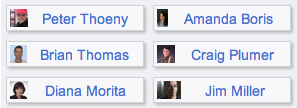
- Section "slim_box_css": Defines the style sheets of the slim boxes. Optionally include it once per page; it is done for you by the "slim_box_start" section if needed.
- Section "slim_box_start": Defines the start of a set of slim boxes.
- Parameter
style: Optional, overrides the css of the container div of slim boxes. Default:padding:0 5px 0 5px; background-color:#f0f0f4;.
- Parameter
- Section "slim_box": Show a single slim box.
- Parameter
user: Specify the WikiWord of a single user. - Parameter
style: Optional, overrides the css of the slim box. Default:float: left; width: 130px; border: solid 1px #d0d0d8; background-color: #f8f8fb;.
- Parameter
- Section "slim_box_list": Show a set of slim boxes.
- Parameter
users: Specify a list of WikiWords of users. The list may be provided by including the "user_list" section. - Parameter
style: Optional, same as section "slim_box".
- Parameter
- Section "slim_box_end": Defines the end of a set of slim boxes.
%USERREPORT{ action="slim_box_start" }%
  %USERREPORT{ action="slim_box" user="TWikiGuest" }%
  %USERREPORT{ action="slim_box" user="JaneSmith" }%
%USERREPORT{ action="slim_box_end" }%
%USERREPORT{ action="slim_box_start" style="background-color: #f0f0e8;" }%
  %USERREPORT{ action="slim_box_list" users="UserOne, UserTwo, UserThree" }%
%USERREPORT{ action="slim_box_end" }%
Sample output: Section: small_box

- Section "small_box_css": Defines the style sheets of the small boxes. Optionally include it once per page; it is done for you by the "small_box_start" section if needed.
- Section "small_box_start": Defines the start of a set of small boxes.
- Parameter
style: Optional, overrides the css of the container div of small boxes. Default:padding:0 5px 0 5px; background-color:#f0f0f4;.
- Parameter
- Section "small_box": Show a single small box.
- Parameter
user: Specify the WikiWord of a single user. - Parameter
style: Optional, overrides the css of the small box. Default:float: left; width: 130px; border: solid 1px #d0d0d8; background-color: #f8f8fb;.
- Parameter
- Section "small_box_list": Show a set of small boxes.
- Parameter
users: Specify a list of WikiWords of users. The list may be provided by including the "user_list" section. - Parameter
style: Optional, same as section "small_box".
- Parameter
- Section "small_box_end": Defines the end of a set of small boxes.
%USERREPORT{ action="small_box_start" }%
  %USERREPORT{ action="small_box" user="TWikiGuest" }%
  %USERREPORT{ action="small_box" user="JaneSmith" }%
%USERREPORT{ action="small_box_end" }%
%USERREPORT{ action="small_box_start" style="background-color: #f0f0e8;" }%
  %USERREPORT{ action="small_box_list" users="UserOne, UserTwo, UserThree" }%
%USERREPORT{ action="small_box_end" }%
Sample output: Section: business_card
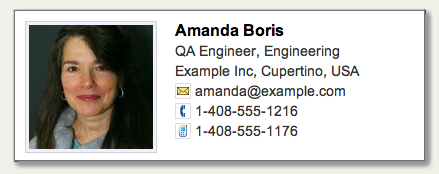
- Section "business_card_css": Defines the style sheets of the business cards. Optionally include it once per page; it is done for you by the "business_card_start" section if needed.
- Section "business_card_start": Defines the start of a set of business cards.
- Parameter
style: Optional, overrides the css of the container div of business cards. Default:padding:10px 15px 1px 15px; background-color:#f0f0f4;.
- Parameter
- Section "business_card": Show a single business card.
- Parameter
user: Specify the WikiWord of a single user. - Parameter
style: Optional, overrides the css of the business card. Default:float: left; width: 410px; border: solid 1px #d0d0d8; background-color: #fff;.
- Parameter
- Section "business_card_list": Show a set of business cards.
- Parameter
users: Specify a list of WikiWords of users. The list may be provided by including the "user_list" section. - Parameter
style: Optional, same as section "business_card".
- Parameter
- Section "business_card_end": Defines the end of a set of business cards.
%USERREPORT{ action="business_card_start" }%
  %USERREPORT{ action="business_card" user="TWikiGuest" }%
  %USERREPORT{ action="business_card" user="JaneSmith" }%
%USERREPORT{ action="business_card_end" }%
%USERREPORT{ action="business_card_start" style="background-color: #f0f0e8;" }%
  %USERREPORT{ action="business_card_list" users="UserOne, UserTwo, UserThree" }%
%USERREPORT{ action="business_card_end" }%
Sample output:

Section: select_one_user
Show a selector to pick a user, for use in HTML forms.- Section "select_one_user": Selector to pick a user.
- Parameter
name: Name of form field, required. - Parameter
selected: WikiWord name of a user, optional. - Parameter
users: Specify a list of WikiWords of users, optional. The list may be provided by including the "user_list" section. All registered users are shown if the parameter is missing. - Parameter
firstoption: Label of first option, optional. Default:Select... - Parameter
firstvalue: Value of first option, optional. Default: empty value
- Parameter
<form>
%USERREPORT{ action="select_one_user" name="Owner" selected="TWikiGuest" }%
</form>
Sample output: Section: select_users
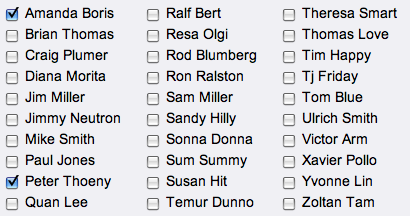
- Section "select_users": Set of checkboxes to select users.
- Parameter
name: Name of form field, required. - Parameter
selected: List of WikiWord names indicating the selected users, optional. - Parameter
users: Specify a list of WikiWords of users, optional. The list may be provided by including the "user_list" section. All registered users are shown if the parameter is missing. - Parameter
colums: Define number of columns, optional. Default:5 - Parameter
style: Set the css of the container div, optional. Default:margin: 0; border: 1px solid transparent;
- Parameter
<form>
%USERREPORT{ action="select_users" name="Members" selected="TWikiGuest, AmandaBoris" }%
</form>
Sample output: Note to Maintainer:
- This topic has user report sections intended for TWiki application developers.
- This topic uses more user friendly ParameterizedVariables
%USERREPORT{ action="..." ... }%instead of the more verbose parameterized include%INCLUDE{ "%SYSTEMWEB%.UserReports" section="..." ... }%. - If you add a section to this topic, or add a parameter to a section, make sure to keep the parameterized variables settings in TWikiPreferences in sync.
 - 2013-02-06
Topic revision: r3 - 2014-10-15 - PeterThoeny


 Site map
 Blog web
 User registration
 Users
Users Groups
 Index
Index Search
 Changes
 Notifications
 RSS Feed
 Statistics
 Preferences


 Copyright © 1999-2026 by the contributing authors. All material on this collaboration platform is the property of the contributing authors.
 Ideas, requests, problems regarding TWiki? Send feedback
Note: Please contribute updates to this topic on TWiki.org at TWiki:TWiki.UserReports.