TWiki Application Report - Holiday Planner
2008-08-17 - 12:57:51 by StefanAlthoefer in Usability
My group in our company had the same problem as all groups: How to coordinate annual holiday
for the group members?
Recently we used the wall-calendar in my office to remember each members holiday plan.
After plans had changed, it looked odd. And it worked only inside my office.
As we already use TWiki for project management and knowledge base, I looked for a Wiki based solution.
I browsed through
the rich TWiki plugin area, but nothing fulfilled my wishes. Especially no plugin was
able to show an annual overview.
I created a solution by combining EasyTimelinePlugin and FilterPlugin.
A table is maintained, where group members can define their holiday plans. Keywords in the
last column define whether it is acknowledged holiday, a plan for holiday or some other
kind of absence of a person.
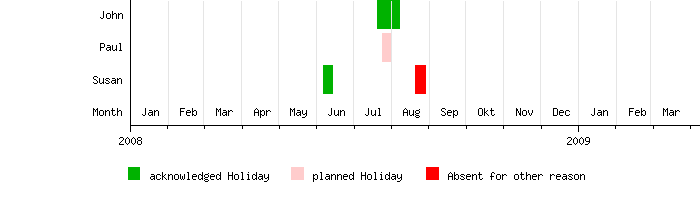 You can now easily see, that Paul will have problems in getting his holiday acknowledged,
as John jumped ahead.
You can now easily see, that Paul will have problems in getting his holiday acknowledged,
as John jumped ahead.
Implementation Details
Displaying Data
Below you find the EasyTimeline code to render the calendar. Syntax details are beyond the scope of this application note. However, you should find it easy to do gently modifications (e.g. translate labels, change size, change/add keywords or add team members).
<easytimeline>
ImageSize = width:700 height:200
PlotArea  = width:570 height:125 left:130 bottom:75
AlignBars = justify
DateFormat = dd/mm/yyyy

Period     = from:01/01/2008 till:10/04/2009
TimeAxis   = orientation:horizontal
ScaleMajor = unit:year    increment:1 start:01/01/2008
ScaleMinor = unit:month   increment:1 start:01/01/2008

Colors =
  id:HOLIDAY       value:green  legend:acknowledged_Holiday
  id:HOLIDAY?     value:pink   legend:planned_Holiday
  id:ABSENT        value:red    legend:Absent_for_other_reason
  id:RULER            value:gray(0.9)

LineData =
  layer:front
  at:01/02/2008 color:RULER width:0.1
  at:01/03/2008 color:RULER width:0.1
  at:01/04/2008 color:RULER width:0.1
  at:01/05/2008 color:RULER width:0.1
  at:01/06/2008 color:RULER width:0.1
  at:01/07/2008 color:RULER width:0.1
  at:01/08/2008 color:RULER width:0.1
  at:01/09/2008 color:RULER width:0.1
  at:01/10/2008 color:RULER width:0.1
  at:01/11/2008 color:RULER width:0.1
  at:01/12/2008 color:RULER width:0.1
  at:01/01/2009 color:RULER width:0.1
  at:01/02/2009 color:RULER width:0.1
  at:01/03/2009 color:RULER width:0.1

Legend = orientation:horizontal position:bottom

PlotData=
  align:left textcolor:black fontsize:8 width:28 shift:(3,-4)  anchor:till

  bar: John
%EXTRACT{topic="%TOPIC%" expand="off"
  pattern="\|\s*(John)\s*\|\s*([0-9]+)\.([0-9]+)\.([0-9]+)\s*\|\s*([0-9]+)\.([0-9]+)\.([0-9]+)\s*\|\s*(.*?)\s*\|"
  format="   from:$2/$3/$4 till:$5/$6/$7 color:$8 $n"
}%

  bar: Paul
%EXTRACT{topic="%TOPIC%" expand="off"
  pattern="\|\s*(Paul)\s*\|\s*([0-9]+)\.([0-9]+)\.([0-9]+)\s*\|\s*([0-9]+)\.([0-9]+)\.([0-9]+)\s*\|\s*(.*?)\s*\|"
  format="   from:$2/$3/$4 till:$5/$6/$7 color:$8 $n"
}%

  bar:Susan
%EXTRACT{topic="%TOPIC%" expand="off"
  pattern="\|\s*(Susan)\s*\|\s*([0-9]+)\.([0-9]+)\.([0-9]+)\s*\|\s*([0-9]+)\.([0-9]+)\.([0-9]+)\s*\|\s*(.*?)\s*\|"
  format="   from:$2/$3/$4 till:$5/$6/$7 color:$8 $n"
}%

  bar:Month color:white
  at:15/01/2008 align:center text:Jan
  at:15/02/2008 align:center text:Feb
  at:15/03/2008 align:center text:Mar
  at:15/04/2008 align:center text:Apr
  at:15/05/2008 align:center text:May
  at:15/06/2008 align:center text:Jun
  at:15/07/2008 align:center text:Jul
  at:15/08/2008 align:center text:Aug
  at:15/09/2008 align:center text:Sep
  at:15/10/2008 align:center text:Okt
  at:15/11/2008 align:center text:Nov
  at:15/12/2008 align:center text:Dec
  at:15/01/2009 align:center text:Jan
  at:15/02/2009 align:center text:Feb
  at:15/03/2009 align:center text:Mar
</easytimeline>
Notes: - The EaysTimeline code will work only for a particular year. If you step to the next year, you'll have to edit.
- All group members have to be included in the EasyTimeline code. Just adding a new member into the holiday table will not be enough.
- Normally you would want to use the group members Wiki name in the table (e.g.
Main.JohnDoe)
Extracting Data
While the EasyTimeline rendering is fine in itself, the holiday planer application would be a pain if you had to edit the EasyTimeline code itself for changing the events. It becomes usable by extracting the event dates from a table (which is easily modified). This is done with the help of FilterPlugin. Refer to this slice of the EasyTimeline code:
  bar:Susan
%EXTRACT{topic="%TOPIC%" expand="off"
  pattern="\|\s*(Susan)\s*\|\s*([0-9]+)\.([0-9]+)\.([0-9]+)\s*\|\s*([0-9]+)\.([0-9]+)\.([0-9]+)\s*\|\s*(.*?)\s*\|"
  format="   from:$2/$3/$4 till:$5/$6/$7 color:$8 text:$2-$5$n"
}%
With %EXTRACT% the table(s) inside the current topic are searched for lines with Susan in the
first column. The regular expression (refer to pattern) then matches the dates in column 2 and 3 and the keyword in
the last column. Finally the matched data is rearranged and inserted into the EaysTimeline code
(refer to format).
EasyTimelinePlugin will see this code:
  bar:Susan
    from:21/08/2008 till:29/08/2008 color:ABSENT text:21-29
    from:07/06/2008 till:14/06/2008 color:HOLIDAY text:07-14
Notes: - The table uses German date syntax. You can change this by modifying the regular expression pattern.
Conclusion
TWiki is fine in itself. It becomes outstanding when you can do gentle application programming by combining plugin features as above. Which other Wiki can do that?Comments
PeterThoeny - 17 Aug 2008: Thank you Stefan for sharing this with the TWiki community!CarloSchulz - 18 Aug 2008: Stefan, very cool stuff. Especially the detailed doccu. Will give it a try on my own TWiki site...
SeanCMorgan - 19 Aug 2008: I very much like this approach. I tried to introduce this function with HolidaylistPlugin, but it died because it was too hard for users to maintain their data. Thanks.


| I | Attachment | History | Action | Size | Date | Who | Comment |
|---|---|---|---|---|---|---|---|
 png png |
holiday_plan.png | r1 | manage | 1.8 K | 2008-08-17 - 12:31 | UnknownUser | Preview in case plugin is not available |

Topic revision: r4 - 2008-09-07 - ArthurClemens


 Site map
 Blog web

 Write New Post
 Blog Feed (ATOM)
 Changes
 Search
 Notifications
 Index
Index Statistics
 Preferences


 Account

 |
 |
|
|
|




 Ideas, requests, problems regarding TWiki? Send feedback. Ask community in the support forum.
Copyright © 1999-2026 by the contributing authors. All material on this collaboration platform is the property of the contributing authors.