Tutorial: Wikis in the Workplace - for Wiki Symposium, Montreal, Canada, 2007-10-22
This presentation is outdated, see the latest presentation Social Media and Structured Wikis at Work - Enterprise Collaboration for Millennials.
 TWikiPresentation2007x10x22.pdf - PDF version of this presentation.

Slide 1: Tutorial: Wikis in the Workplace
"Wikis have changed the way we run meetings, plan releases, document our product and generally communicate with each other" - Eric Baldeschwieler, Director of Software Development of Yahoo!- Wiki, a writable web: Communities can share content and organize it in a way most meaningful and useful to them
- If extended with the right set of functionality, a wiki can be applied to the workplace to schedule, manage, document, and support daily activities
- A structured wiki combines the benefits of a wiki and a database
- This tutorial explains publishing wikis and structured wiki, covers its deployment, and shows some sample applications using TWiki, an open source enterprise wiki platform
-- Peter Thoeny - peter.thoeny.public AT twiki.net - TWIKI.NET

Slide 2: About Peter
- Peter Thoeny - peter.thoeny.public@twikiPLEASENOSPAM.net
- Founder of TWiki, the leading wiki for corporate collaboration, managing the open-sourced project for the last 9 years
- Co-founder of TWIKI.NET, a company offering services and support for TWiki
- Co-author of Wikis for Dummies book
- Invented the concept of Structured Wikis - where free form wiki content can be structured with tailored wiki applications
- Recognized thought-leader in Wikis and social software, featured in numerous articles and technology conferences including LinuxWorld, Business Week, Wall Street Journal and more
- Software developer with over 20 years experience, specializing in software architecture, user interface design and web technology
- Graduate of the Swiss Federal Institute of Technology in Zurich
- Lived in Japan for 8 years, and in the Silicon Valley for the past 9 years
Slide 3: About You!
- What departments?
- What collaboration challenges?
- What collaboration solutions are you using?
- What problems you hope a wiki can solve?
Slide 4: Agenda
- What is a wiki?
- Wikis and blogs
- Enterprise collaboration landscape
- TWiki & wiki basics
- Why deploy something new? (collaboration challenges at the workplace)
- Structured wikis
- Overcoming barriers to adoption
- Some case studies
- Lifecycle of a wiki at the workplace
- Advanced TWiki features
- Sample wiki applications
Slide 5: What is a Wiki?
- WikiWikiWeb = Writable Web
- As quick to contribute as e-mail
- As easy to use as a website
- Ward Cunningham implemented the original WikiWikiWeb in 1995 to collaborate on software patterns
- Inspired by HyperCard; some call it a Blog for groups
- The original WikiWikiWeb has these features:
Slide 6: Wikis in Plain English
)
Slide 7: Blogs vs. Wikis
- Blog: (weblog)
- Key: Easy to publish sequential posts
- Media to express individual voice
- "Post media" (like e-mail), usually with feedback and trackback
- Typically hosted service (e.g. Six Apart's TypePad)
- Wiki: (WikiWikiWeb)
- Key: Easy to create and refactor content owned by group
- Media to express group voice, deemphasizing identity of individuals
- "Refactor media", content may change at any time
- Usually open source software, installed on own server
- Some Blogs have wiki-like features, some wikis have blog capabilities
Slide 8: Trend of Blogs and Wikis

Slide 9: Wikipedia - The 800 Pound Gorilla
- Wikipedia: Wiki + Encyclopedia

- A free encyclopedia that is being written collaboratively by its readers
- Project started in January 2001
- The most active public Wiki: 2,000,000 articles and 1,000,000 registered users in the English language Wikipedia; many more in other languages
- Anyone in the world can edit any page.
- Doesn't that lead to chaos?
- Content can be freely distributed and reproduced under the terms of the GNU Free Documentation License (GFDL)
Slide 10: Trend of Term "Enterprise Wiki"

Slide 11: Enterprise Collaboration Landscape 80s
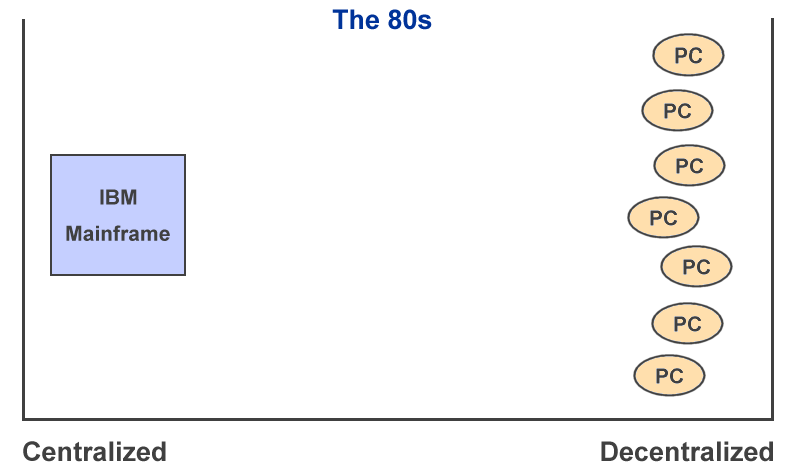
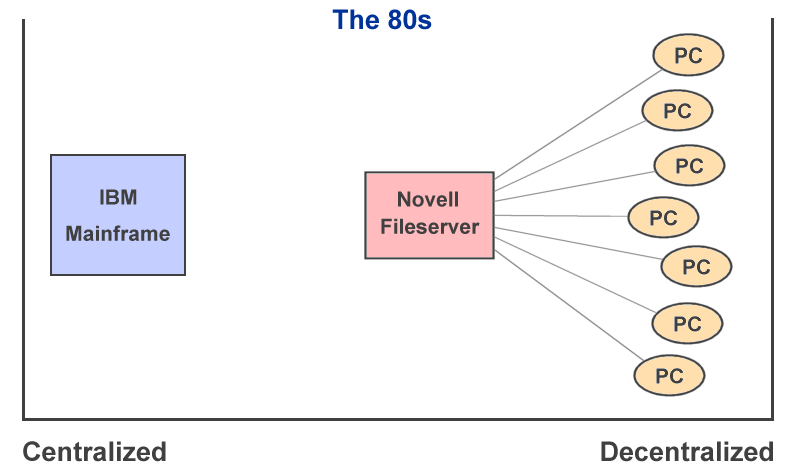
Slide 12: Enterprise Collaboration Landscape 80s - Networked
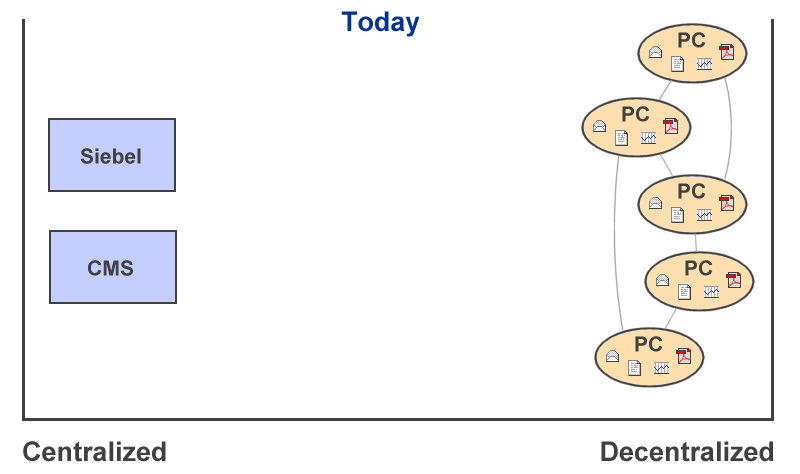
Slide 13: Enterprise Collaboration Landscape Today
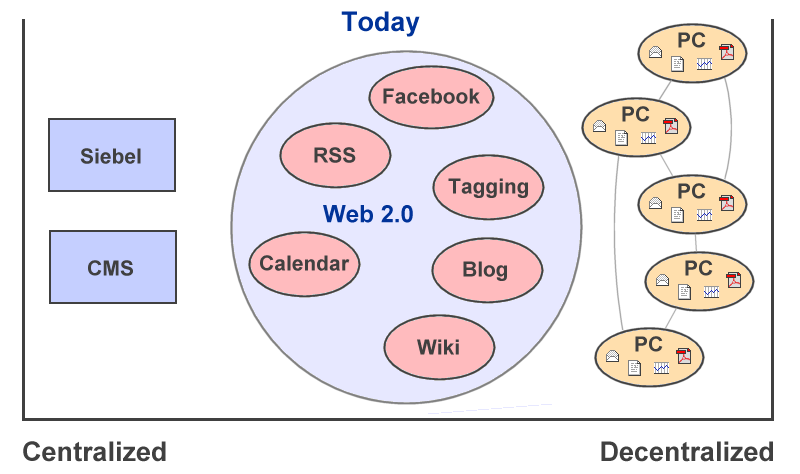
Slide 14: Enterprise Collaboration Landscape Today - Web 2.0
Slide 15: Enterprise Collaboration Landscape Today - Enterprise Wiki

Slide 16: Wiki Applications - Whet Your Appetite

- Event tracker of Swiss Peninsula Club
- Outage tracker of an IT organization
- Voice enabled project tracker of a construction company
Slide 17: How to chose a Wiki for the Workplace
- Type of deployment:
- Hosted service:
- Quick deployment
- Data sits somewhere else (backup, security, migration)
- Wiki appliance:
- Quick deployment
- Control over data
- Wiki engine:
- Longer to setup
- Control over engine and data
- Hosted service:
- Compare wikis at WikiMatrix.org
Slide 18: Requirements for a Wiki at the Workplace
- Version control -- audit trail
- Access control -- security
- File attachments -- document management
- Ease of use -- productivity
- Ease of administration -- productivity
- Feature set -- create web applications
- API -- integration with existing enterprise applications
- Scalability -- room to grow
- Support -- get help when needed
Slide 19: What is TWiki?
-
 TWiki is an open source enterprise wiki platform
- Specifically built for the workplace
- Vibrant open source community
- 400 TWiki Extensions: Add-Ons, Plugins, Skins
- Open source software (GPL), hosted at http://TWiki.org/
- 10,000 downloads per month, estimate 60,000+ installations
-
 TWiki.org now backed by TWIKI.NET, a company offering services and support for Certified TWiki distribution and open source TWiki.
Slide 20: What is TWiki used for?
- Shared notebook for teams: Projects, repository, scheduling, meetings
- Departmental collaboration tool: Processes, project reviews, QA tracking
- Intranet publishing tool: IT, HR, ISO standards
- CMS with focus on free-form collaboration: Requirements capture
- Knowledge base: Problem/solution pairs with attached patches
- TWiki started its life as a KB for support
- TWiki started its life as a KB for support
- Platform to create wiki applications, such as news portals, inventory systems, issues tracking systems
Slide 21: Who is using TWiki?
- Many corporations, such as 3Com, AMD, Alcatel, AT&T, Boeing, ... Xerox
- BT, Disney Corp, Motorola, SAP, TI, Wind River and others have submitted success stories
- Major TWiki deployments: Google, Motorola, Nokia, Wind River, Yahoo
- BT, Disney Corp, Motorola, SAP, TI, Wind River and others have submitted success stories
- Academia, such as Vanderbilt University School of Medicine
- Also Internet communities, such as Java.net's Javapedia, Biowiki of UC Berkeley, IntelliJ community wiki, Indymedia
- Many installations, 10,000+ downloads/month
- Browse the TWiki Installation directory to see who is using TWiki for what purpose
Slide 22: Wiki Basics: Getting Started
- Homepage: http://twiki.org/cgi-bin/view/Main/WebHome
- Register: Create an account
- Webs: A TWiki site is divided into webs, each one represents an area for collaboration: Blog, Codev, Main, Plugins, Sandbox, Support, TWiki, TWiki01, TWiki02, TWiki03, TWiki04, TWiki04x01, TWiki04x02, TWiki04x03, TWiki05x00, TWiki05x01, TWiki06x00, TWiki06x01, WikiWed
- Topics: Each web is made up of hyperlinked topics (web pages)
- Browse: This is a site like other sites. Read and follow interesting links.
- Edit: Every page has an edit link, feel free to edit any page! (sample topic)
- Relax: Everything is under version control
Slide 23: Wiki Basics: Navigation & Search
- Webs: Familiarize yourself with the webs of your TWiki site, start in Main web home
- Breadcrumb: Tells you where you are, and allows you to go back in the hierarchy:
TWiki > Sandbox web > WebNotify - Sidebar: Every web has a sidebar with important links
- Search: Every web has a WebSearch topic to search the current web
Slide 24: Wiki Basics: Text Formatting Shorthand
-
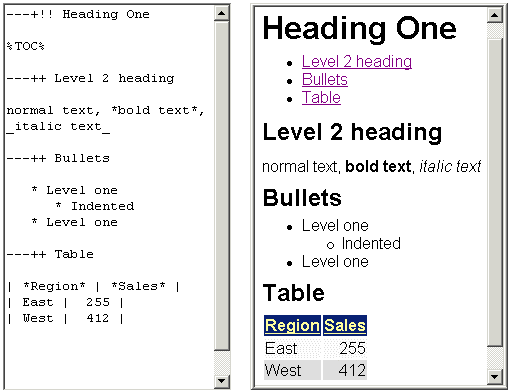 Wikis are text oriented
- Text formatting shorthand:
- Easy to learn
- More compact than HTML
- Example TWiki shorthand
- Some wikis offer true WYSIWYG editing, such as MoinMoin and TWiki
Slide 25: Wiki Basics: WikiWords for Linking
- Easy to create hyperlinks within a Wiki, just use a WikiWord
- WikiWords are capitalized words, run together, e.g., WebCollaboration, IntranetTools
- To create a link to an existing page, edit a page and type:
-
For more info, see IntranetTools
-
- If the 'IntranetTools' page exists, it is turned automatically into a link:
- For more info, see IntranetTools
- See WikiWordDemo example
Slide 26: Wiki Basics: Creating New Pages
- First, edit the page where you want to spin off a new page, and type in some text that includes a WikiWord for the new page:
-
For more info, see WebServices
-
- After you save the page you will get:
- For more info, see WebServices?.
- The '?' is a link, indicating that this page does not exist, yet
- Now, to create the WebServices page, click on this link, type in some text and save it
- If you return to originating page and hit refresh, the link covers now the whole WikiWord:
- For more info, see WebServices
- See WikiWordDemo example
Slide 27: Wiki Basics: Attaching Files
- Anything: Attach any file (pdf, doc, xls, ppt, ...) to any topic (sample topic)
- Easy: Like e-mail attachments
- Organized: In wiki, not e-mail inbox
- Relax: Everything is under version control
- Visualize: Attach images (check-mark link box!)
Slide 28: Wiki Basics: Stay up to Date
- Changes: Visit WebChanges in any web to see recent changes in the web
- Get notified: Visit WebNotify in any web to get notified by e-mail of changes in the web
- Subscribe: Visit WebRss in any web to get an RSS feed of changes in the web
Slide 29: Wiki Basics: Quick Navigation with Jump Box
- Enter a topic name into the jump box to quickly jump to the topic, for example:
-
WebNotifyto jump to WebNotify in the current web -
Main.WebNotifyto jump to WebNotify in the Main web -
Main.(with dot) to jump to the home of the Main web -
BrandNewTopicto jump to a non existing topic in the current web, which is useful to create orphaned topics
-
- Enter part of a topic name to get a list of similar topics, for example:
-
faqto get TWiki.TWikiFAQ, TWiki.TWikiFaqTemplate, TWiki.TextFormattingFAQ if in the TWiki web -
Sandbox.testto get list of topics in another web
-
Slide 30: TWiki Basics: Version Control
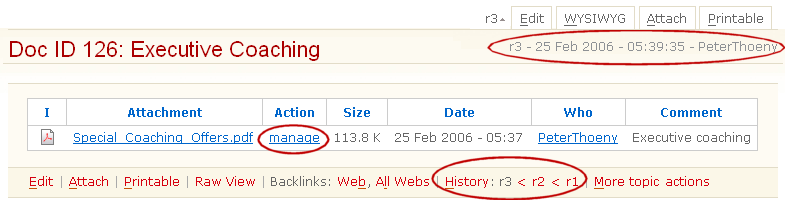
- Pages are under revision control:
- See previous page revisions
- See differences between revisions
- See who changed what and when
- Roll back unwanted changes
- "Soft Security" - anyone can change anything, but changes are logged
- Complete audit trail, even for meta data, such as access control
Slide 31: TWiki Basics: Access Control
- Default - use Soft Security
- Avoid roadblocks to knowledge sharing
- Special applications - use access control
- Avoid write access restrictions - "If you can see you can play"
- Fine grained access control:
- Define groups in Main.TWikiGroups
- Set read/write/rename access restrictions to site, webs and pages based on these groups
- Complete audit trail of access control settings
Slide 32: TWiki Basics: Skins
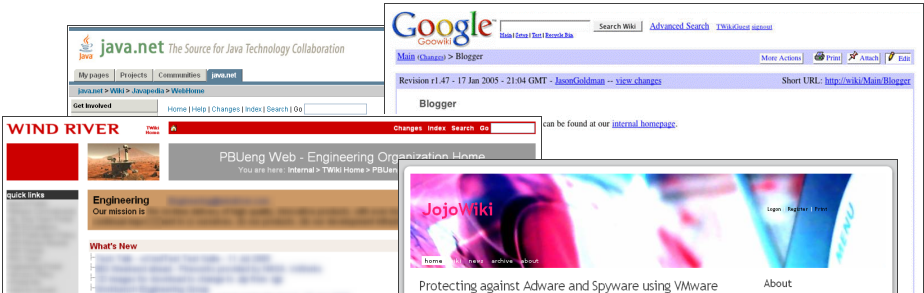
- TWiki Skins change the look of a TWiki topic, for example the style of the text and the layout of the header and footer
- Separation of program logic, look and content
- Many SkinPackages available for download at TWiki.org
- The PatternSkin and NatSkin are highly customizable
- Corporations typically create their own skin or customize the PatterSkin to match the wiki to corporate branding standard
Slide 33: Why Deploy a Wiki?
- Wikis are robust
- Wikis are fun and easy to use
- Wikis solve some of the limitations of existing collaboration software:
- Maintenance of static intranets
- Taming internal e-mail flood
- Implementation of business processes
Slide 34: Challenges of Static Intranets
-
 Some content is outdated
- Incomplete content
- When was the page last updated?
- Difficult to find content
- Inconsistency across departments
- Special tools, knowledge and permission required to maintain
- Content is static, it has a "webmaster syndrome":
If an employee discovers a page with incorrect or insufficient information, the employee will often ignore it because it takes too much time to find out who the webmaster is and to write an e-mail requesting an update
Slide 35: Wikis and Static Intranets
-
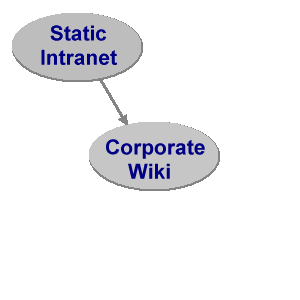 Move some/all Intranet content into a wiki
 - No difference for readers to browse and search content
- Employees are empowered to fix content on the spot
- Ease of maintenance
- No need to install client side software
- Consistent look & feel
- Paradigm shift
- from: webmasters maintain content
- to: domain experts and casual users maintain content
Slide 36: Challenges of E-mail
-
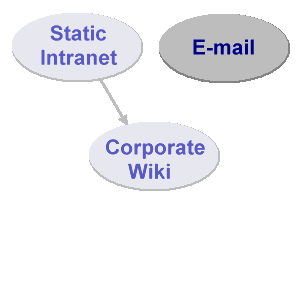 E-mail and mailing lists are great, but:
 - Post and reply vs. post and refine/refactor
- Great for discussion, but ... hard to find "final consensus" on a thread
- E-mail is not hyper-linked and is not structured, content can't be grouped easily into related topics
- E-mail and attachments are not version controlled and it is difficult to determine the history of a document
- Not all interested people / too many people in the loop
Slide 37: Wikis and E-mail
-
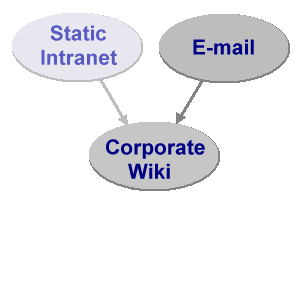 Move some e-mail traffic into a wiki
 - Ease of reference (cross-linking)
- Flexible notification (favorites only, daily digest, RSS/ATOM feed)
- Pockets of knowledge made available to interested parties
- Audit trail / domain experts
- Paradigm shift
- from: post & reply
- to: post & refine & cross-link
- Send e-mail with link to content instead of content itself
Slide 38: Challenges of Business Processes
-
 Business processes are implemented in large scale by IT department (Sarbanes-Oxley compliance etc.)
- Teams follow formal/informal workflow to accomplish tasks, which is often a paper-based process (rolling out laptops to employees etc.)
- No resources allocated to implement applications to automate these processes; IT department has no bandwidth to implement lightweight applications for a variety of teams
Slide 39: Wikis and Business Processes
-
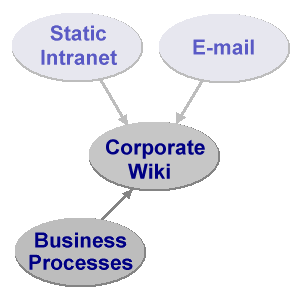 A structured wiki is a flexible tool to support evolving processes
 - in the free-form wiki way -- linked pages, collaboratively maintained
- and with a structured wiki application -- forms, queries, reports
- Content contributors with moderate skill sets can build web applications
- Paradigm shift
- from: programmers create applications
- to: all of us can build applications
Slide 40: What is a Structured Wiki?
- Goal of a structured wiki:
- Combine the benefits of a wiki and a database application
- Wiki:
- Organic content: The structure and text content of the site is open to editing and evolution
- Open content: Readers can refactor incomplete or poorly organized content at any time
- Hyper-linked: Many links to related content due to WikiWord nature
- Trust: Open for anyone to edit, "soft security" with audit trail
- Database application:
- Highly structured data
- Easy reporting
- Workflow (e.g. purchase requisition)
- Access control
Slide 41: Usage Pattern in a Structured Wiki
- Users typically start with unstructured wiki content
- Example: Call-center status board
- User discovers patterns in content
- Example: Call-center status board has fixed list of users and fixed list of time slots
- User or administrator builds an application, typically in iterations
- Goal: Automate tasks based on discovered patterns
- In other words: A structured wiki enables users to build lightweight applications
Slide 42: Example: Call-Center Status Board, v1
- Requirement for status board:
- Easily see who is on call at what time
- Easily change the status board
- Start with a simple bullet list for status board v1:
- 07:00am - 11:00am: Richard
- 11:00am - 03:00pm: Peter
- 03:00pm - 07:00pm: Sam
- See CallCenterStatusBoard example on TWiki.org
Slide 43: Example: Call-Center Status Board, v2
- Status board v1 does the job, but lets make it more presentable and useful:
- Convert the bullets into a table
- Use WikiWord links to team member's home pages for easy reference
- Add Backup person
- Improved status board v2:
Start End Primary Backup 07:00am 11:00am RichardDonkin 11:00am 03:00pm PeterThoeny 03:00pm 07:00pm SamHasler
- See CallCenterStatusBoardV2 example on TWiki.org
Slide 44: Example: Call-Center Status Board, v3
- Status board v2 is presentable, now lets make it more user friendly:
- Use the TWiki:Plugins.EditTablePlugin to select the times and names from a list
- Use the TWiki:Plugins.EditTablePlugin
- Improved status board v3, view and edit:

- See CallCenterStatusBoardV3 example on TWiki.org
Slide 45: Collective Learning
- You are not alone
- The wiki champion is a coach assisting you with best practices in collaboration
- Learning process for wiki users and wiki champions
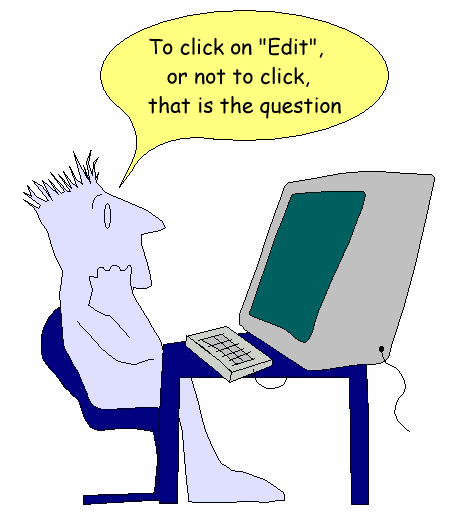
Slide 46: To Click on "Edit" or not to Click
Slide 47: Be Aware of Mental Barriers
- Wikis can be intimidating; the wiki pages appear "official" and corporate
- Overcome your own internal resistance to edit existing content
- Paradigm shift: Content is owned by team, not individual
- I want my contributions to be near "perfect"
- It is more effective to post content early and let the team provide feedback and revise it iteratively
Slide 48: Wikis are Fun
- Wikis are easy to use
- Even people with moderate skill sets can build great content
- Wikis are quick
- Wikis change as your workflow changes
Slide 49: Case Study: Wind River
- Context, year 2000:
- New teams: Wind River acquired Integrated Systems
- New large software project: 100 engineers, 7 offices, 2 continents
- New methodology: Change from "big-bang" releases to "technology lines"
- Solution: Use a wiki
- Challenges:
- How to induce paradigm shift from e-mail to wiki?
- How to get the buy-in from users?
- How to keep track of teams, schedules, milestones, interdependencies, meeting minutes, code reviews, and documents?
- Details: http://twiki.org/cgi-bin/view/Main/TWikiSuccessStoryOfWindRiver
Slide 50: Case Study: Michelin China
- Context, year 2001:
- New ERP project to accompany growth of Michelin China
- Need: Tool to share project information within the project team and with a communication circle outside the project team
- Issues with previously used tools:
- To much access restriction
- Administrative overhead to manage project related data
- Fat client software, difficult to use
- Some team members asked other team members to publish documents
- Solution: Use a wiki
- Details: http://twiki.org/cgi-bin/view/Main/TWikiSuccessStoryOfMichelinChina
Slide 51: Case Study: Motorola Denmark
- Context, year 2004:
- Engineering department of 400 engineers
- Quality Management System, part of ISO9000
- Old system: MS-Word doc based, very little feedback
- 12 month turn around for change requests
- Introduce wiki-based Quality Management System:
- Roll-out took 6 month
- Big productivity gain
- 1 month turn around for change requests
- Number of review comments increased 30-100 times
- Preparing weekly report dropped from 2 hours to 15 minutes
Slide 52: Case Study: Motorola Denmark (cont.)
- What happened:
- Shift from word processor to structured wiki application
- Shift from document owned by individual to structured content owned by team
- Support iterative process improvements
- Discover usage patterns while using the system; enhance process accordingly
- Introduced POT teams (Process Ownership Teams) to de-centralize responsibility of reviewing change requests
- Delegate security setup to team leads
- Quote by manager: "TWiki as such has made this process much easier. And had opened new possibilities that we would probably never have pursued if we had stayed with MS Office docs"
- Use of TWiki has now grown into all aspects of product development
Slide 53: Lifecycle of a Wiki at the Workplace
- 1. Initial deployment - focus on:
- Getting buy-in
- Training
- 2. Growth period - focus on:
- Growing laterally across teams & departments
- Achieving critical mass (to benefit from the network effect)
- Organizing and refactoring content
- 3. Large wiki > 50K pages - focus on:
- Navigation, taxonomy, search
- Managing stale content
- May require an official or unofficial "librarian" or "coach"
- Consolidate wikis into a central wiki
Slide 54: 1. Initial Deployment: A. Role of Wiki Champion
- A wiki champion is a person who:
- understands the process of the work for a given project or business (the domain), and
- knows how to use a wiki (best practices in collaboration)
- In this role you are coaching the employees
- You are an advocate, and play an important role especially in the initial phase of a wiki
- Typically a part time role
- As the wikis gets larger and grows laterally, new wiki champions emerge
Slide 55: 1. Initial Deployment: B. Support Your Wiki Users
- Wiki champions monitor content and send hints to users, such as:
- "Did you know you can automate the meeting minutes? Here is how..."
- "You can add a %COMMENT% to your design document for an easy way to solicit feedback"
- "You can use a spreadsheet formula to calculate the total"
- Provide user training
- Help create wiki applications
Slide 56: 1. Initial Deployment: C. Learn & Get Backup Support
- Learn from books:
- Wiki Tools: Web Collaboration: Springer, by Anja Ebersbach et al, ISBN:3540259953
- Wikis for Dummies: Wiley, by Dan Woods, Peter Thoeny
- Wiki Tools: Web Collaboration
- Get support from open source TWiki community:
- Support web: Wiki-based support forum
-
#twiki IRC: Ask developers and users
- Support web
- Get help from TWIKI.NET to help deploy a wiki in a managed way
Slide 57: 1. Initial Deployment: D. Get Buy-in from Management
- Convince your boss:
- Revision Control: Documents can be rolled back to a previous version
- Peer Review: If another user spots a mistake, she or he can easily change it
- Audit Trail: Changes are logged
- Access control: Content can be restricted where needed
- Increased productivity by sharing content
Slide 58: 1. Initial Deployment: E. Installation & Administration
- Select hardware - example TWiki deployment serving 1000 employees:
- Enterprise class Linux, dual CPU, 2 GB RAM, RAID 5 and dual power supply for redundancy
- Plan disk space:
- Page content: 15MB per 1000 pages
- Attachments: 1GB per 1000 pages
- Server administration:
- Install dependencies as per system requirements
- Install wiki engine and additional Plugins
- Authenticate users internally (quick setup) or externally via AD, LDAP (preferred)
- Plan & implement scheduled backups
- Good news:
- Very little server administration once installed
Slide 59: 1. Initial Deployment: F. Initial Content
- Plan content and rollout
- Use the wiki initially as a pain killer, not as a vitamin
- Replace or extend static intranet with wiki?
- Build initial structure
- One web per department?
- One web per project?
- Glossary web
- Populate initial content with help from early adopters
- Migrate some content from intranet
- Copy content received by e-mail
- Initial rollout with smaller group
Slide 60: 1. Initial Deployment: G. User Training
- Train and coach users
- WelcomeGuest - a fast track introduction covering all the basics
- TWikiTutorial - a compact, 20-minute TWiki primer
- ATasteOfTWiki - a short introduction training course for beginners
- (this tutorial) - Rolling Out a Wiki at the Workplace
- Do not underestimate inertia and time
- Expect quick growth after slow start
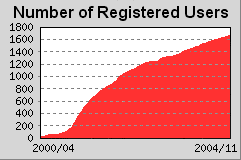
- Example: Wind River's wiki has now 120K pages and 20K page changes / month
- Example: Wind River's wiki
Slide 61: 1. Initial Deployment: H. Get buy-in from Users
- The wiki champion works with the users:
- Encourage frequent use, even small tidbits
- Encourage users to define the future of the wiki themselves by changing content as needed
- Reward knowledge sharing with inexpensive and fun gadgets, coupons, activities, etc.
- Demonstrate support from management by highlighting management use of wiki
- Create appropriate wiki culture from the beginning with training
- Customize the wiki skin to match the branding of your organization
Slide 62: 1. Initial Deployment: I. Wikis Induce a Paradigm Shift
- Management perceives wikis as chaotic; any employee can update any page
- Audit trail and "soft security" of peer pressure
- Wikis can be intimidating; the wiki pages appear "official" and corporate
- Overcome one's own internal resistance to edit existing content
- It's OK to edit, it is good to refactor and delete content (revision control)
- Paradigm shift: Content is owned by team, not individual
- Users want their contributions to the wiki to be "perfect"
- It is more effective to post content early and let the entire team revise it iteratively
- In other words - focus on:
- Communication, communication, communication
Slide 63: 2. Initial Growth Period: A. Grow Laterally
- Grow laterally across teams & departments:
- Other teams will see the benefits of the wiki and want to try it
- Train the trainers: Identify new wiki champions
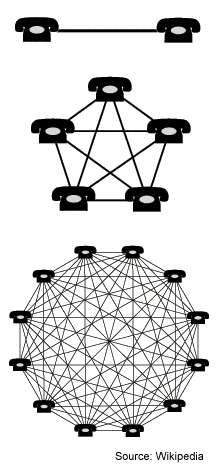
- Achieve critical mass:
- Especially for wikis, the system thrives or dies with the use of it
- Benefit from the network effect: Metcalfe's law states that the value of a network equals approximately the square of the number of users of the system (n2)
Slide 64: 2. Initial Growth Period: B. Organize Content
- Organize webs:
- A web is a container of pages
- Use one web per department, possibly one per project
- Define process to establish new webs
- Balance between number of webs and number of topics per web
- Few webs with many pages each: Easy to search & cross-link
- Many webs with fewer pages each: Easy to define access control & to get notified
- Organize content:
- Use CategoryCategory to group related pages
- Use TWiki Forms and Formatted Search to build database tables and reports
- Use CategoryCategory
Slide 65: 2. Initial Growth Period: C. Refactor Content
- Refactor content:
- Definition: Refactoring refers to the process of rewriting and reorganizing text to shorten it while preserving content
- Encourage users to refactor content; nothing is lost due to version control
- Definition: Refactoring
- Two types of documents:
- ThreadMode: Content displayed / organized as a conversation; sequential posts like e-mail
- DocumentMode: Content updated by multiple and changing authors, reflecting the consensus of the team
- A wiki page may be in ThreadMode, DocumentMode, or a combination thereof
- Wikipedia has a discussion page per article (see example)
- TWiki.org has DocumentMode followed by ThreadMode on the same page by convention (see example)
- Wikipedia has a discussion page per article (see example
- ThreadMode
Slide 66: 2. Initial Growth Period: D. Standardize
- Take advantage of the benefits of a structured wiki:
- A wiki is great media to work collectively on content that grows organically
- Start unstructured, discover patterns, and add structure as needed
- Standardize on "how to do things" to keep content organized:
- Use template topics to get a standard look and feel for project management, meeting minutes, status reports, risk management, code reviews, etc.
- Build wiki applications that support your business processes
- Use template topics
- Add structure with TWiki Forms to:
- Get standardized reports across teams
- Roll-up status reports into master report
Slide 67: 3. Maintaining a Large Wiki: A. Issues
- Once a wiki grows to 50K pages it becomes harder to find content
- Contributing factors:
- Company reorganizations - web structure no longer reflects org chart
- Turn over - content maintainers change
- Project life cycles - stale content; still needed for audits
- Misplaced content
- Grassroot wikis - content distributed in several wikis
- How to address these issues:
- Improve navigation and search
- Establish standardized team home pages
- Use folksonomy
- Manage stale content
- Consolidate wikis into a central wiki
- May require an official or unofficial "librarian" or "coach"
Slide 68: 3. Maintaining a Large Wiki: B. Standardized Team Homepages
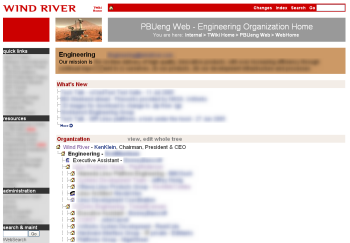
- Every team has a team home page - with a common layout:
- Top banner with image acting as team icon
- Sidebar with quicklinks, resource and administration links
- Box with name of team and a "what we do" description
- Optional "What's new" list (from Employee News Portal)
- Organization tree with links to other team home pages
- Team internal links (below the fold)

Slide 69: 3. Maintaining a Large Wiki: C. Folksonomy and Tagging
- Folksonomy: Term combining "folk" and "taxonomy", refers to collaborative efforts to organize content with freely chosen keywords, typically referred to as "tags"
- TWiki has a TagMePlugin to tag content
- Designed to make it easy to find content in a large wiki:
- Any page can be tagged by individuals
- See my own tags to quickly access my favorite pages
- See my own tags
- Every page shows the tags used by all users
- Quickly access related pages (see example)
- Quickly access related pages (see example
- Users are encouraged to add a vote on a tag found on a page to get a "collective ranking", or "tag count"
- Tag search shows pages ranked by tag count (see example)
- Tag search shows pages ranked by tag count (see example
- Any page can be tagged by individuals
- Idea: Feed the "human intelligence" ranking back to the search engine for better ranking
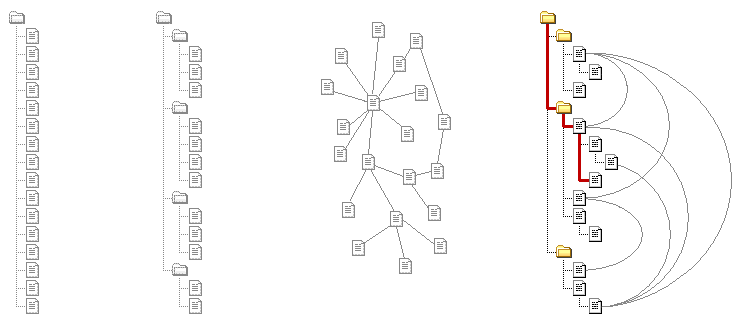
Slide 70: Adding Structure: Context of Content - TWiki Breadcrumb
Table Tree Hypertext Tree + Hypertext
Breadcrumb example:Home
Slide 71: Adding Structure: TWiki Variables
- TWiki Variables are what environment variables are to an OS, or macros are to a programming language
- TWiki Variables are text strings that get rendered at page view time, such as
%SCRIPTURL%,%URLPARAM{"city"}%,%INCLUDE{"OtherPage"}% - Types of variables: Predefined variables; preferences variables; user defined variables
- Useful when creating wiki applications
Slide 72: Adding Structure: TWiki Template Topics
- The site wide default template topic is TWiki06x01.WebTopicEditTemplate
- It can be redefined on a TWiki web level: Create a WebTopicEditTemplate in the local web
- You can define a topic and use it as a template for new topics
- An HTML form is used to create topics that are based on a specific template topic
- A unique topic name can be based on a time stamp or an auto-incremented number
- Example use case: TWiki:Sandbox.MeetingMinutes application
- Documentation: TWikiTemplates
Slide 73: Adding Structure: TWiki Forms
- Use TWiki Forms to add form-based input to free-form content, e.g., you can structure topics with unlimited, easily searchable categories
- A form is defined in a topic - (DB table definition)
- Forms can be attached to topics - (DB table row)
- The form appears in edit mode, and its content gets rendered as a table when viewing the page

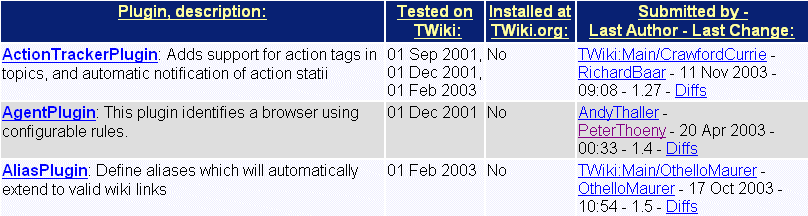
Slide 74: Adding Structure: Formatted Search
-
 Use FormattedSearch to generate customized reports in list format or table format
- Typically used to query topics with data in forms
- Report is embedded in a page with a
%SEARCH{...}% - Example applications:
- Example report:
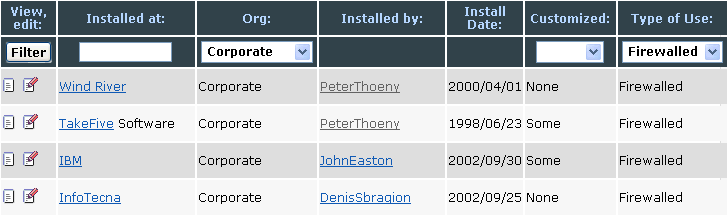
Slide 75: Sample Wiki Application: TWiki Installation Directory
- Some TWiki admins list their TWiki installation on twiki.org
- The entries can be filtered by type of organization, type of use and more
- This wiki application is built using TWikiForms, TWikiVariables, FormattedSearch and some HTML
Slide 76: Sample Wiki Application: Simple TWiki CRM
- TWIKI.NET has a TWiki intranet
- We created a TWiki CRM application to keep track of clients and projects
- AccountDB - table of accounts (companies)
- ContactDB - table of contacts (people)
- Project DB - tables of project
- Workflow: Pipleline, Active, Closed, Parked, Cancelled
Slide 77: Sample Wiki Application: Employee News Portal
-
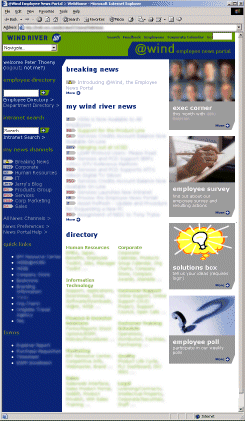 Goal for Employee News Portal:
 - Reduce e-mail flood to the corporate-wide mailing lists
- Reach a broader audience
- Intranet home page as a newspaper
- Specification:
- News channels: IT, Engineering, Sales, etc
- Each news channel has an editor group, responsible for releasing news
- Subscribe to news channels of interest
- Some news channels are "always on", e.g. employees cannot unsubscribe
- Aggregated news is shown on intranet and sent via e-mail
- More details at TWikiNewsPortal

Slide 78: TWiki Plugins
- TWikiPlugins enhance the functionality of TWiki
- Growing Plugins repository - over 200 Plugins
- A great resource for administrators and web developers to tailor TWiki to their needs, such as:
- ActionTrackerPlugin: Keep track of action items in meeting minutes and notify assignees by e-mail
- CalendarPlugin: Monthly calendars with events
- ChartPlugin: Create charts visualizing TWiki tables
- DatabasePlugin: Access a relational database
- HeadlinesPlugin: Show news based on RSS feeds
- TWikiDrawPlugin: Use the TWikiDraw Java Applet to create editable drawings embedded in topics
- SlideShowPlugin: Turn a TWiki page into a web-based presentations
- ActionTrackerPlugin
Slide 79: TWiki Plugins: Table Plugin
- TablePlugin handling
%TABLE{ }%variable:- Allows sorting of tables
- Changing table properties like border width, cell spacing/padding, background color
|
Slide 80: TWiki Plugins: Edit Table Plugin
- EditTablePlugin handling
%EDITTABLE{ }%variable:- Allows users to edit TWiki tables like in a spreadsheet
- Cells can be off different types: Edit fields, drop down boxes, radio buttons, checklist, date field, etc
- Example table, in view mode and edit mode:
Slide 81: TWiki Plugins: Spreadsheet Plugin
- SpreadSheetPlugin handling
%EDITTABLE{ }%variable:- Add spreadsheet formulae to TWiki tables
- Over 70 formulae available such as
$AVERAGE(),$IF(),$REPLACE(),$TIME(),$SET(),$GET()
|
|
Slide 82: TWiki Plugins: Comment Plugin
- CommentPlugin handling
%COMMENT{ }%variable:- Allows users to easily add content to a topic without edit/save cycle
- Can be a simple comment box, or a complex form to capture structured content
- Example:
- TWiki:Sandbox/EditActionItems - using CommentPlugin and EditTablePlugin
- Note: TWiki.org's Sandbox web is a good resource to borrow examples
- TWiki:Sandbox/EditActionItems
Slide 83: Summary
- A structured wiki is a powerful platform for web collaboration
- Collaborate in free form; add structure as needed
- Use it as shared notebooks, a departmental collaboration tool, a publishing tool, a CMS and a knowledge base
- Use it as a platform to create lightweight applications
- Easy to share knowledge
- Corporate brain gives a competitive advantage
- Careful coaching is needed
- Viral growth after people "get it"
Slide 84: What do You Want to do Now?

Notes
- Copyright © 2007 by Peter Thoeny, TWIKI.NET. This presentation may be reproduced as long as the copyright notice is retained and a link is provided back to http://www.twiki.net/
- This presentation is based on the SlideShowPlugin and uses the TWiki:Main/PeterThoenySlideShowTemplate
- Please do not edit this topic, provide TWiki:Codev/TWikiPresentation2007x10x22Feedback
- Only TWikiAdminGroup can change this topic; view topic in raw format
- Set ALLOWTOPICCHANGE = TWikiAdminGroup
- Download PDF version of this presentation

Topic revision: r4 - 2011-08-31 - PeterThoeny


 Site map
 Blog web

 Create New Topic
 Index
Index Search
 Advanced search
 My topics of interest
 Changes
 Major changes only
 All tags
 Notifications
 RSS Feed
 Statistics
 Preferences
 Community
  Readme first
 Developers News
 How you can help
 Community roles
 #twiki IRC
 Lima Release
 Feature Proposals
 Bugs Changes
 Categories


 Account


 Ideas, requests, problems regarding TWiki? Send feedback. Ask community in the support forum.
Copyright © 1999-2026 by the contributing authors. All material on this collaboration platform is the property of the contributing authors.