This presentation was held at the monthly meeting of the Internet Developer Group on 20 May 2003. A webcast is available at their web site.

Writeable webs empower employees to share knowledge and to be more productive
Presentation for Internet Developer Group on 20 May 2003
-- Peter@ThoenyPLEASENOSPAM.com








on 20 May 2003. A webcast is available at their web site.
Slide 1: Web Collaboration with TWiki
Writeable webs empower employees to share knowledge and to be more productive
Presentation for Internet Developer Group
on 20 May 2003
-- Peter@ThoenyPLEASENOSPAM.com
Slide 2: Agenda
|
|
Slide 3: About Peter
- Peter Thoeny - Peter@ThoenyPLEASENOSPAM.com
- Software developer with over 15 years experience, with interests in corporate collaboration, web technology and UI design
- Author of the open source collaboration software TWiki, managed the project over the last four years
- Graduate of the Swiss Federal Institute of Technology in Zurich
- Lived in Japan for 8 years working as an engineering manager for Denso, the largest auto electric parts supplier in Japan
- Now in the Silicon Valley for 5 years, managing the Engineering Operations group at Wind River
Slide 4: Introduction
- Web collaboration empowers teams to work faster and more productively
- Web collaboration is used to schedule, manage, document, support and present the work of task groups
- Teams may co-reside in one building or be spread out around the world in different time zones
- Their work may be secured or openly available
- Collaboration works best if the culture is "right"; it needs to be coached appropriately
- Today's talk focuses on TWiki, which is a leading open-source GPL web collaboration platform
Slide 5: Challenges of Intranets
- Conventional Intranet sites are typically not very popular
- This is because:
- Some content is outdated
- The quantity is limited
- Difficult to find content; inconsistent
- Special tools and knowledge required to maintain
- Content is static, it has a "one webmaster syndrome"
- Example of "one webmaster syndrome":
- If I discover a page on the Intranet that has incorrect or insufficient information, I just ignore it because I am too busy to find out who the webmaster is and to write an e-mail requesting an update
- Result: Content tends to get stale
Slide 6: Challenges of Distributed Teams
- Open questions:
- How to get a virtual team working together efficiently?
- How to get everyone in sync?
- How to avoid duplicate efforts?
- Typical answers:
- Scheduled conference calls
- Occasional visits
- Shared drives
- Exchange documents by e-mail
- Instant Messaging (IRC, AIM, ICQ, etc)
Slide 7: Challenges of Distributed Teams (cont.)
- Issues with e-mail and mailing lists:
- E-mail gets lost after some time
- Search is limited to email client
- Great for discussion, but ... hard to find 'final consensus' on a thread
- E-mail is not hyper-linked and is not structured, content can't easily be grouped into related topics
- E-mail and attachments are not version controlled, e.g. it is difficult to determine the history of a document
Slide 8: Challenges of CMS
- Rigid structure (can be good and bad)
- Control over content more important then free form knowledge sharing
- Content is typically structured hierarchically or in table format, with limited cross-linking between pages
- Limited support for unstructured content, or content that has "structure and exceptions"
Slide 9: What is Knowledge? How can it be Fostered?
- KM: Is all about knowledge management
- Can knowledge be managed?
- Von Krogh, Nonaka and Ichijo in Enabling Knowledge Creation, ISBN:0195126165, do not think so:
- Knowledge can only be enabled
- Von Krogh, Nonaka and Ichijo in Enabling Knowledge Creation, ISBN:0195126165
- Five key knowledge enablers:
- Instill a knowledge vision
- Manage conversations
- Mobilize knowledge activists
- Create the right context for knowledge creation
- Globalize local knowledge
Slide 10: What is a Wiki?
- WikiWiki = Writeable Web
- As quick to contribute as e-mail,
- as easy to use as a website
- Ward Cunningham implemented the original WikiWiki in 1995 to collaborate on software patterns
- Inspired by HyperCard
- Design principles:
- Open - Should a page be found to be incomplete or poorly organized, any reader can edit it as they see fit.
- Incremental - Pages can cite other pages, including pages that have not been written yet.
- Organic - The structure and text content of the site is open to editing and evolution.
Slide 11: What is a Wiki? (cont.)
- The original WikiWiki has these features:
- Over 100 Wiki engines based on the original Wiki idea, mostly open source
Slide 12: What is TWiki?
- TWiki started as a Wiki engine, but has outgrown its roots and is now a platform for web applications
- Mission: "TWiki is a leading-edge, web-based collaboration platform targeting the corporate intranet world. TWiki fosters information flow within an organization; lets distributed teams work together seamlessly and productively; and eliminates the one-webmaster syndrome of outdated intranet content."
- Open Source software (GPL), hosted at http://TWiki.org/
Slide 13: What is TWiki? (cont.)
- A Wiki in the original sense, but also:
- A shared notebook for projects: Repository, scheduling, meetings
- A departmental collaboration tool: Processes, project reviews, QA tracking
- An Intranet publishing tool: IT, HR, ISO standards
- A CMS with focus on free-form collaboration: Requirements capture
- A knowledge base: Problem/solution pairs with attached patches
- TWiki started its life as a KB for support
- TWiki started its life as a KB for support
- A platform to create web based applications like news portals, inventory systems, issues tracking systems
Slide 14: Who is using TWiki?
- Many corporations, like 3Com, AMD, Alcatel, AT&T, Boeing, ... Xerox
- BT, Inktomi, Disney Corp, Motorola, SAP, Wind River and others submitted success stories
- BT, Inktomi, Disney Corp, Motorola, SAP, Wind River and others submitted success stories
- Academia, like Brandeis University
- Also communities on the Internet, like IPCop Firewall, Hurd GNU fans, blueDonkey.org
- Statistics:
- > 28K downloads
- > 10K on mailing list for upgrade announcements
- > 1000 installations
- See TWikiInstallation directory to see who is using TWiki for what purposes
Slide 15: Who is developing TWiki?
- Six Core team members with CVS write access:
- PeterThoeny (CA), NicholasLee (New Zeland), AndreaSterbini (Italy), JohnTalintyre (UK), MikeMannix (NY), RichardDonkin (UK)
- PeterThoeny
- Over 100 developers contributing spec, code, patches
- Main communication vehicle: TWiki at TWiki.org
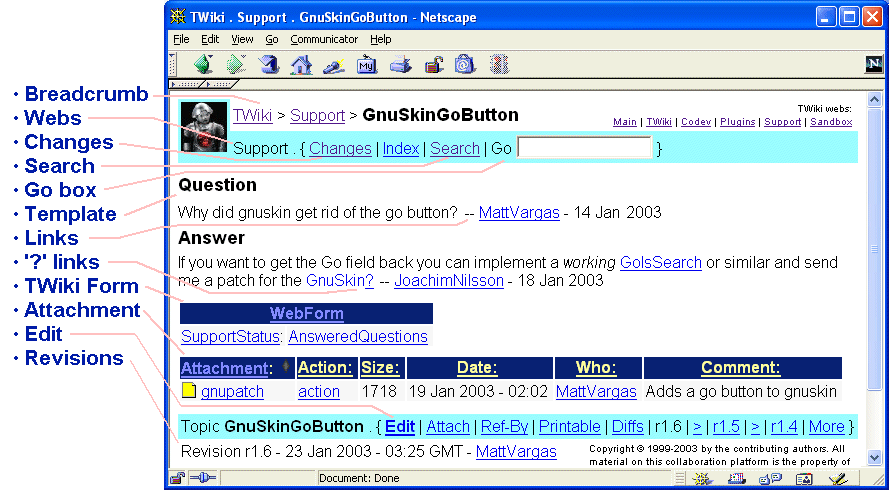
Slide 16: Highlights: Web Environment
Slide 17: Highlights: Interactive Environment
- Add and refactor content - "Share Knowledge"
- Vs. posting e-mails
- Notification of changes:
- Get notified of page changes by e-mail or RSS feed
- A way to keep everybody in synch
- Also a way to check content by senior engineers
- Peer review for up to date content:
- Fix a posting that is inaccurate or insufficient
Slide 18: Highlights: WikiWords for Linking
- Easy to create hyperlinks within TWiki pages, just use a WikiWord
- WikiWords are capitalized words, run together, e.g. WebCollaboration, IntranetTools
- To create a link, edit the page and type:
-
For more info, see IntranetTools
-
- If the 'IntranetTools' page exists, it is turned automatically into a link:
- For more info, see IntranetTools
Slide 19: Highlights: Creating New Pages
- First, edit the page where you want to spin off a new page, and type in some text including a WikiWord for the new page. You will get:
- For more info, see IntranetServices?.
- The '?' is a link (to a page that doesn't exist, yet)
- Now, to create the IntranetServices page, click on this link, type in some text and preview / save it
- If you return to original page and hit Refresh, the link now covers the whole WikiWord:
- For more info, see IntranetServices
Slide 20: Highlights: Version Control
- Pages are under revision control:
- See previous page revisions
- Click on the r1.4 type links at bottom of page
- See differences between revisions
- Click on the Diffs link at bottom of page
- See who changed what and when.
- See previous page revisions
- 'Soft Security' - anyone can change anything, but changes are logged
- Complete audit trail, even for meta data like access control

Slide 21: Highlights: Access Control
- Define groups in Main.TWikiGroups
- Example TWikiAdminGroup page:
- Set GROUP = AndreaSterbini, JohnTalintyre, MikeMannix, NicholasLee, PeterThoeny, RichardDonkin
- Set ALLOWTOPICCHANGE = TWikiAdminGroup
- Set GROUP = AndreaSterbini
- Set read/write/rename access restrictions to webs and pages based on these groups
- Set ALLOWWEBCHANGE = TWikiAdminGroup
- Default - use Soft Security
- Special applications - use Access Control
- Avoid write access restrictions - "If you can see you can play"
Slide 22: Highlights: Preferences Settings
- Three level of preferences settings:
- TWikiPreferences: Site-level settings
- Example: Site name, proxy settings, access control, skin
- WebPreferences in each web: Web-level settings
- Example: Web specific access control, navigation links, colors
- In each user's home page, e.g. TWikiGuest: User-level settings
- Example: Edit box size, preferred skin
- TWikiPreferences: Site-level settings
Slide 23: Limitations of TWiki
- Is a purely web based environment. This has the following implications:
- The editor is simply an HTML form; browser editors are primitive
- Some browsers allow you to launch your preferred editor, like w3m on Unix
- Non WYSIWYG editing; nevertheless rich text can be created using a very simple markup language (WikiSyntax)
- Type:
Make text *bold* and =fixed= - Get: Make text bold and
fixed
- Type:
Slide 24: Resources for Learning TWiki
- It takes 20 minutes to learn TWiki essentials and start sharing knowledge!
- Read TWiki.WelcomeGuest
- Sign up TWiki.TWikiRegistration
- Follow the TWikiTutorial (optional)
- Check TextFormattingRules while editing a page
- (follow link in lower right hand corner of edit box)
Slide 25: Advanced Features
- TWiki skins
- TWiki variables
- Server side includes
- TWiki forms
- Formatted search
- Plugins
- Plugin API
Slide 26: Advanced: TWiki Skins
- TWikiSkins change the look of a TWiki topic, for example the layout of the header and footer
- Rendered text between header and footer does not change
- You can also use skins to define an alternate view, like a view optimized for printing
- Separation of program logic, look and content
- Many SkinPackages available for download at TWiki.org
Slide 27: Advanced: TWiki Variables
- TWikiVariables are text strings -
%VARIABLE%- that expand into content whenever a page is opened - There are predefined variables like
%RED%and
%GMTIME{"$day $month, $year"}% - There are preferences variables like
%EDITBOXHEIGHT% - You can also define custom variables, with new names and values
Slide 28: Advanced: Server Side Includes
- Include other topics (all or part of)
- Include other web pages (all or part of)
- Details in TWikiVariables and IncludeTopicsAndWebPages
Slide 29: Advanced: TWiki Forms
- Use TWikiForms to add form-based input to free-form content, e.g. you can structure topics with unlimited, easily searchable categories
- A form is defined in a topic - (DB table definition)
- Forms can be attached to topics - (DB table row)
- The form appears in edit mode, and the contents are rendered as a table when viewing the actual page
Slide 30: Advanced: Formatted Search
- Use FormattedSearch to generate customized reports in list format or table format
- Typically used to list topics with attached form data
- Report is embedded in a page with a
%SEARCH{...}%variable - Examples:
- MeetingMinutes application
- ChangeRequest application
- MeetingMinutes
Slide 31: Advanced: TWiki Plugins
- TWikiPlugins enhance the functionality of TWiki
- Growing Plugins repository at TWiki.org
- Example: Formulas with SpreadSheetPlugin
|
Slide 32: Advanced: Plugin API and Plugin Internals
- A TWikiPlugin is composed of a Perl module that gets installed on the server and a topic with help and Plugin configuration
- A Plugin implements callbacks that extend the functionality of TWiki
- An API for TWikiPlugins provides the specifications for hooking into the core TWiki code from your external Perl Plugin module
Slide 33: Web Applications
- The basic feature set of TWiki can be used to implement web applications
- We look at two examples:
- TWiki Installation Directory
- Workflow system to track features and bugs of TWiki
- Use/create Plugins for more advanced applications
Slide 34: Web App: TWiki Installation Directory
- The TWikiInstallation page lists TWikis installed on public and access restricted web sites
- The entries can be filtered by type of organization, type of use and more
- Built as a TWiki application using TWikiForms, TWikiVariables, FormattedSearch
Slide 35: Web Application: Feature Tracking
- New features of TWiki are tracked in TWiki.
- New entries are classified as:
- These features can be promoted to:
Slide 36: Initial Deployment
- Install TWiki on web server
- Note: Web server administration skills are assumed

- Note: Web server administration skills are assumed
- Plan rollout and content
- Pain killer vs vitamins
- Build initial structure
- Populate initial content with help from early adapters
- Initial rollout with smaller group
- Train and coach users
- Do not underestimate inertia and time
Slide 37: Collaboration Issues
- 'Don't Touch' syndrome
- Looks like a 'proper website'
- 'Better not touch it, John Smith owns that page'
- Shared knowledge vs. 'Owners' - "I don't want to edit someone else's page"
-
 Wiki culture: nobody 'owns' pages, and any change can be built upon.
- First person to create page is *not* the owner!
-
- 'No control' syndrome - "This leads to chaos"
- Nightmare of DB admin; perceived as disruptive by upper management
- Soft security and audit trail
Slide 38: Collaboration Issues (cont.)
- Effort - "It takes too much time to contribute"
- Save time by doing less e-mail, and finding critical info quicker
- Learn new technology and share by taking notes on TWiki
-
- TWiki syntax - "yet another language"
- TWiki is e-mail, e.g. just *do it*
- Use the help pages, doesn't take long to learn
-
- E-mail Habit - "I prefer e-mail"
- E-mail doesn't scale - new people, new technology, new customers, new partners...
-
- Network infrastructure - "I'm not always connected"
- Collaboration assumes constant network access
Slide 39: Case Study Wind River: Initial deployment
- Wind River started a large software project in spring 2000, involving around 100 engineers located in 7 offices on two continents
- Evaluated two web based products to keep track of teams, schedules, milestones, meeting minutes, code reviews, and to store all project related documents:
- eRoom: Was in use by merged company ISI
- TWiki: Was in use by acquired company TakeFive
- Decided for TWiki because it was more flexible and configurable then eRoom, even though eRoom had a more polished UI and more out-of-box applications
Slide 40: Case Study Wind River: Build and Coach
- Initial time was spent to compile the requirements with key stakeholders, and to build the content structure
- Gave virtual trainings for each office on collaboration, with focus more on "pros and cons of e-mail, webmaster maintained Intranets, and TWiki based collaboration", and "why it pays off using online collaboration"
- Coached employees by monitoring content and sending "collaboration hints"
Slide 41: Case Study Wind River: Growing Up
- Other groups within the company started using TWiki after seeing how projects can be managed in TWiki
- A big push in TWiki usage happened after the Corporate Council started using TWiki to document their initiatives, metrics and processes
- Several skins have been created in the familiar Wind River Intranet look
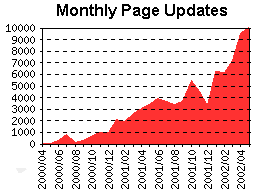
- Large deployment:
- 1200 registered users
- 100 webs, 26K pages
- 133K actions / month
- 11K updates / month
Slide 42: Summary
- TWiki is a powerful platform for web collaboration
- Free form content and content with structure where needed
- Easy to share knowledge online
- Careful coaching is needed
- Viral growth after people "get it"
- TWiki is a platform to build web-based applications efficiently
Slide 43: Questions & Answers
Slide 44: References
- This presentation: http://TWiki.org/cgi-bin/view/Codev/TWikiPresentation20May2003
- Video of the presentation: http://eyeball.internetdeveloper.org/TWiki.html
- TWiki Home: http://TWiki.org/
- Tool of the month, Unix Review: http://www.unixreview.com/documents/s=1820/uni1011715271489/
- Wiki Time, LINUX MAGAZINE: http://www.linux-mag.com/2002-12/lamp_01.html
- TWiki - The poor man's Lotus Notes? http://www.monitor.ca/monitor/issues/vol10iss3/macstuff.html
- Business Is Toying With a Web Tool, The New York Times: http://www.nytimes.com/2003/05/19/technology/19NECO.html
- WikiWikiWeb: http://www.c2.com/cgi/wiki?WikiWikiWeb
- Wiki Engines: http://www.c2.com/cgi/wiki?WikiEngines
- Wind River: http://www.windriver.com/
Notes
- This presentation is based on the SlideShowPlugin and uses the PeterThoenySlideShowTemplate
- Please do not edit this topic, provide TWiki:Codev/TWikiPresentation20May2003Feedback
- Only TWikiAdminGroup can change this topic; view topic in raw format
- Set ALLOWTOPICCHANGE = TWikiAdminGroup

Topic revision: r12 - 2005-06-01 - PeterThoeny


 Site map
 Blog web

 Create New Topic
 Index
Index Search
 Advanced search
 My topics of interest
 Changes
 Major changes only
 All tags
 Notifications
 RSS Feed
 Statistics
 Preferences
 Community
  Readme first
 Developers News
 How you can help
 Community roles
 #twiki IRC
 Lima Release
 Feature Proposals
 Bugs Changes
 Categories


 Account





 Ideas, requests, problems regarding TWiki? Send feedback. Ask community in the support forum.
Copyright © 1999-2026 by the contributing authors. All material on this collaboration platform is the property of the contributing authors.