SID-00255: How to use AutoCompletePlugin in WebTopBar's Jump box
| Status: |
 Unanswered Unanswered |
TWiki version: |
4.2.3 |
Perl version: |
5.8.8 |
| Category: |
AutoCompletePlugin |
Server OS: |
Windows Server 2003 |
Last update: |
17 years ago |
Auto-completion would seem to be a natural fit for the jump box, since the list of topics is known (assuming the list of topics isn't too long...). There is even a nice example of that provided with the
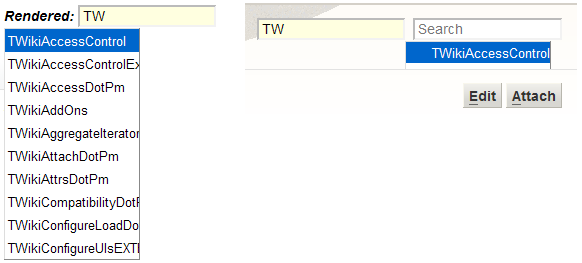
AutoCompletePlugin. Unfortunately I can't get it to work in the WebTopBar, which is the home of the Jump box. There are two issues:
- (annoying) The pop-up is shifted far to the right, so that it appears under the Search box instead of the Jump box.
- (critical) the pop-up is cut-off at the edge of the frame containing the top bar, so that only one entry can be seen.
Here you can see how it looks on the plugin page, and how it looks in the top bar:
Any ideas on how to fix these problems?
P.S. the users' browser is Internet Explorer 6.
--
SeanCMorgan - 2009-04-08
Discussion and Answer
Not, an answer, just a comment. I also think that an auto-complete in jump box would be a very good usability enhancement.
On point 2, I'd look into either fixing the skin to allow overlap of header content into text body, or fixing the plugin to use a detached Javascript popup.
--
PeterThoeny - 2009-04-08
Closing this question after more than 30 days of inactivity. Feel free to reopen if needed. Consider engaging one of the
TWiki consultants if you need timely help. We invite you to
get involved with the community, it is more likely you get community support if you support the open source project!
--
PeterThoeny - 2009-06-02
 If you answer a question - or someone answered one of your questions - please remember to edit the page and set the status to answered. The status selector is below the edit box.


 png
png 


 Site map
 Blog web

 Search
 Changes
 RSS Feed
 Notifications
 Statistics
 Preferences
 Register new user
 Support Forum
  Ask a question
 Open questions
  My recent questions
 Get quick help in #twiki IRC channel





 Ideas, requests, problems regarding TWiki? Send feedback. Ask community in the support forum.