SID-02001: Error in configuration
| Status: |  Answered Answered |
TWiki version: | 6.0.1 | Perl version: | 5.18.2 |
| Category: | Server OS: | Last update: | 10 years ago |
 Timo Treichel - 2014-12-15
Discussion and Answer
The CGI of Perl 5.18.2 behaves differently now. Try setting$CGI::LIST_CONTEXT_WARN = 0 in your twiki/bin/LocalSite.cfg. Let us know if that helps.
Source: https://github.com/leejo/CGI.pm/issues/149 --
--  Peter Thoeny - 2014-12-15
i've added the line, since there was no preset paramenter for it.
i've tried with and without the #, but it had totally no effect.
i still have the same error message.
-- Timo Treichel - 2014-12-16
Install the latest CPAN:CGI module and try again. See also HowToInstallCpanModules.
-- Peter Thoeny - 2014-12-16
since our server is at domainfactory i cant ...
... i am sry =(
we have multiple perl versions, where do i can set to another path?
-- Timo Treichel - 2014-12-16
You can set the
Peter Thoeny - 2014-12-15
i've added the line, since there was no preset paramenter for it.
i've tried with and without the #, but it had totally no effect.
i still have the same error message.
-- Timo Treichel - 2014-12-16
Install the latest CPAN:CGI module and try again. See also HowToInstallCpanModules.
-- Peter Thoeny - 2014-12-16
since our server is at domainfactory i cant ...
... i am sry =(
we have multiple perl versions, where do i can set to another path?
-- Timo Treichel - 2014-12-16
You can set the @localPerlLibPath in twiki/bin/LocalLib.cfg
-- Peter Thoeny - 2014-12-16
it still does not work ... I've changed the adress, but he does not accept:
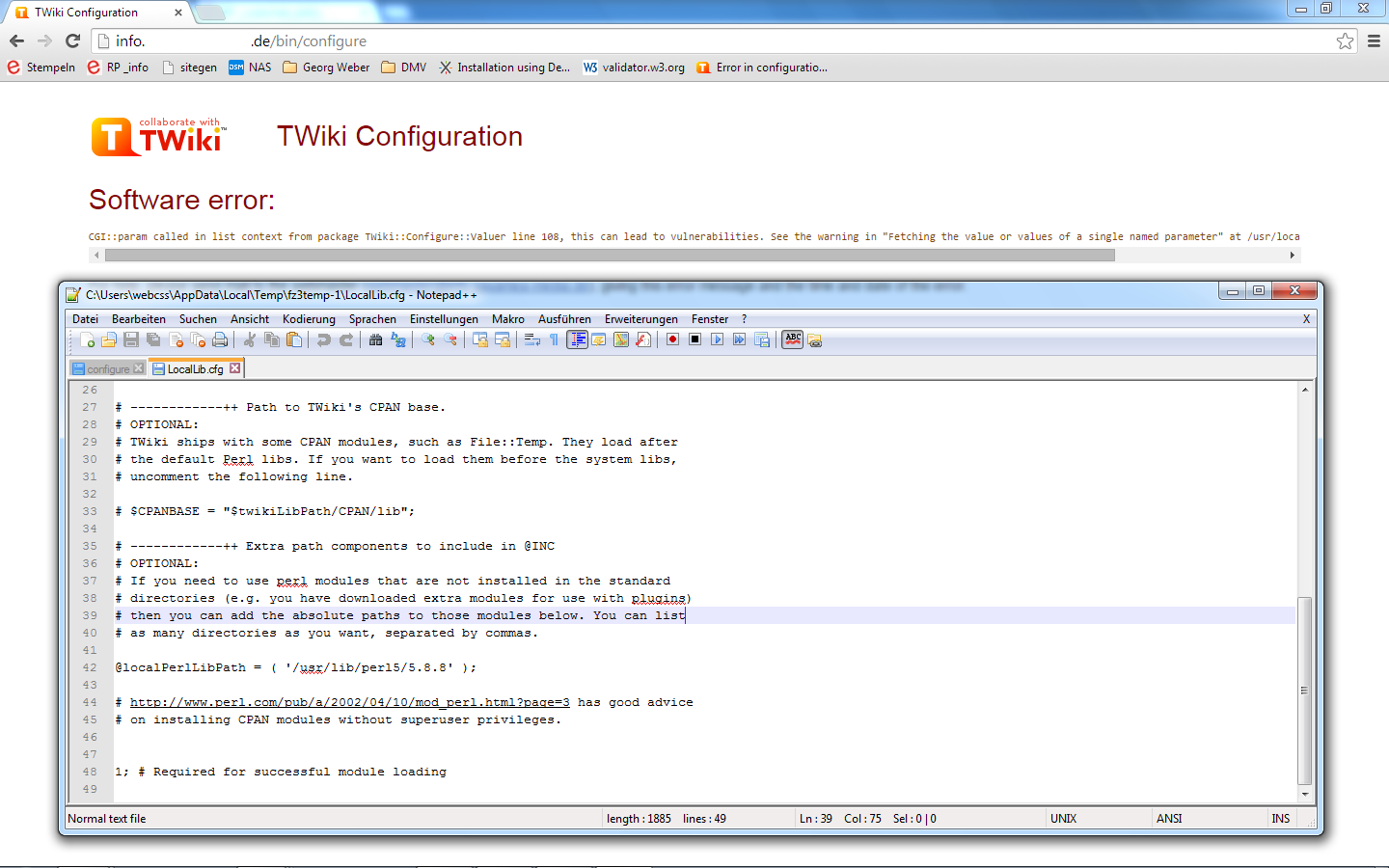 Here is the full Error Message:
"CGI::param called in list context from package TWiki::Configure::Valuer line 108, this can lead to vulnerabilities. See the warning in "Fetching the value or values of a single named parameter" at /usr/local/lib/perl5/5.18.2/CGI.pm line 436."
ofc i also tried with the hash before
-- Timo Treichel - 2014-12-17
Uncomment the
Here is the full Error Message:
"CGI::param called in list context from package TWiki::Configure::Valuer line 108, this can lead to vulnerabilities. See the warning in "Fetching the value or values of a single named parameter" at /usr/local/lib/perl5/5.18.2/CGI.pm line 436."
ofc i also tried with the hash before
-- Timo Treichel - 2014-12-17
Uncomment the $CPANBASE so that the @localPerlLibPath loads before the system libs.
-- Peter Thoeny - 2014-12-17
it does not change anything. looks like i gonna give up and change to xwiki or something which neigther uses perl nor java ...
-- Timo Treichel - 2014-12-18
What version is /usr/local/lib/perl5/5.18.2/CGI.pm?
Argh, I just read the code of the latest CGI from CPAN, version 4.04. It does not support $LIST_CONTEXT_WARN yet. You need to download the latest version 4.13 from Github at https://github.com/leejo/CGI.pm - install it into a local directory and set the @localPerlLibPath to that.
-- Peter Thoeny - 2014-12-18
we now decided to take xwiki, since we cant make those nessesary changes for twiki.
but tyvm for all your help
-- Timo Treichel - 2014-12-19
Sigh. If only people (not Timo in this case, because it is a domainfactory server) would stop installing CGI.pm on their own when it isn't actually needed. The path /usr/local/lib/perl5/5.18.2/CGI.pm indicates a local installation which takes precedence over CGI.pm version 3.63, as is shipped with Perl 5.18.2. Even CGI.pm version 4.04, as available on CPAN, works perfectly: It doesn't spit out the offending warning and therefore there's no need for $LIST_CONTEXT_WARN. The warning which causes TWiki to fail has been introduced in 4.05 (precisely: in 4.04_05), only available from Github, and there might be a reason that this version is not yet the default when one installs from CPAN. Apparently all this stir has been caused by the announcement to remove CGI.pm from Perl core in version 5.20, which definitely is not an issue here.
So, a fix would have been to install CGI.pm from CPAN into TWiki's space and use $CPANBASE. Unfortunately this comes too late for Timo, but maybe the issue pops up again...
--  Harald Jörg - 2015-01-13
Hello all,
well, this issue popped up for me.
Briefly: CentOS 6.6 x64, last TWiki 6.0.1
I've downloaded https://github.com/leejo/CGI.pm (today is version 4.21) and installed over /usr/share/perl5/CGI.pm
I've also tried tweak LocalLib.cfg with:
@localPerlLibPath = ('/home/twiki/twiki/lib/CGI.pm-master/lib/');
and / or
compiling Github's CGI into my twiki path: PREFIX=/home/twiki/twiki/lib/CPAN/lib
and tried with @localPerlLibPath = ('/home/twiki/twiki/lib/CPAN/lib/share/perl5/','/home/twiki/twiki/lib/CGI.pm-master/lib/');
It continues failing miserably with:
Software error:
Failed to load the perl module CGI qw(:any). The module could not be found.
Please ensure that:
Harald Jörg - 2015-01-13
Hello all,
well, this issue popped up for me.
Briefly: CentOS 6.6 x64, last TWiki 6.0.1
I've downloaded https://github.com/leejo/CGI.pm (today is version 4.21) and installed over /usr/share/perl5/CGI.pm
I've also tried tweak LocalLib.cfg with:
@localPerlLibPath = ('/home/twiki/twiki/lib/CGI.pm-master/lib/');
and / or
compiling Github's CGI into my twiki path: PREFIX=/home/twiki/twiki/lib/CPAN/lib
and tried with @localPerlLibPath = ('/home/twiki/twiki/lib/CPAN/lib/share/perl5/','/home/twiki/twiki/lib/CGI.pm-master/lib/');
It continues failing miserably with:
Software error:
Failed to load the perl module CGI qw(:any). The module could not be found.
Please ensure that: - CGI qw(:any) is installed,
- that the module is available on the @INC path,
- that the webserver user (apache) has permission to read the CGI qw(:any).pm file.
Abel Angel - 2015-07-31
Try version 4.04 or older - http://search.cpan.org/~leejo/CGI-4.04/, that should just work. Lee Johnson's work since then has introduced a couple of incompatible changes.
But wait a minute... Does CentOS ship its Perl without the CGI package? That would explain why so many people fall into this trap. Normally, CGI is part of the Perl core distribution up to version 5.20, so no one expected this problem to pop up so often. If the CentOS folks strip CGI.pm from their Perl distribution, then maybe we should backport a change scheduled for the next TWiki release - a Contrib which brings its own version of CGI - it is in SVN, but not yet available from TWiki.org. See discussion in Codev/AddCGIpmToTWikiCore for details.
-- Harald Jörg - 2015-07-31
Hello,
got stuck in the same problem as Abel. Same error message, same versions of CentOS and TWiki.
Strange because I installed TWiki several times in the last years, without major issues. I usually installed it on RedHat.
I also had a previous error while trying to load /twiki/do/configure , googled it and turned out I needed to install the CGI::Carp module.
Now I followed Harald suggestion and installed a previous version of CGI
cpan> install L/LE/LEEJO/CGI-4.04.tar.gz
Now I have the TWiki configuration web page loaded correctly. Ready to start with the configuration!
Thanks,
Thomas
-- Thomas Fozzi - 2015-08-05
Thank you for confirming that Thomas!
-- Peter Thoeny - 2015-08-05
CGI 4.04 also caused subsequent problems for me. I have regressed to CGI 4.03 on the latest, out of the box version of Debian 8.1. This seems to be working now.
It also means that this page is incorrect: http://twiki.org/cgi-bin/view/TWiki/TWikiSystemRequirements#Required_CPAN_Modules
This is a bit of a mess since modern Linux distros are shipping much later CGI modules now.
Phil
-- Phil Marsden - 2015-08-13
Thanks Phil. I updated the TWikiSystemRequirements accordingly.
See how we address this moving target: AddCGIpmToTWikiCore
-- Peter Thoeny - 2015-08-13
A new extension is now available that addresses the CGI issue: CgiContrib - for background see AddCGIpmToTWikiCore.
-- Peter Thoeny - 2015-10-28
 If you answer a question - or someone answered one of your questions - please remember to edit the page and set the status to answered. The status selector is below the edit box.
 | SupportForm | |
|---|---|
| Status | Answered |
| Title | Error in configuration |
| SupportCategory | |
| TWiki version | 6.0.1 |
| Server OS | |
| Web server | Apache2 |
| Perl version | 5.18.2 |
| Browser & version | Chrome Version 39.0.2171.95 m; FireFox 34.0.5 |

Topic revision: r19 - 2015-10-28 - PeterThoeny


 Site map
 Blog web

 Search
 Changes
 RSS Feed
 Notifications
 Statistics
 Preferences
 Register new user
 Support Forum
  Ask a question
 Open questions
  My recent questions
 Get quick help in #twiki IRC channel





 Ideas, requests, problems regarding TWiki? Send feedback. Ask community in the support forum.
Copyright © 1999-2026 by the contributing authors. All material on this collaboration platform is the property of the contributing authors.