TWiki-VM Comments/Questions page
These are the comments moved over from TWikiVMDebianStable. The idea is not to stifle feedback or comments, but to try any keep the main instructions page just a tad bit shorter. Please, if you see any useful tips or corrections in the following comments, please feel free to add them to the TWikiVMDebianStable page!
Comments
Comments on performance
I've just tried it to compare the performance against my (awfully slow) pure-cygwin installation. And hey - the virtual machine is significantly faster! The comparison (running ab against/twiki/bin/Main/TWikiUsers on both servers) is not really fair right now because the cygwin installation does some extra things (more plugins, external authentication), and I've replaced /usr/bin/perl by /usr/bin/speedy in the view program. But this looks very promising
-- HaraldJoerg - 17 Jan 2006
Thanks for reporting back, Harald - glad to hear numbers are not too depressing Looking at http://www.wikimatrix.org/ the other day, I'm beginning to think there might be something to gain by offering this. TWiki has been in 184538 compares according to their statistics, so there's gotta be some users out there looking for an easy way to start a wiki (and considering TWiki already). We might be successful in lowering the AdminSkillsAssumptions skills this way.
To all: I have uploaded a beta 6 (but it's entirely possible just to unzip the release file to the
the other day, I'm beginning to think there might be something to gain by offering this. TWiki has been in 184538 compares according to their statistics, so there's gotta be some users out there looking for an easy way to start a wiki (and considering TWiki already). We might be successful in lowering the AdminSkillsAssumptions skills this way.
To all: I have uploaded a beta 6 (but it's entirely possible just to unzip the release file to the twiki share in the beta 5 vm, for those that want to save the bandwidth).
-- SteffenPoulsen - 17 Jan 2006
There are plenty of people who would love to have an easy TWikiOnWindows install. This approach here looks very promising.
-- PeterThoeny - 17 Jan 2006
Very neat idea... good stuff.
This does allow people to keep their TWiki install separate from Windows but what's the overhead cf. TWiki On Windows IIS or TWiki On Windows IndigoPerl?
-- MartinCleaver - 12 Jan 2006
Wikipedia:VMware mentions an overhead of about 3-6%, and I can only say, that on my machine (2.4ghz p4/1gb ram) TWiki still feels like TWiki when it's running in the vm - and indeed still feels very fast when it's on SpeedyCGI. Wikipedia:Comparison_of_virtual_machines talks about "near native speed" for Workstation and GSX, and "native" on ESX.
But then again, I have never installed TWiki on Windows, so I don't know what to expect from that kind of installation, or how to compare the two approaches. If anybody does, feel free to comment.
-- SteffenPoulsen - 12 Jan 2006
I'd be surprised if a modified TWikiInstallerWindowsContrib that installed a native IndigoPerl on Apache is not faster than the VM Ware install, but I've long advocated against the use of CygWin in favour of GnuWin32.
-- MartinCleaver - 18 Jan 2006
That's very interesting, Martin. Would you be able to post an ab or other comparison of vmware / indigo / gnuwin32 performance with TWiki?
-- SteffenPoulsen - 18 Jan 2006
Instinctively I'd have thought that a native install (Apache or IIS) would be faster than emulating an entire operating system, but I agree we should check.
I don't mind benchmarking my IndigoPerl install. Do I start by downloading the BenchmarkContrib shown on the AthensMarks page? - Benchmark is overkill imho, if you would just post some quick findings using i.e. ApacheBenchmark that would be great.
abis included inside the VM as is. -- SteffenPoulsen - 30 Jan 2006
-- SteffenPoulsen - 19 Jan 2006
This is a really good idea, particularly since TWiki generally runs much faster on Linux than on Windows (because Windows CGI is very slow at forking a Perl process, I think). I used to test TWikiOnCygWin on my PC against TWikiOnLinux (running remotely via an ADSL connection), and the Linux version was twice as fast - both using CGI. So I expect this TWikiOnLinux virtual machine to be quite a lot faster, even without ModPerl or SpeedyCGI.
This is also a great idea to simplify installation on Windows - given the sheer number of support issues resulting from the WindowsInstallCookbook, I'd really like a 'download one package and run' Windows installation.
Final thought: since VMware Player is completely free of charge, including commercial use, this could be a great way to distribute TWiki to large populations of Windows PCs, particularly laptops. The person preparing the VM would need a full copy of VMware, but it's not that expensive since VMware Player avoids the need to pay per-user licenses.
I used to use VMware a lot, and have always been impressed with it.
-- RichardDonkin - 22 Jan 2006
Comments on installation
I just downloaded this and installed. It's important to emphasise that there is virtually no installation effort to get a working TWiki on Windows using this approach (unlike WindowsInstallCookbook!), and no Linux knowledge is needed. You just download and install VMware player, download the TWiki VM image (long download), then run VMware Player pointing it at the TWiki VM file, and then just wait for it to boot. Once TWikiOnDebian is booted, you just click on http://twiki-vm/ and you have a working TWiki. Files can be edited via Windows file sharing and Windows editor, and most admin is through the browser anyway.
Really very impressive - apart from download time, the installation time is about 5-10 minutes, most of which is waiting for disk activity and system bootup, and absolutely anyone could do it!
Currently using about 95 MB of RAM, which is not bad considering Firefox often uses a lot more than that, and this is a complete running Linux system. It's also a lot faster than the normal TWikiOnCygwin used by WindowsInstallCookbook.
-- RichardDonkin - 29 Jan 2006
Thanks for all of the effort you put into this, Richard. I think with the security issues "gone", or at least pushed to the "user" side of things, there shouldn't be much left to hold us back from advertising this approach.
-- SteffenPoulsen - 30 Jan 2006
So far, the need to know Debian is almost zero, so no need for Ubuntu (which is a larger download) but I think we do need a few things to finalise this:
- Restructure instructions above so there's a numbered list of steps, to include resetting both
rootanduserpasswords. Currently there is a list but it's not very detailed - need a 'How to Install' section. - Document exactly how to get VMware player to use NAT/host-only mode - it grabbed a real IP address from the LAN (or at least Debian did), so by default it exposes an insecure Linux host to the world with obvious passwords... (unless the user is running a firewall, which is only the case in Windows XP SP2+).
- Create security checklist - how do you shut down services,? Or perhaps release a new VM image without any services other than essential (Samba, SSH and HTTP probably all count, SMTP probably doesn't). Or document how to enable firewall filtering, which might be easier (or just include in image)?
Other comments and questions
This is a test run / idea, comments welcome. Were thinking about "compiling" a version focusing on having all plugins enabled / working - most plugins don't have a demo-url, this might be a way of providing a kind of do-it-yourself url. But I'll get back to that, perhaps. Actually having such a vm ready might ease things for someone wanting to host a plugin-site one day. Lots of possibilities in this, share your thoughts. -- SteffenPoulsen - 11 Jan 2006 Cool stuff Steffen! I would highlight that this is an easy way to get TWiki running on Windows, and also crosslink from some TWikiOnWindows topics. -- PeterThoeny - 13 Jan 2006 I thought briefly of promoting it for "real" use, but decided on keeping it at a proof-of-concept level for now. I'm a bit uncertain how much responsibility and / or support the community can or should take for this kind of TWiki distribution - that's why I'm clearly stating the lack of a "Officially Community Proofed[tm]" stamp. But if there's an interest, I don't mind throwing some work into it, discussing optimal parameter set for an intended "TWiki for Windows"-distribution. I put the access log online, so you can follow binary action: http://twikivms.forskernet.dk/access.log (only two downloads so far - I think I can guess who *g*).
-- SteffenPoulsen - 13 Jan 2006
Hi, worked with this installation for two days and a night now. And it still does not work  There is still something wrong thou I have downloaded second version twiki-vm-debian-stable-4.0.1-vm02.zip, When typing http://twiki-vm/ I'm directed to http://twiki.org/cgi-bin/view/Codev/TWikiVMDebianStable all the time What am I doing wrong ? The VMware Player seems to work. Is' it right to type root/root in the the VmPlayer-window ? Doing so I get this message in the VMwarePlayer window: twiki-vm:~# Is that right? You are doing great work, but it seems I need some help here. (Yes I've also tried user/user) Are there anything more to do int the VMwarePlayer-window before firing up my browser? Thanks for any answer and tips&trics =) Best Regards Ole Johnny
-- OleJohnnyBergum - 10 Feb 2006
I can't find any included file named \\twiki-vm\twiki\.htaccess.txt
-- OleJohnnyBergum - 10 Feb 2006
I'm afraid I can't reproduce these findings Ole, but it sounds like you are doing the right thing. If you try to login as root (root/root and the twiki-vm:~# prompt is right) and enter
There is still something wrong thou I have downloaded second version twiki-vm-debian-stable-4.0.1-vm02.zip, When typing http://twiki-vm/ I'm directed to http://twiki.org/cgi-bin/view/Codev/TWikiVMDebianStable all the time What am I doing wrong ? The VMware Player seems to work. Is' it right to type root/root in the the VmPlayer-window ? Doing so I get this message in the VMwarePlayer window: twiki-vm:~# Is that right? You are doing great work, but it seems I need some help here. (Yes I've also tried user/user) Are there anything more to do int the VMwarePlayer-window before firing up my browser? Thanks for any answer and tips&trics =) Best Regards Ole Johnny
-- OleJohnnyBergum - 10 Feb 2006
I can't find any included file named \\twiki-vm\twiki\.htaccess.txt
-- OleJohnnyBergum - 10 Feb 2006
I'm afraid I can't reproduce these findings Ole, but it sounds like you are doing the right thing. If you try to login as root (root/root and the twiki-vm:~# prompt is right) and enter ifconfig eth0 what do you get for "inet addr"? I'm thinking you might not have a DHCP service running, which might give the kind of result you describe. You can compare the inet address you get to what you get on your Windows installation when typing ipconfig at a dos prompt (look for IP Address). The two addresses shares the first three numbers in a typical setup. Let me know what you find out, any detail will help troubleshooting this.
-- SteffenPoulsen - 10 Feb 2006
I thought Twiki was inside twiki-vm-debian-stable-4.0.1-vm02.zip But I now more and more believe that I also shall download TWikiRelease04x00x01 Is that correct ? If so, where should files from TWikiRelease04x00x01 be installed? Could anyone please tell me that ? Thank you, Best regards Ole Johnny
-- OleJohnnyBergum - 10 Feb 2006
Oh, it is, and usually when you boot the VM the Linux inside it will grap an IP address from a DHCP server nearby, and things will "just work". But we need to troubleshoot a bit more on why you are having problems. Finding out about the IP address would be a good place to start, I believe.
-- SteffenPoulsen - 10 Feb 2006
My IP address is 80.111.114.211 and this is what I get for "inet addr" in VMware: inet addr screenshot.
-- OleJohnnyBergum - 10 Feb 2006
OK, this explains - the virtual machine is not getting an IP address at all, this probably means you do have a DHCP service available at your LAN. Can you cut & paste the info you get from running "ipconfig /all" in a dos prompt at your Windows box? Then we can probably figure out what setting would work for a static IP address for the TWiki VM. If you're on a managed network, perhaps you have a sysadmin available to help giving you an IP address for the VM?
-- SteffenPoulsen - 10 Feb 2006
Yes, I have a DHCP service http://i23.photobucket.com/albums/b362/labelfil/VM006.gif.
Info you from running "ipconfig /all" in a dos prompt: http://i23.photobucket.com/albums/b362/labelfil/VM005.gif.
This is a home computer - no sysadmin available.
-- OleJohnnyBergum - 10 Feb 2006
This virtual TWiki is a great idea Steffen, but how do I access the virtual linux filesystem via samba from my Windows environment, means: how do I connect a Windows network drive with the virtual system (which username/password?) Thanks!
- As should be mentioned above, I have added a default password for a samba connection, which is simply: login
user/ Passworduser. Should work ok? -- SteffenPoulsen - 10 Feb 2006- Thanks, that works great, must have missed this by reading through the doc. -- FJ
And yes, this is a great idea - have waited for this nearly for a year. That's way I use night and day to have it up an go. And Steffen gives great service too
- Once a TWiki-pusher, always a TWiki-pusher, I hope this will work out in the end -- SteffenPoulsen - 10 Feb 2006
out there (with wireless/WLAN stuff and without).
I am sorry, but I'll have to leave you on your own if you want to try to get things working without a router in your current setup. Of course, if you succeed, others will be interested in your findings, no doubt - do some notes on your progress, should you choose to try your luck
-- SteffenPoulsen - 10 Feb 2006
I'm using such a simple router, very recommendable and not really costly (one can get one for less than 50 EUR)
-- FranzJosefSilli - 10 Feb 2006
Yes I am connected directly. And yes I have a "router" here too, but it is not installed on this computer yet. This is a Belkin Wreless G Router (G54Mbps). Would this router do the work ? I'll tray to install this Belkin-router and I'll come back telling you the result of that. Thank you for all help. It seems we found somethin g what may be wrong here.
-- OleJohnnyBergum - 10 Feb 2006
What about these settings on the VMwarePlayer, are they right?
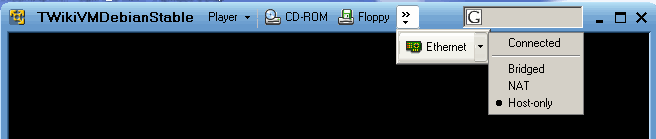 -- OleJohnnyBergum - 11 Feb 2006
The Ethernet setting should be set to "bridged" - and if the Belkin is in place, then hopefully you should be running in no time now (the Belkin looks quite alright for the purpose from what I briefly skimmed in specs)
-- SteffenPoulsen - 11 Feb 2006
-- OleJohnnyBergum - 11 Feb 2006
The Ethernet setting should be set to "bridged" - and if the Belkin is in place, then hopefully you should be running in no time now (the Belkin looks quite alright for the purpose from what I briefly skimmed in specs)
-- SteffenPoulsen - 11 Feb 2006
- Router installed.
- Router probably not right configured.
- Typed http://twiki-vm/ in my browser.
- Got the picture below in may screen
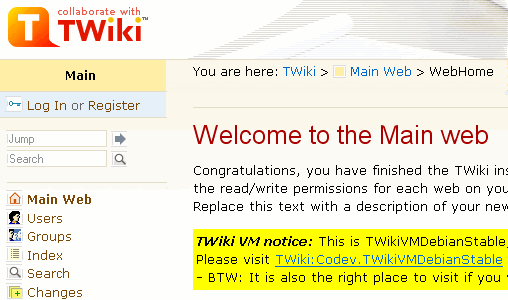
- BDW 1: Any info about how to configure the router for the VMwarePlayer is welcome.
- It's all set, no further configuration nescessary (whee!) -- SteffenPoulsen - 11 Feb 2006
- BDW 2: Can all plugins be installed in this version ? (mean as for TWikiRelease04x00x01 )
- Most should work, some might have issues with the SpeedyCGI enabled, but that can be reported and fixed. Get the most recent plugins from SVN if possible. -- SteffenPoulsen - 11 Feb 2006
- Thank you for all your help during this Best Regards Ole Johnny / Norway
- Next: Olympic Games. Good luck to you too, but we'll beat you inn skiing and skating you know
- Sad story, that - hope we'll put you up with some resistance after all -- SteffenPoulsen - 11 Feb 2006
- Sad story, that - hope we'll put you up with some resistance after all
-section at the VMware site  - looking forward to welcoming some of the VMware-crazed hordes!
-- SteffenPoulsen - 11 Feb 2006
For anyone without a router set up to provide DHCP service - try configuring your TWiki VM as follows:
- looking forward to welcoming some of the VMware-crazed hordes!
-- SteffenPoulsen - 11 Feb 2006
For anyone without a router set up to provide DHCP service - try configuring your TWiki VM as follows:
- VMware window, Devices menu, Ethernet submenu, select NAT
 -- FranzJosefSilli - 12 Feb 2006
Heh, beginning the "Debian advanced users"-class already? Well, an important command to know when installing software on Debian is
-- FranzJosefSilli - 12 Feb 2006
Heh, beginning the "Debian advanced users"-class already? Well, an important command to know when installing software on Debian is apt-cache search. After this command you just put phrases to search for - for instance CPAN packages typically can be found by entering something like:
-
apt-cache search perl lib cgi sessionorapt-cache search perl lib sha1- and then, when you find what you are looking for, you can install it using: -
aptitude install libcgi-session-perloraptitude install libdigest-sha1-perl
apt-cache search imagemagick will present you with some imagemagick-related packages, and either you can really just install all of them from one end (if in doubt), or you can be selective if you know what to go for (i.e. aptitude install imagemagick).
That'll be a quick introduction, ask away on specific problems. BTW: All aptitude install commands needs to be run as root.
-- SteffenPoulsen - 12 Feb 2006
Hm, aptitude install tetex-bin and aptitude install imagemagick fail with
Media Change: Please insert the disc labelled
 'Debian GNU/Linux 3.1 r1a _Sarge_ - Official i386 Binary-1 (20051224)'
in the drive '/cdrom/' and press enter
which is somehow funny, cause I was able to do
aptitude install tetex-base without a problem. Where can I set the URL from where aptitude can download the necessary data?
-- FranzJosefSilli - 13 Feb 2006
Oh, that's me forgetting to remove an important line from /etc/apt/sources.list after installing. Just delete the line starting with deb cdrom:. After this you need to run aptitude update and you should be OK (this will refresh sources list, leaving out the CD-ROM source).
You can also run apt-setup which will help you add new sources or delete old sources.
-- SteffenPoulsen - 13 Feb 2006
Many thanks! Now everything works as expected (till now will report further problems as they appear). This is really awesome (and so easy, even for a Debian greenhorn like me)
-- FranzJosefSilli - 14 Feb 2006
Has anybody got this version running under GSX server? I'm not able to start the virtual machine. It doesn't even shows the BIOS. Other virtual machines run perfectly.
-- RoyMeister - 14 Feb 2006
What is the error you get, Roy? If it just seems to "halt" or "lock" (nothing happens), try shutting down the console session and re-connect to the server again - it has happened to me once that the machine then would pop up and run as expected. Don't know if this relates to your experience, though. Could you give more detail?
-- SteffenPoulsen - 14 Feb 2006
I don't receive a specific error. When I start the VM when I'm watching the VM-details pane the sceen blinks for a second and then it shows the VM-details pane again. The VM seems to run because in the inventory list it shows the TWikiVMDebianStable machine with the green play button on it. Another virtual machine (RHE 4) runs perfect.
-- RoyMeister - 14 Feb 2006
I think you can just disconnect and re-attach to it, then. Use "open virtual machine" and select it (from the menu) and you will see it running - and it will probably work as expected. Can't explain why this happens. Try to disconnect local a-drive and cd-rom drive from the machine, perhaps?
-- SteffenPoulsen - 14 Feb 2006
Can't get the ImageGalleryPlugin to run on twiki-vm although Imagemagick works (cause LatexModePlugin needs it and runs) and the Image::Magick perl interface needed by ImageGalleryPlugin is shown to be installed in configure (if I add it manually to the list of optional perl modules) with version 6.0.6 and the Plugin is listed as enabled in the Plugins section of configure. But it DOES NOT appear in InstalledPlugins, no matter what I try (and I tried hard, believe me).
Can't get the localisation of the user interface to run either, although all corresponding settings in configure seem to be correct.
I give up for today and hope for some enlightenment over night. - Strange, today I just set local to the correct
de_AT.iso885915@euroafter I had restarted the twiki-vm yesterday before giving up and voila, now everything works. Guess this must have been some kind of memory problem. I blame Windows.
de_DE.ISO8859-1 (check locale -a from ssh login into your Debian VM to see what you have installed, and install this if you have original VM version).
This is done through configure - you shouldn't need to set anything else other than enabline {UserInterfaceInternationalisation}, and the languages (translations) that you want to have available.
One thing to note is that the 'choose language' form in the UI has some character set issues, and might need a bit of work.
Curious to know Steffen's download figures btw...
-- RichardDonkin - 15 Feb 2006
Franz, I have a feeling what you have experienced, is a sideeffect of the view script running with SpeedyCGI. - That's what I suspected after the magic night.
- I fear this speedup also conflicts somehow with the session handling, cause the log out function sometimes doesn't work
- All in all it's fun to run a TWiki on a virtual Debian box under Windows. -- FJ
configure or TWikiPreferences won't really take effect until either the VM is restarted or you log in as root and do a killall speedy_backend. Both approaches will kill "old configuration" and allow new perl processes to spawn with correct configuration on board. (The non-working plugin I won't have time to dig into at present, sorry - perhaps you might ask for help in the plugin topic?).
Richard, regarding download figures at "mirror1" :-), you are free to inspect the statistics available (access.log | awstats | mrtg) - but in short there has been some action now, a couple of hundred downloads so far - not bad at all! (We will be needing the numbers from the USA mirror if we want to get an exact view, though).
Btw, on inspecting the TWiki.org awstats it looks like vmware.com is the #1 referrer (origin) in February, 824 clicks. Very happy with all of these numbers - good for TWiki.org
-- SteffenPoulsen - 15 Feb 2006
Hm, God I'm silly ;-), I can't figure out how to get ShorterURLs with the ShorterUrlCookbook on my twiki-vm. Guess it's so stupidly simple that noone has bothered to write it down clearly and understandable. I don't want to disturb people with the useless /twiki/bin/view part of the URL, just for viewing some topic in some web. Can this be done easily on twiki-vm? - This should not present any real challenges, never tried it myself though. Most "standard" apache modules can easily be aptitude'ed if nescessary to support chosen rewriting scheme. -- SteffenPoulsen - 19 Feb 2006
- The problem wasn't to install modules, it had been to chose the right rewriting. I'm running a compromiss (will post it when I hav tested it some more) -- FJ
- The problem wasn't to install modules, it had been to chose the right rewriting.
- For using the VM in a larger company there is the need for changing the hostname of the debian machine. With the ability to switch the hostname, more than a single VM could run in parallel on different machines. But I face the problem that simply switching debian's hostname is not enough. Samba access works, but the name lookup (DNS) is not aware of the new hostname. Who knows what's missing? What is the procedure to touch all necessary settings?
- I suppose that the most often use will be running the VM on a Windows PC. When running the VM in a Windows domain a NTLM based authentication should be part of the standard VM. Most time of my TWiki installation efforts I spent in getting TWiki authentication to work... I vote for supporting NTLM right from the VM image. At least there is the need for a step by step explanation if NTLM authentication is not present by default. Can somebody give advice?
- Just a short comment: Regarding 1) you might want to give some feedback whether the procedure Richard added helped you out? 2) is definetely a valid point, and very interesting. I know KennethLavrsen is using this kind of setup in production and he promised to do a doc on how he gets this to work with Active Directory. It's probably not that simple, and one setup might have subtle differences to another, but it would be interesting to get started on this one. Please hint Kenneth that his knowledge is asked for? -- SteffenPoulsen - 19 Feb 2006
twiki-vm-debian-stable-4.0.1-vm02.zip, and another 53 as of 21:45 PST 18-Feb-2006 for a total of 402 in roughly six days.
I have since installed awstats and set up a script to keep backup copies of my logs, hopefully I'll have better numbers in the future
- That's great, Jason! Never thought the VM would be this popular, this is impressive. Thanks for sharing the load. -- SteffenPoulsen - 19 Feb 2006
hwclock doesn't fix this... Very odd, don't have time to debug, but interested if anyone else has seen this. Discussion in TWikiVMWrongDate perhaps?
-- RichardDonkin - 19 Feb 2006
Thanks for contributing once again, Richard - much appreciated :-). I added a suggestion on how to solve the date/time issue in TWikiVMWrongDate.
-- SteffenPoulsen - 19 Feb 2006
Is there anything that needs to be done, other than setting up your VM networking mode to get this to run? I keep getting directed to this website when I enter in http://twiki-vm/ in my host machines browser.
-- PaulMiller - 19 Feb 2006
This sounds very much like the problem Ole is having, but I'm afraid I'm a bit blank on what is happening in your setup. One thing I could imagine, is that somehow the direction that should take place (the "samba" name lookup) is not happening, and what is going on instead is something in the lines of "google-for-'twiki-vm'-and-direct-browser-to-first-link-found".
It would be helpful, if you could do a ping twiki-vm from the command line at the host (with the VM running), and report the result. I'm afraid that the ping command will return something like "could not find host twiki-vm" (which it really shouldn't! :-)), but lets see what it says. Please try both NAT and bridged networking modes out, and see if you get the same result. BTW: Do you have "Client for Microsoft Networks" enabled on the connection for the VM?
-- SteffenPoulsen - 19 Feb 2006
Well, I did get the "could not find host twiki-vm" on the ping attempt, and also checked that "Client for Microsoft Networks" is running on the connection for my VM (incidently, it is running on all of my connections). I have had this same problem on my machine at work also. I tried to run the VM there using VMware Desktop and get the same result. Right now, I am using the VMware player, and still cannot get it to work. I have logged into the vm as root, but am not really an linux type of guy, so I don't really know what to do once I get in there Aside from the issue I am having, this really does seem like a wonderful product! I can't wait to get it working and start using it. Great job!
-- PaulMiller - 19 Feb 2006
In trying to troubleshoot my non-working installation further, I have a few more questions. Shouldn't I be able to see Samba and sshd listed if I do a lsmod? Not only can I not reach the webpage in my vm, I am not able to see the share from my host either. It seems as though things are not configured correctly in the vm, but take that with a grain of salt. Like I said in an earlier post, I am not really a linux type of guy.
-- PaulMiller - 21 Feb 2006
its sounds to me like the problem you are having is a DNS issue - the twiki-vm hostname is simply non-existant for your host system. I also have this problem on my linux host, and so need to work out the ip address that was assigned to the virtual machine, and then use the full path (to avoid the twiki-vm redirect http://192.168.167.128/twiki/bin/view works for me but its quite likely to be different on your system.
For the demo i'm giving, i've added X to the virtual machine, with it logging in and starting firefox pointing at twiki-vm right from boot - i'll publish it soon.
-- SvenDowideit - 21 Feb 2006
Excellent initiative, Sven! If you're building on top of twiki-vm-debian-stable-4.0.1-vm02.zip (making a v03?) or preparing another 2.6 kernel VM, please include the TWikiVMWrongDate modifications.
Paul, if you would perform the same trouble shooting steps that Ole has done above, that would allow us to start helping you on your problem. Either you can upload small screenshots like Ole did, or you can just cut'n'paste your findings in verbatim text. Thanks.
-- SteffenPoulsen - 22 Feb 2006
Paul, you need to do ps -ef to see running processes, which is what will show you sshd and smbd (part of Samba). lsmod is to show kernel modules loaded, e.g. for particular hardware.
-- RichardDonkin - 22 Feb 2006
Sven, You the man! That worked for me. At the same time, I switched from NAT to Bridged mode, but I had been using bridged mode before, and had no luck. I had tried going to the IP address before, but did not have the full path to the Twiki html files. I assume that since I have to use an IP address on my host, instead of the DNS name, I should be able to add the DNS entry into my hosts file on my host machine, and that will let me use the twiki-vm name instead of the IP address, at least on this machine only.
-- PaulMiller - 22 Feb 2006
I've used the vm on my laptop for 2 days - thank you very much, worked like a charm! Yesterday I had a hard shutdown due to a battery issue. When I restarted VMware player, I discarded the old saved state and rebooted the vm. Now, debian is not able to get an IP from DHCP anymore. I tried different network modes in VMplayer as well as several reboots of the vm, and it fails every time. ifconfig is showing an IPv6 assigned to eth0. Anybody seen something like that? Thank you very much!
-- MarkusSchmidt - 23 Feb 2006
Glad to hear its useful, Markus Well, I'm not really sure what might be going on here, but let's try to troubleshoot it a bit. First of, if you try to obtain a new IP manually (using /etc/init.d/networking restart as root), what kind of error message do you get?
This could be related to your DHCP server, thinking the old IP was never really released properly or similar (hence the server not allowing a new IP to be obtained). If this is a simple ADSL router, perhaps you can release the given IP by entering the routers web interface and try to find the proper place for this somehow. - A simple power cycle of the router might also bring something.
-- SteffenPoulsen - 23 Feb 2006
I've got a similar issue with two different VM's based off Debian. Neither seem to be able to use eth0 even when I manually configure it. The Ubuntu based Browser Application works fine for both NAT and Bridged mode. I can't get packets in/out with either NAT or Bridged mode on Debian.
-- TimSHarvey - 02 Mar 2006
Perhaps instead of using raw Debain, it'd be better to use Ubuntu or Mepis distributions since they have many more networking drivers that work out-of-the-box, including the ndiswrapper incorporating windows drivers?
-- RyanKnoll - 02 Mar 2006
Please feel very free to experiment with other distributions. I am most comfortable with supporting Debian, but there's plenty of room for TWikiVMUbuntuAdventurousAardvark or TWikiVMMEPIS as alternative offers here, if you are up for providing such an initiative.
I'm wondering, regarding the network issue, if switching to a 2.4 kernel solves the problem? ( aptitude install kernel-image-2.4-686 .. you know the drill).
-- SteffenPoulsen - 02 Mar 2006
I'll play around with it some more. It definately seems like a Debian issue as other linux distro VM's work with networking. The TWikiVMDebianStable works on my laptop at work just fine... strange. So it could be something to do with my windows network configuration too although both are almost identical. I have a local network with a DHCPD but it doesn't report getting any offers and configuring the network manually doesn't work either
-- TimSHarvey - 03 Mar 2006
I don't think Tim's issue is a network driver problem - VMware provides a single standard Ethernet device, which should work with any Linux distro. However, if Ubuntu works better for some reason, we should figure out why and replicate on Debian if possible. Most likely this is a VMware issue not a Linux distro issue, so the VMware knowledge base and VMware Player forums might help.
Download size for the VM is already large - if we go Ubuntu or Mepis, it would be good to make a stripped down version that's a similar size if possible.
-- RichardDonkin - 03 Mar 2006
BTW: Did anybody read about the VMware Ultimate Virtual Appliance Challenge? A 4.0.2 with a good set of plugins would do a nice bet for an allround appliance for "the everyday doc needs". Would probably take at least compiling a new doc-set making the VM appear as a integral "appliance", but sure worth a thought
First prize is $100.000 with the criteria having the most weight being: "What does the appliance do and what unique value does it provide to the intended audience (50%)". I sure find it an interesting challenge, I am sure it will do the FOSS community a lot of good.
-- SteffenPoulsen - 03 Mar 2006
Such an appliance would definitely need some indexing engine as SearchEnginePluceneAddOn preinstalled cause many people misuse TWiki as document management system. -- Better misuse than not use at all, I always said.
-- FranzJosefSilli - 03 Mar 2006
Finally got it working - its a VMWare Player issue apparently: I have a 'Microsoft Loopback Adapter' installed for another app (virtual enet interface) and VMWare Player is attaching to that instead of its own virtual interfaces. I simply had to go into that adapter and disable 'VMWare Bridge'. No idea why this wasn't an issue with Fedora Core under VMWare
-- TimSHarvey - 04 Mar 2006
Hi! I love your package (heh). I updated your documentation, there was a 'typo' for the apt-get install update (it said upgrade), and also there was nothing in the Changing Hostname that told people about the Apache redirect.. after changing hosts using your steps people end up coming straight to this page, as their browser attempts to redirect them to twiki-vm/bin etc, with no such host the "i'm feeling lucky" web search approach dumps you right here.
-- DavidWall - 06 Mar 2006
Thanks, David - feedback is much appreciated Actually, the correct apt-get option for security-upgrading the Debian OS is "dist-upgrade" - I updated the line above, and changed all apt-get commands to using the never & better aptitude command in the proces.
Thanks for spotting both this and the hostname issue!
-- SteffenPoulsen - 06 Mar 2006
If I visit:
http://twiki-vm/twiki/bin/view/TWiki/WikiWordI get:
'500 Internal Server Error'and /var/log/apache2/error.log says:
AccessControlException: Access to CHANGE TWiki.WikiWord for TWikiGuest is denied. access not allowed on webIt occurs after I have visited:
http://twiki-vm/twiki/bin/view/TWiki/LatexModePluginSo I guess there is something wrong with the LatexModePlugin. I sometimes get an error message like:
Twiki LatexModePlugin error messages:
   Error! multiple equation labels 'eqn:one' defined. (Eqns. 1 and 1)
Has anybody any idea what I am doing wrong? Otherwise its all working fine as far as I can see (after some hours work to get some plugins going). -- TeunVanDenDool - 06 Mar 2006 Thank you for feedback, Teun! When experimenting with the VM (i.e. adding new plugins) you should definetely change the first line in
/home/httpd/twiki/bin/view to not using speedy but just straight perl - change the first line into #!/usr/bin/perl -wT.
Then, when you have verified that the behaviour of the installation is OK with i.e. the new plugins, you can try to enable SpeedyCGI again and see what happens (for better response times when browsing). Remember to kill old speedy_backend processes before trying to use speedy again.
I have not tried to reproduce your finding related to the LatexModePlugin, but if the problem goes away when you're running straight perl, you should report it at the plugin homepage as a modperl / SpeedyCGI issue (or you can report it directly in Bugs:WebHome). If the problem still exists when running straight perl, though, I'll take a look at it.
-- SteffenPoulsen - 07 Mar 2006
Your answer crossed my attempt because I already found remarks about SpeedyCGI and 'killall speedy_backend'. Unfortunately it didn't help. I am of to work now but I will try this evening to start all over again (reinstall TWikiVM and the LatexModePlugin) because I discovered some more weird things (missing log file names in the configuration files which make it difficult to debug). Maybe something went wrong along the way. Now that I know better what to do I will give it a clean start.
-- TeunVanDenDool - 07 Mar 2006
I did a fresh install: - VMware was already installed.
- unzip twiki-vm-debian-stable-4.0.1-vm02.zip
- Load the vmx file in VMware (with a new identifier).
- Check that twiki-vm is up and running.
- Check that the configuration is fine (including log file names).
- ssh as root into twiki-vm
- aptitude install libmd5-perl
- aptitude install libimage-info-perl
- comment the cdrom line in '/etc/apt/sources.list'
- aptitude install tetex-bin (156 Mbyte after install!)
- ghostscript (gs) is already installed.
- aptitude install imagemagick.
- Unzip the LatexModePlugin in the twiki root directory.
- Add the following lines at the bottom of '/home/httpd/twiki/lib/TWiki.cfg':
- $TWiki::cfg{Plugins}{LatexModePlugin}{latex} = '/usr/bin/latex';
- $TWiki::cfg{Plugins}{LatexModePlugin}{dvips} = '/usr/bin/dvips';
- $TWiki::cfg{Plugins}{LatexModePlugin}{convert} = '/usr/bin/convert';
- There is an installer in the LatexModePlugin but the manual doesn't tell I should use it and it now works fine without. The previous time I did run the installer.
- Enable the LatexModePlugin in the twiki/bin/configure
- change speedy to perl in /home/httpd/twiki/bin/view
- killall speedy_backend
). I get the message: Access denied Access check on TWiki.LatexModePlugin failed. Action "CHANGE": access not allowed on web.The configure file is still OK and there are no warning or debug files in the data directory. I can display other Plugin pages. So I suppose its not a perl/speedy problem. -- TeunVanDenDool - 07 Mar 2006 I also did an installation on a Windows 2000 system (sort of Indigo-Perl installation). It has exactly the same problem. So I think that the problem lies in the LatexModePlugin. I am going to post a message there. -- TeunVanDenDool - 08 Mar 2006 The cause is that TWikiGuest cannot view the page. But any other user can. -- TeunVanDenDool - 11 Mar 2006 Hi. This is a newbie question. I have TWikiVM running well on Windows XP Home. I would like to try to install a skin not included in the package, but since the debian that comes with TwikiVM has no browser, how to I get the tarball into the Debian file system? The skin I am looking at is at : http://twiki.org/cgi-bin/view/Plugins/SimpleBlueSkin
I know this is a newbie question. Stephan, this is an amazing achievement. Thanks for all the terrific work.
-- JimS - 11 Mar 2006
Hi Jim! Heh, we were all newbies once
Well, I'm unsure if you have problems getting to the TWiki installation directory using the instructions in TWikiVMDebianStable? If yes, we'll have to look into that (you might get lucky by following some of the earlier threads on getting this to work), but if it already works as is, then the installation is simply a matter of following the instructions given in SimpleBlueSkin ("Installation"). I think WinZip works alright for unzipping the tar.gz file, but else my own preference for this kind of Windows file operation tend to be "Total Commander" from http://www.ghisler.com/. I know this utility will handle this archive type with no problems.
-- SteffenPoulsen - 11 Mar 2006
Hi Steffen. Thanks for the advice. Sorry about the bad spelling of your name.
file://twiki-vm/ is not pulling anything up. I will have to find out more.
If I do get file://twiki-vm to work, are you saying I handel the download like any other in windows? I am assuming I need the tarball, not the windows.zip file because this is all in linux.
I think if I could get file://twiki-vm to show, i'd be there. Thanks for the reply Steffen.
-- JimStrupp - 11 Mar 2006
Jim - You're correct.. if file://wikihost was working, then you'd be all set. the Samba share lets you work with the wiki filesystem just like any other directory in your file system. You could unzip the skin, then just drag the folders into the TWiki install location.
-- DavidWall - 13 Mar 2006
Steffen - I've appended some basic instructions for MailerContrib to the Mail Configuration section of your document, thought it would be helpful for some people. My markup is messy and could do with elaboration but it gets the point across. HTH
-- DavidWall - 13 Mar 2006
David - Thanks. Any thoughts on how to get file://wikihost/ aka file://twiki-vm to work? I've been looking in the threads above and dont see much on it.
-- JimStrupp - 13 Mar 2006
The Samba configuration should be correct straight away, it's very generic. Are you on a workgroup? Are you able to access your wiki directly in a browser? (ie: http://twiki-vm) If so, Samba should be ok.
If you are on a workgroup other then 'workgroup' you may need to change your config.. first check that samba is actually running.
In linux: -
# ps -ef | grep smbd - Look through process table for
smbd- this is Samba. - If it's not running, try
# shutdown -r nowand see if it starts on reboot - edit your samba config,
# pico /etc/samba/smb.conf.. try changing the workgroup to be the same workgroup your machine operates on, then ctrl+O, then ctrl+X, then# shutdown -r now
# ls /var/log/samba .. is there anything there?
-- DavidWall - 13 Mar 2006
I can access http:twiki-vm/ directly, without having to enter the ip address. I do not know if I am on a workgroup other than workgroup - where would I look? - I'm that new. But my smb.conf file says the workgroup is "workgroup". I'll look in the samba logs for something too. Thanks David.
-- JimStrupp - 14 Mar 2006
To determine if you're on a workgroup in Windows 2000/XP, hold your WIN key, and press PAUSE, go to Computer Name, it should state your workgroup in there. The default workgroup when you install windows is called WORKGROUP but it is frequently changed. I have no idea if/how that would effect your ability to connect to Samba.
-- DavidWall - 14 Mar 2006
Thanks David. Workgroup was something else and I changed it, but it did not affect the ability to access file://twiki-vm/ from the browser. Go figure.
Steffen - Has there been any prior knowledge or discussion about problems with accessing the twiki file system through the browser, and if so, where might I find it? Thanks all.
-- JimStrupp - 14 Mar 2006
Actually, thinking of it, i.e. the firefox browser blocks this links pr. default. So if you're on firefox you need to visit this page: http://kb.mozillazine.org/Links_to_local_pages_don't_work and follow instructions to disable this blocking feature.
But let's try something else as well: If you go to Start -> Run and write "\\twiki-vm\twiki" does that perhaps bring up the twiki installation share?
-- SteffenPoulsen - 14 Mar 2006
I have the same problem in IE too. Run and write "\\twiki-vm\twiki" returns a message "Network path not found"
-- JimStrupp - 15 Mar 2006
Sorry, out of ideas on that one. Next step would be to run through the debugging steps mentioned above (as i.e. Ole did), noting IP addresses of both the Windows installation and the VM. Post results here and I'll have a look.
-- SteffenPoulsen - 15 Mar 2006
I've got another newbie question, and I haven't seen on this. Maybe it's just late and I'm tired...
First, the thing that took longest on this install on my XP Professional Laptop was the download. Everything else went swimmingly. Much easier than the WindowsInstallCookbook that I used on my desktop. Way to go!
However, I would now like to get all my TWIKI pages from the desktop to this new Debian Stable version on my laptop. I can't seem to find the files this version creates. How do I move things over?
Thanks
-- PaulShort - 18 Mar 2006
TWiki VM's data directory is /home/httpd/twiki/data - you can use Windows file sharing, or ssh/scp, to transfer your Windows TWiki's data over - just transferring any new webs under your data directory is enough if all your changes are in new webs.
If you've made changes to standard TWiki webs such as Main or TWiki, you need to figure out the list of changed topics (WebChanges will help) and then whether you can simply copy the topic .txt files over (don't forget the RCS .txt,v files if you want version history), or need to merge the changes into the new base versions. You might find it easiest to get the new TWiki 4.0 topics into one directory, and the old ones in another directory, both on Windows, and then use a suitable visual diff tool to help make the merges - one OpenSource tool that looks good is WinMerge. This [[http://www.google.com/search?hl=en&lr=&q=+site:twiki.org+TWiki+move+new+server search for 'move to new server' may also help.
For more details on the TWiki configuration, see #TWiki_Configuration section here. On the Windows TWiki, if you followed the WindowsInstallCookbook, your data directory is c:\twiki\data (which is same as /twiki/data in the cookbook's CygWin setup).
Generally, to find your TWiki data directory, you should use the configure script (http://twiki-vm/twiki/bin/configure) on TWiki 4.0 (i.e. TWiki VM) or the older bin/testenv script on earlier TWiki versions.
(I've also updated the documentation sections above to mention host-based firewall options in the Security Setup section.)
-- RichardDonkin - 18 Mar 2006
Suggestions for added/removed packages in this VM: - Drop netatalk and various other marginally useful packages, focusing on what's needed to support web server admin and Perl development
- Install
perl-doc
apt-get in the security upgrade instructions has been replaced with aptitude - latter does seem like a nicer tool, but it's more to type! Might be good to have a simple 'security-upgrade' script under the ~root/bin directory to handle the required commands.
It would be good to have an easy way of just upgrading TWiki, but I guess that's more of a general UpgradeTWiki question - latter should work but I like apt a lot.
-- RichardDonkin - 19 Mar 2006
Richard, thanks for the pointer. I was having a brain cramp re: virtual machines on Windows.
I did get my WIKI from the desktop to my laptop, but not with the versions. I copied all the files over, and could see the pages, but when I tried to edit them, it wouldn't save. I couldn't resolve the versions. I ended up copying only the text files, and that works. It means I've lost the versions, but for this it is no big deal. I'm not going to chase it anymore, but don't know if anyone else has had trouble copying pages from another installation.
-- PaulShort - 19 Mar 2006
Hi,
I think I must be doing something wrong. I downloaded and installed the VMWare Player, I downloaded the TWiki file, I pointed the VMWare to the Twiki file, it loaded up, I logged in and...nothing happened. Pointing IE to http://twiki-vm/ does nothing but give me a 'cannot find server'. What am I doing wrong?
-- DamianKelleher - 20 Mar 2006
Huh. Disregard. Resetting the Virtual Machine did the trick. Thanks anyway
-- DamianKelleher - 20 Mar 2006
Another question.
I've got the TWiki up and running, everything is fine there. I'm changing around preferences and etc to get a better feel for what is happening. One thing though - nobody can access the TWiki.
I've set the ethernet to connected and bridged, and reset Debian just in case. Didn't seem to work.
My concern is not to get the TWiki working on the outside internet, it is more as an intranet. But I can't find it. ifconfig in VMware gives me an 'inet addr' for eth0, which I assume is the IP, but that doesn't work. The 'lo' (local loopback) is set to my computer's ip - could that be the problem?
-- DamianKelleher - 21 Mar 2006
Hello,
I'm sure everyone (anyone?) is getting sick of me by now. Oh well. I managed to figure out how to make myself visible to others, which is grand. I have a new question - yes, I might fix it myself beforehand, but probably not.
I'm doing a bulk registration. At the moment with just one registration, so I can test it. I get this error every time:
Access Denied Attention Access check on BobSmith failed. Action "CHANGE": access not allowed on web. Contact wiki@wikiPLEASENOSPAM.com.au if you have any questions.
Related topics: TWikiGroups, TWikiAccessControl
I've added the topicchange, topicview, etc permissions to the TWikiAdminGroup everywhere, just in case (Main, TWiki, etc), but it doesn't seem to help. Is this a problem of VMWare, or am I doing something wrong?
-- DamianKelleher - 21 Mar 2006
An interesting update.
I did a table with the user 'bob smith', and I put in front of FirstName, LastName and WikiName. This stopped any errors, but when the registration page comes up, it says no registrations.
Strange.
I realise this is probably outside the scope of the VMWare discussion, but...?
-- DamianKelleher - 21 Mar 2006
To MartinRowe: Thanks for the new download mirror!
-- RichardDonkin - 29 Mar 2006
np. I guess it will be a bit slower than the Denmark or US mirrors, but it's still popular - around 10 downloads/day since adding it. As well as the standard 220Mb zip I've put up a 7zip compressed version that shrinks the VM down to 131Mb - don't know if that's worth adding to the other mirror sites...
-- MartinRowe - 31 Mar 2006
With the popularity of Wikis, proof of concept in my company took about 5 minutes. Within 30 minutes, I had imported this into my ESX infrastructure for others to evaluate. I give it 1 week before I am asked to make this production in my environment. I am sure others are wondering what I am about to ask. I realize that this was not specifically designed for production, but what would it take to make this production from aspects of security, database, expected growth, etc?
-- BillDean - 01 Apr 2006
I think the main issue to go production is security (enable a firewall or stop lots of services), and ensuring that you have a SpeedyCGI setup that works well and can be updated when you get new TWiki versions (i.e. kill speedy backends on upgrades).
Also, knowing how to do upgrades is useful - both of Debian for security reasons, and of TWiki. Taking the TWiki VM using 4.0.1 and doing a 4.0.1 upgrade is a good idea. It's also a good idea to learn how to apply patches provided in TWikiSecurityAlerts.
Quite a lot of this is about AdminSkillsAssumptions - if you know Linux it makes it a bit easier, but you don't need to know a great deal and the setup is very much standard TWikiOnLinux.
-- RichardDonkin - 03 Apr 2006
I'm running vmserver on win2k3.
i've got a win2k3 server running PHPbb on virtual machine, it's running fine, folks are posting etc.
i've got the twiki-vm setup and running, on the host i can pull up the site, on the other virtual machine, i can pull up the site. But nowhere else.
any ideas?
-- LorenMcnett - 05 Apr 2006
nevermind. excellent product ya've got here.
-- LorenMcnett - 05 Apr 2006
Glad you like it, let us know how you get on.
-- RichardDonkin - 05 Apr 2006
I'm now using this in a production environment, and I upgraded to TWiki4.02. It all works great, currently have about 40 users. Just an FYI for a success story.
It's not available on the internet, it's used in an Intranet environment.
-- DavidWall - 11 Apr 2006
Thanks David, always great to have feedback! Even though it is an intranet environment, you might want to think about adding your install to TWikiInstallation - we simply love to hear about TWiki installations out there
To all: I won't be doing a 4.0.2 release of this, instead I'll save some energy for a 4.0.3 update with hopefully some more shipped by default (Plugins/PluginsTestedOnTWiki04x00 says 66 plugins are now TWiki4 compatible, gotta activate some of all the gold hidden in there :-)).
In the meantime, if you want to upgrade the VM yourself, follow the upgrade guide (it's mostly overwriting what is already there, but a few preferences and group files need to be preserved).
-- SteffenPoulsen - 18 Apr 2006
Hm, the virtual machine has a relative short lease-time for the IP address fetched by a local DHCP server (e.g. local rooter). So the address chances from time to time with the result that I have to reconfigure the firewall on my local rooter. How do I set up the client to use the DHCP server only once, on system startup (or where do I specify a much longer lease time?).
-- FranzJosefSilli - 23 Apr 2006
Have found a solution myself. Just edit /etc/network/interfaces and specify a static address instead using dhcp. Mind the broadcast address and the network mask! -- Maybe there should be a section about Network configuration in the docs above.
-- FranzJosefSilli - 23 Apr 2006
Would be lovely! Feel free to add what you find
-- SteffenPoulsen - 23 Apr 2006
-- JaredWillardson - 24 Apr 2006
-- JaredWillardson - 24 Apr 2006
I just wanted to say this is awesome! I have one question if I may. I am trying to setup Backup Exec 10 program to automatically save changes to the Twiki and I am not sure what file on the C: drive these are saved to. Do you know? thanks!
-- JaredWillardson - 24 Apr 2006
Jared, the virtual machine's data is all contained in the directory where you unzipped the .ZIP file - includes an .vmx file for example. Just back up that directory and all your TWiki VM state is saved.
-- RichardDonkin - 29 Apr 2006
Thank you for your help! I just wanted to make sure I had the correct files.
-- JaredWillardson - 01 May 2006
Awesome work! This is as close to a "plug-n-play" solution as you can get. I got TWiki up and running in no time. And the supplemental information found on this page is concise and very useful.
Thanks a lot!
-- DysonLuong - 05 May 2006
Jared and others: DO NOT set your backup software to automatically process the VMWare file. It will crash the virtual machine; this is a known issue and is frequently brought up on the VMWare site.
You should set it up to backup when the vmware server isn't running; otherwise it will break
-- DavidWall - 10 May 2006
IS there an easy way to migrate the TWiki site you create using this VM to a real production server running TWiki? I tried to just tar the /home/htpd folder and put it in my /var/www/ folder on my Debaian server but I got nothing but the surrounding frame of the page ... Looks like all the internal frames are missing i.e the body, the side panel, etc
-- ChrisHowe - 16 May 2006
I must say that this is the easiest way that we have foundto deploy TWiki. Not only that the installation was easy, but the author has ensured that every step is well documented.
I must say that even an ametuer like me can install TWiki like a Breeze...
Keep up the great work!!
-- SucharithMenon - 17 May 2006
Hello developers! This Twiki-in-an-appliance rocks!! Talk about a god-send; to be able to have it up and running in a few minutes, and then ready as an company's internal wiki with just a little more effort (as mostly detailed above. I plan to augment it to show how to set to a static IP).
Quick comment: This page is getting long with comments (like this one, ironically). There are some useful comments (like "don't back up the VMWare file"), but some of the early ones have been addressed. Is it possible for a moderator to go in and clean those up, so that the page isn't so long and confusing? Including this one...
-- RickVanderveer - 17 May 2006
Hey all... just loaded up 4.0.1-vm02 on Win2k3 R2 Enterprise under VMware Server Beta 3. Came up with no obvious problems. Good job all. Hadn't used twiki in a while... looks terrific!
- unable to install VMware tools
- doing this as a matter of course... typically huge performance gains
- refer to installing vmware tools on linux
- basically get to the point where it says I don't have suitable vmhgfs modules (whatever that is) and it needs a C compiler and kernel header files
- um, are the kernel header files installed? if so help a brother out
. Unfortunately using #apt-get install kernel-headers-2.6.8-2-386 is asking for a cd of which this vmware image did not come with. Also, wget does not seem to work on this website when trying to download MsOfficeAttachmentsAsHTMLPlugin.zip (funny, JohnDhom is having this problem on the same day )
-- NickSkitch - 20 May 2006
Rick, feel free to refactor comments - ideally just put all comments in TWikiVMComments, and include any useful tips here in existing or new sections.
-- RichardDonkin - 23 May 2006
Twiki installed in 15 minutes on corporate prototyping machine. Very impressive.
I plan on Twiki'n a collabrative technical knowledge base, call/escalation work flow, and HR Onboarding/Access Administration Portal. The instantaneous debianVM-Twiki installation made it easy to convince managemet and staff that using a Wiki based system for our KM and CRM demands is definately the way to go. This product far and a way the best candidate platform to build our system. After trying many systems from XAMPP to WAMP to Devside etc etc... Twiki.org and specifically Codev/TWikiVMDebianStable have lapped the competition. The KM/CRM/CMS/ERP are beggining to merge with software like TwikiVMDebian. -- JohnBusciglio - 24 May 2006 John - glad this is working well for you, and great to see that it helps you convince management to go with a Wiki approach! Nick - to solve the
apt-get issue where it asks for a CD, just comment out or delete the line mentioning 'cdrom' in /etc/apt.sources - this is the list of places where apt will look for files when trying to install a package, and the TWiki VM package originally included this by mistake. I think Steffen may have already fixed this in a later version, or at least he said he was going to - see his comment earlier.
-- RichardDonkin - 24 May 2006
-- Contributors: RickVanderveer
Discussion
-- RickVanderveer - 24 May 2006 one small issue I run into on my corporate prototype that is somewhat frustrating, and am sure its 100% networking on the corporate end... Our DNS will not resolve 192.168 IP addresses. It seems the DebianVM prefers to setup on 192.168. At one point, DebianVM did pull a valid private IP that registers in DNS 172.31 and was able to resolve host from anywhere in the country. But for whatever reason, I am unable to successfully duplicate this. It seems random. We cant really go static until we get appropriations, and we cant get appropriations until we see our team leads using the Twiki successfully. I can explain the DNS/DHCP vs DNS/Static issue, but in theory if I cannot have the Leads collaborating for a week or two with succesful results, then I cant get appropriated. Any skillful DebianVM help would really be appreaciated, or any networking work-arounds that reject a 192.168 and force/waitfor DHCP to assign a 172.31 address would rock. Any ideas? -- JohnBusciglio - 26 May 2006 I think this may be a VMware issue - VMware seems to create VMnet* ethernet adapters that have addresses such as 192.168.94.1 and 192.168.184.1, and you may be using NAT mode. If you have used NAT as recommended, you will need to use one of the other VMware networking modes so that Debian can allocate an IP address from your corporate DHCP server (hopefully 172.31.x.x) rather than from VMware's built-in DHCP server (intended for addresses that are 192.168.x.x and local to your Windows PC). Give this a go, and do also try the VMware forums - there is a huge user base there so I'm sure someone can help. -- RichardDonkin - 30 May 2006 John, You might want to try switching the VMware ethernet controller to 'bridged'. I think this will allow Debian to pull an IP from your corporate DHCP server (and since Debian is configured for DHCP, it'll rightly go out and grab one). -- RickVanderveer - 30 May 2006 This is GREAT! I have an old 2004 install of Twiki - how would I go about migrating content from that (it's running on an old Red Hat machine) to this VM version running on our Windows server? -- JimPriest - 01 Jun 2006 Jim, I'm not practiced at doing this myself, but you might try simply copying the files from your /twiki/data/ folder into the TWikiVM folder. You'll have to adjust other config settings in other places on the VM. Also, search the twiki.org site, I'm sure there's another page that describes how to back up a twiki site. -- RickVanderveer - 06 Jun 2006 Has ANYONE had success integrating Windows authentication with TwikiVM?? I know I'm not alone with this need. I've tried following the instructions here ModAuthSSPICookbook and here GettingWindowsLoginPassedToTwiki and here TransparentAuthentication and here WindowsInstallModNTLM all with no luck. I always get anInvalid ELF Header error. Is this because the mod_auth_sspi.so file is compiled for Windows or something? Is there anyone who can compile it for linux (sorry, my experience in Linux is a bit rusty)? If anyone can help me get this working I promise I'll write up detailed instructions!
-- RickVanderveer - 06 Jun 2006
Ok good news, its very simple to get VMware to pull a valid IP off of a corporate 172.31 switch. Go into services and disable VMWare NAT Service and VMware DHCP Service. I am running in host only mode. Also, disable or delete the 2 VMware network adapters that were added to Network Connections. BTW this is WINXP SP1 Slip Streamed with hand picked SP2 updates (no firewall or TCPIP.sys limit).
Yay!! everyone thanks for the input. Now ned to figureout how to change the machine name in VMware so I can have my base URL look like http://TierOne.MyLOB.MyCompany.com instead of MyLOB.MyCompany.com.
Also need to fix my redirect. Ihave all that under control I think.. any advice or suggestions would be appreciated.
-- JohnBusciglio - 07 Jun 2006
Jim, re migrating TWiki content, the best thing to do is read up elsewhere on TWiki.org about topics like 'migrating to new server', 'TWiki upgrade', etc - Google is your friend There is a well defined upgrade procedure from TWikiRelease04Sep2004 to the new DakarRelease (TWiki 4.0), see the TWiki04 web for details.
-- RichardDonkin - 08 Jun 2006
When I first installed the VMPlayer and Twiki it slowed down my network access very significantly. I was using Windows XP connected to SBS Server 2003. After some experimentation it seems that removing 'Microsoft windows client' and 'file and printer sharing' from the network services for the installed VMWare virtual ethernet adapters solved the problem. Hope this helps others.
-- RogerLai - 22 Jun 2006
I'm with RickVanderveer - I can't get mod_auth_sspi to work with this configuration. Apache is at version 2.054, and i'm using a release of mod_auth_sspi compiled for this apache release, but get the Invalid ELF Header error as well. Any ideas?
-- DavidWall - 04 Jul 2006
Rick, David - It's best if you post a question over on Support initially, or try TWikiIRC - if that doesn't help, try a topic on Codev (I'm sure there's an existing one somewhere, try Google:mod_auth_sspi+TWiki.)
I've commented over on ModAuthSSPICookbook.
-- RichardDonkin - 05 Jul 2006
Has anyone tried SvenDowideit's graphical add-on to TWiki VM?
-- RichardDonkin - 05 Jul 2006
I have uploaded a new version of the VM today, based on TWikiRelease04x00x04. Other changes are:
- Upgraded to new Debian version (3.1)
- Using 2.4 kernel instead of 2.6 kernel (2.6 has issues in some configurations)
- Debian development environment on board (for compiling Apache modules, etc)
- VMwareTools pre-installed (resolves TWikiVMWrongDate, adds more effective network driver)
- Initial redirect from http://twiki-vm/ to the
Main.WebHomepage will work without configuration, including for hostnames other thantwiki-vm - All mail activity suspended by default
is now discussing the TWiki VM at vmware.com, please feel free to join discussion there and rate this machine.
Thanks for all the effort that have been put into this so far, answering questions and resolving issues - very much appreciated!
-- SteffenPoulsen - 08 Jul 2006
Hi Steffen - made some minor edits to your bullets above for readabilty, and will include them at top of main TWiki VM page. Great to see 4.0.4 included now, will save time/hassle on patching for latest TWiki fixes, and VMware Tools should help too.
-- RichardDonkin - 09 Jul 2006
hello all first i have to say that the installation of the VMware and TwikiVm has worked perfectly!! thanks a lot! i have started to create a web with approx. 10 topics in it. now i have realized that the size of the twiki folder has grown up to 5 gb!!! i have searched the folders and files with file://twiki-vm and i have found a textfile called "error" in the //twiki-vm\root\var\log\apache2 directory. this file has the amazing size of 5,1 gb. it is that large that i am not able to read it! my question is : what is this file for and do i need it. i cant believe that 10 topics with a little bit of information will need this huge amount of space.their must be something wrong (even the file name says it:-))
-- PatrickSchwachulla - 10 Jul 2006
Wouw - now that doesn't sound entirely right!
Could you try to inspect the file using a command line tool in the vm, such as tail -200 /var/log/apache2/error or less /var/log/apache2/error, pasting a few lines from the contents?
Sounds like a bad case of the re-directs or similar going on, but let's see it in writing.
BTW: If you need a good fast tool for viewing large files in Windows, you could try something like Total Commander from http://www.ghisler.com/. It has an excellent viewer that will nicely display most of what is thrown at it (it's at F3 in the GUI).
-- SteffenPoulsen - 10 Jul 2006
I love the VM, but have a redirect problem under certain situations that is similar to one mentioed above in a 10 February posting. In my case I'm running twiki-vm-debian-stable-4.0.1-vm02 in Bridged mode on a small home LAN. When I try to access the TWiki installation using ONLY the dynamically assigned IP address http:\\192.168.1.206 , it redirects me to http://twiki.org . However, when I type a full URL to the topic I want such as http://192.168.1.206/twiki/bin/view, it works correctly. Also, once I'm into the twiki-vm, I don't have any redirection problems.
Maybe there is some redirection being done strangely on the twiki-vm root directory? Any suggestions?
-- DaveFoster - 11 Jul 2006
Thank you for your fast response steffen! but i am so impatient :-(( i have allready deleted the error file. i hoped that this will minimize the folder size of the twikivm-debian folder! but it didnt! So i have solved the problem in another way. i have reinstalled the TWikiVM in a new folder. after that i have filled my old topic with copy&paste in the new TWikiVM.i am so lucky that this has worked. but unfortunately we dont know the reason of the problem. i am sorry about that. but thank you for your help again.
-- PatrickSchwachulla - 11 Jul 2006
Updated my UK download mirror page with the new 4.0.4 version. I've also put on a self extracting (7-zip) archive which reduces the file size by over 100Mb.
-- MartinRowe - 11 Jul 2006
VMware Server is now released - no longer Beta. Good news for people who want to do production deployments of TWiki VMs!
-- RichardDonkin - 12 Jul 2006
This is great news!
I noticed that were some rumours that a Mac OS version might be on its way as well for the MacTel architecture (http://www.macosxrumors.com/articles/2006/04/07/vmware-ceo-confirms-mac-version-plans/). Clearly this is just rumours sofar, but I'm impressed by the amount of ongoing activities in the whole virtualization area; it is indeed very busy.
-- SteffenPoulsen - 14 Jul 2006
1.) This VM is totally awesome. I just spent the better part of the day migrating my Win32 based TWiki to this VM -- and it rocks.
- Excellent! We're totally subject to flattering -- SteffenPoulsen - 25 Jul 2006
- Honestly, you have no idea how cool this is. And it's waaaay faster on the VM than on the Windows box. -- StevenColbert - 25 Jul 2006
- Initially I have worried myself a bit with what kind of feedback this machine would get, so I have tried to limit liability on and risk to the TWiki community. But I think feedback has been far more positive than negative so far, so I'm also interested in how to open this machine more up / take it to the next level. As I have stated in the TWiki VM discussion thread at vmware.com I am thinking about offering a parallel version with more features on board - along the lines you mention. My time for now is limited, but late August I will probably be able to give this some more thinking. A really important need for this to succeed would be to figure a way to script the setup procedure of the extensions, so the future creation of the VM from scratch could be as automated as possible. This also allows for keeping the setup utililies in SVN, and working on the scripts from there. Any ideas that you have in this direction I would be very interested in hearing! (Working code = instant bonus points :-))
- I have posted an inquiry on the vmware forum to hopefully get some input on what other folks did to this end. -- SteffenPoulsen - 26 Jul 2006
- I have posted an inquiry on the vmware forum
- This sounds like the VM is without internet connectivity when you are trying this. If you are running in NAT'ed mode, I think you will need to supply a gateway / run a NAT service on the PC that will provide connectivity to the VM. Alternatively, if you have a DHCP service+router in your environment, just restart the VM in bridged mode and it should be able to install htmldoc without further ado. And remember,
aptitude install htmldocis the next generation package tool - That's the weird thing - it is run in Bridged Mode. It does pick up an IP Address from my DHCP server with no problem, so that's working. Thanks for the tip re: aptitude too. UPDATE Problem solved: http://www.faqs.org/docs/securing/chap9sec91.html -- StevenColbert - 25 Jul 2006
- That's the weird thing - it is run in Bridged Mode. It does pick up an IP Address from my DHCP server with no problem, so that's working. Thanks for the tip re: aptitude too. UPDATE Problem solved: http://www.faqs.org/docs/securing/chap9sec91.html
# Now set default access rights.
Order Allow,Deny
Allow from all
Deny from env=anonymous_spider
Since I have added a block in the twiki_httpd.conf file to block all users not from a certain IP range, is this block of text necessary? Also, I changed:
<FilesMatch "[^/]*\.html$">
       SetHandler blabla
       allow from all
</FilesMatch>
to
<FilesMatch "[^/]*\.html$">
       #SetHandler blabla
       #allow from all
</FilesMatch>
Is that the right thing to do with this setting?
-- StevenColbert - 25 Jul 2006
Regarding twiki_httpd.conf you can really just delete the sections you don't see fit. Only the sections referred to elsewhere is nescessary.
- OK - thanks for this Steffen... seems that it wasn't really a TWikiVM issue but I appreciate your comments anyway -- StevenColbert - 25 Jul 2006
- Install HTMLDOC (for the GenPDF plugin)
- Enable mod_rewrite (to help secure the /pub fodler attachments)
- Add two lines in the twiki_httpd.conf (see above line)
- Install a few more plugins (maybe all Dakar-supported plugins can be installed)
- Install a few CPAN packages to support various plugins
- To install HTMLDOC, it's a one line command.
- To enable mod_rewrite, it's a one line command.
- Obviously the .conf file is just an edit to the base file
- Dakar plugins. I can download all of them, and get them sorted into one tarball. Then all you would have to do is extract the one file when you build the TwikiVM.
- The CPAN packages list I'll have to update once the plugins are all downloaded.
mentioning something called APhPLIX Development Studio VM. I think it would be good to look into this and check eventual potential for us.
-- SteffenPoulsen - 28 Jul 2006
Hi Steffen -
Re: size... I am not sure how large the base install of Debian is, but I would venture to guess that all of the plugins + HTMLDOC + the CPAN packages can't be more than 25MB.
In any case, I can start the new topic and add what I have thus far. It's going to take a while to download the plugins. I am only going to download the ones that say that they have been tested in 4.0.
-- StevenColbert - 29 Jul 2006
OK so I have next to 0 knowledge about linux, but have setup a TWiki on a windows box with the Dabian VM, everything seems to be working fine, but I do not understand how to install plugins. I am able to download them to the windows side of teh machine, but can't seem to access the files through the VMware Player. If anyone has the two-year-old how-to guide I would very much appreciate the help!!
-- BenjaminDalton - 17 Aug 2006
You just need to unzip the contents of the plugin to the twiki directory on the VM. Samba should be set up on the VM so you can navigate to files on the VM directly from WinXP by Start>Run \\twiki-vm from internet explorer. (You'll need to supply the username and PWD to open the VM folder). Then use winzip to extract all files into the twiki folder. Make sure that 'Use foldernames' is checked in the winzip extract dailog so all files in the zip go to their designated directories.
-- RoyRichards - 18 Aug 2006
Thanks Roy, but what I am unable to figure out is how to navigate to the files. I can find c:\TWikiVMDebianStable24\ and that is a dead end. If I trudge through the Linux virtual machine window I can find the file structure for TWiki, but I can not navigate back out to windows to locate what I just downloaded...never ending circle I hope this makes sense. Please continue to help!!
-- BenjaminDalton - 23 Aug 2006
THANKS! It worked
-- BenjaminDalton - 23 Aug 2006
To continue my list of inexperienced questions, I am unclear what the instructions mean under most plugin installations when they say "visit the configure in your TWiki installation, and enable the plugin in th {Pluigins} section.
-- BenjaminDalton - 25 Aug 2006
Benjamin, don't you worry about a thing. I've been a twiki admin since the BejingRelease and that part about configure confuses me too. It is both the pleasure and the pain of TWiki that some things you would think should be so transparent are actually obscure. My plan is to look around for a ConfigureTWiki or possibly a RunConfigure topic once I find the time & stomach to UpgradeTWiki.
Keep in mind that while the bold text in TWikiVMDebianStable says you can get a demo running without knowing much at all, you'll be on the learning curve from this point forward if you decide to jump "all in" to full fledged twiki meistership. It's a learning experience, but one that for years now has been my way of staying on my toes and also the toes of the Internet revolution.
-- KeithHelfrich - 25 Aug 2006
For those wanting to get Windows-based authentication of users of TWiki VM, have a look at NtlmForSolaris10 - it's based on Solaris but may well apply to Linux and hence TWikiVM.
Update: There's a comment on NtlmForSolaris10 about using mod_ntlm for Debian Linux, so it should be possible to get this working for TWiki VM! Does anyone want to give this a try?
-- RichardDonkin - 01 Sep 2006
I was able to install and run twiki-vm. It was painless! Excuse my newbie question but I haven't been able to find any answers.
How do I install add-ons and where do I create my wiki contents? Are they created & stored on my Windows drive or in the VM image? Is there a written guide that you can point me to? Thanks.
-- StevenTse - 13 Sep 2006
Hi Steven - to create Wiki contents, just use your browser on http://twiki-vm to create and edit TWiki pages. They are held within the VM image, which contains the entire running TWiki system including all data. You can use Windows file sharing to reach these files, as documented on TWikiVMDebianStable, but TWiki works best if you use TWiki to create pages.
To install add-ons, one option is to log in to your TWiki VM with a command line - you can just click on the VMware window and log on as user or root (best to use user unless you have a permissions problem). Then just follow the normal instructions for installing TWiki add-ons - you will need some basic Linux command line knowledge, see AdminSkillsAssumptions for some pointers to online Linux resources. In particular, you'll want to cd to the right directory and run unzip something.zip to install plugins, but see the Plugins web and specific plugin pages.
Alternatively, you can use the Windows file sharing approach to install add-ons - this way, you can using Windows tools such as Explorer and WinZip, which may be easier. Do make sure that you edit any files with a Windows editor that knows the Unix/Linux text file format, as documented on TWikiVMDebianStable.
The normal TWiki documentation, which is in the TWiki web of your TWiki VM installation, has a lot of advice generally on administering TWiki. You can also find the TWiki 4 version of the docs at TWiki04.
-- RichardDonkin - 16 Sep 2006
Moved from main page:
Developers and TWiki experts might like to see SecureSetup - AndyGlew 's comment talks about how VMs can be used to create a secure TWiki setup. This is a developer discussion about improving security, not necessary to have a normal secure TWiki setup.
-- RichardDonkin - 16 Sep 2006
Has anyone else had the slow clock issue logged at IndigoPerlAndTWikIVMOnWinXPPro? This was with latest TWiki VM, which includes VMware Tools, so I'm wondering if the VMware support page on slow clock (linked from my comment on IndigoPerlAndTWikIVMOnWinXPPro) might help. Interested to see if anyone has solved this without VMware tools, as the person who is having this problem is struggling with other installation approaches.
-- RichardDonkin - 07 Oct 2006
I have followed the installation instructions but when I go to http://twiki-vm, I get the "The page cannot be displayed" error. This happens in both NAT and Bridged modes. (I am on Windows Server 2003 SP1, 2.4Ghz & 512 MB RAM). Doing ipconfig in DOS prompt yielded
Ethernet adapter VMware Network Adapter VMnet8:
Connection-specific DNS Suffix . : IP Address. . . . . . . . . . . . : 192.168.33.1 Subnet Mask . . . . . . . . . . . : 255.255.255.0 Default Gateway . . . . . . . . . :
Ethernet adapter VMware Network Adapter VMnet1:
Connection-specific DNS Suffix . : IP Address. . . . . . . . . . . . : 192.168.91.1 Subnet Mask . . . . . . . . . . . : 255.255.255.0 Default Gateway . . . . . . . . . :
Tried http://192.168.33.1/ and http://192.168.91.1/. Both give "Under Construction" error from IIS.
-- AmitAgarwal - 25 Oct 2006
Amit, login in to the VM (root/root), and run "ifconfig" to get the IP address of the VM. The IP addresses listed by dos ipconfig are simply the VM network adapters and not the virtual twiki box. There are also problems sometimes resolving the hostname (twiki-vm) if the VM is restarted and gets a new IP address. If pinging twiki-vm resolves an IP address but doesn't ping, it's usually been assigned the next IP address (192.168.44.132 -> 192.168.44.133), which you can either use manually in the browser in place of twiki-vm, or restart everything.
-- JoshuaJohnston - 25 Oct 2006
Hey guys, I want to install TwikiDrawPlugin and I downloaded the zip file. In the VM I login as user then I navigate using cd WindowsPathToMyZipFile Then as suggested here I try to do an unzip TwikiDrawPlugin.zip but I get "unzip: command not found"
I tried getting through windows \\twiki-vm is also unsuccesful...any ideas for this NEWBIE?
Thanks
-- MiloValenzuela - 25 Oct 2006
Joshua, Thanks for the suggestion. Actually when I first ran ifconfig, I didnt get any useful IP address. I rebooted the machine and then again I tried ifconfig and I got 192.168.91.128 which is indeed different from what the Windows ipconfig was giving. I had done one restart before. So the only useful thing I can add is - Do two restarts.
Anyway, now I am trying to get the site accessible over the WAN to our geographically diverse teams. I followed the instructions to change the etc/network/interface. The ifconfig now mentions the static IP 70.7.14.68 (Numbers changed) correctly but http://70.7.14.68 doesnt work.
-- AmitAgarwal - 26 Oct 2006
Amit, if you want the VM to be accessible to someone on the network beyond your PC, you will of course need to enable bridged mode in VMware, and check that your VM can ping an outside machine, and vice versa.
-- RichardDonkin - 26 Oct 2006
Richard, I was in the bridged mode. I restarted everything and during VMWare restart, it was complaining about "IP address conflicts". The Windows partition has the 70.7.14.68 IP address and giving the same to the Linux partition was causing the problem. I gave a previously unused IP address 70.7.14.70 to the Linux and now everything is working fine.
Now I need to setup access control such that nobody outside the company can even view the site.
-- AmitAgarwal - 26 Oct 2006
Amit, implementing the security checklist on the main TWiki page will be essential if you are exposing TWiki to the Internet, even if only company users have logins. Authenticating everyone even on views would be a good idea.
-- RichardDonkin - 27 Oct 2006
Has anyone tried TWiki VM on an Intel Mac yet? See pointer on TWikiOn - VMware now runs on Macs!
-- RichardDonkin - 15 Dec 2006
Hello,
I like this VM very much, but I have a problem. I'm using VMWare-Tools and an command-line-operation to backup the system. After the machine has shutdown, it does not power off. Does anybody know a solution?
Best regards,
-- GeversMarkus - 28 Dec 2006
This is due to the reason that the standard 2.4 kernel in Debian (which this VM uses) is not compiled with support for ACPI by default. Therefore, one solution would be to recompile the kernel with support for ACPI.
Another alternative is to make two small changes to the kernel options, instructing it to turn off the VM using APM. This is done by adding "acpi=off apm=power_off" as extra kernel options in /boot/grub/menu.lst and "apm power_off=1" to /etc/modules. This is the easiest way to go.
Explicit patches:
/boot/grub/menu.lst
*** /boot/grub/menu.lst_orig    2006-12-28 11:24:22.000000000 +0100
--- /boot/grub/menu.lst 2006-12-28 11:24:44.000000000 +0100
***************
*** 93,99 ****

  title         Debian GNU/Linux, kernel 2.4.27-2-386
  root          (hd0,0)
! kernel                /boot/vmlinuz-2.4.27-2-386 root=/dev/sda1 ro
  initrd                /boot/initrd.img-2.4.27-2-386
  savedefault
  boot
--- 93,99 ----

  title         Debian GNU/Linux, kernel 2.4.27-2-386
  root          (hd0,0)
! kernel                /boot/vmlinuz-2.4.27-2-386 root=/dev/sda1 ro acpi=off apm=power_off
  initrd                /boot/initrd.img-2.4.27-2-386
  savedefault
  boot
/etc/modules
*** /etc/modules_orig   2006-12-28 11:25:11.000000000 +0100
--- /etc/modules        2006-12-28 11:25:16.000000000 +0100
***************
*** 9,11 ****
--- 9,13 ----
  ide-disk
  psmouse
  sd_mod
+ apm power_off=1
+
I will take this second option into the next release of the VM - thanks for feedback! -- SteffenPoulsen - 28 Dec 2006 Hello Steffen, very helpfull
Works! THX
-- GeversMarkus - 28 Dec 2006
Hi, my installation was quite smooth. We had a working TWiki on our Windows Server 2003 in less than five minutes. However, we can not seem to get it working as a Windows service (need the TWiki to run without user login). We tried the SrvAny and its installer "InstSrv" from Microsoft. When we start the service, we see the process "vmplayer.exe" but not "vmware-vmx.exe". Has anybody been successful with this? or have any other suggestions for starting the VM at bootup (not at login). thanks.
-- MervinJohn - 09 Jan 2007
Just got it working. Turns out that in our installation we found that the latest version of VMPlayer (1.0.3-34682) did not work when run as a service. VMplayer.exe would start, but vmware-vmx.exe would not. Version 1.0.1 did work, however when these instructions were followed: http://research.stowers-institute.org/dct/docs/admin/VMwarePlayerService.htm
-- MervinJohn - 09 Jan 2007
Excellent! - If you need to redo your configuration at one point, you could consider running the VMware Server instead, it is build for this purpose (it is also free of charge).
-- SteffenPoulsen - 09 Jan 2007
Use VMware server... just as free and more functional.
-- JoshuaJohnston - 10 Jan 2007
-- OlivierShimizu - 16 Jan 2007
I setup the installation using the viewer and now the VM Ware server... The install is beautifully documented and is quick... I do have a problem however and I have been working on this for the last few days. I can get to the home page with no problem, but if I try to register a user or reset a password - At the end of the process I get a 'page not found'... I can't figure out what parameter is the problem
-- OlivierShimizu - 16 Jan 2007
complete noob here (to twiki & wikis in general). trying to get SMTP authorization working in the VM? does this work? i constantly get errors. and it looks like in Net.PM, no authorization is being sent using Net::SMTP. am i missing something? i've set my smtp variables in the configure app correctly. thanks all...chad
-- ChadChervitz - 19 Jan 2007
Chad - you should be able to set {SMTP}{Username} and {SMTP}{Password} in the TWiki configure tool. You will need TWiki 4.0.3 or higher - if you installed TWiki VM recently you have TWiki 4.0.4, but see SMTPwithServerAuthentication for a patch in case you have an old version and you know Linux/Unix, or just upgrade to latest TWiki VM which would be a lot easier.
If you've already set these parameters in configure, please read SupportGuidelines then create a support request over at Support.
-- RichardDonkin - 20 Jan 2007
CantLocateAuthenSASLpm talks about problem with missing CPAN module, worth looking at if you get this problem.
Steffen, any idea why this module should be required? Also, any chance of a TWiki 4.1 version now that it's released.
-- RichardDonkin - 20 Jan 2007
Richard, thanks for your help. installing Authen-SASL.pm fixed the problem. it was in the warning log, too (now that i know this log file exists, it was easy to find the error)!
-- ChadChervitz - 20 Jan 2007
Hey, I installed twikiVM but I can't get it to work. I think the network is not working on the VM machine. I put a image of the ifconfig command in the VM machine there:  . I tried NAT and Bridged without success...
I running it from a laptop with a PCMCIA network card...
Anyone have an idea of what is the problem?
Alexis
-- AlexisLussierDesbiens - 27 Jan 2007
-- SakshiVashist - 29 Jan 2007
I cannot even get the twikidebian zip file to extract. After I download, it gives me an error " as an invalid file" when I try to extract. I tried all mirrors US and denmark
-- SakshiVashist - 29 Jan 2007
Alexis - you you are not getting an IP address allocated by DHCP. I would recommend setting the VM to NAT mode, as in the main TWiki VM page, for security reasons - this will also ensure that the pre-configured VMware DHCP server is used (running on your host PC), which has always been reliable in my experience.
Once you've set this, you could also try rebooting the TWiki VM (type
. I tried NAT and Bridged without success...
I running it from a laptop with a PCMCIA network card...
Anyone have an idea of what is the problem?
Alexis
-- AlexisLussierDesbiens - 27 Jan 2007
-- SakshiVashist - 29 Jan 2007
I cannot even get the twikidebian zip file to extract. After I download, it gives me an error " as an invalid file" when I try to extract. I tried all mirrors US and denmark
-- SakshiVashist - 29 Jan 2007
Alexis - you you are not getting an IP address allocated by DHCP. I would recommend setting the VM to NAT mode, as in the main TWiki VM page, for security reasons - this will also ensure that the pre-configured VMware DHCP server is used (running on your host PC), which has always been reliable in my experience.
Once you've set this, you could also try rebooting the TWiki VM (type /etc/shutdown -r now at the VM's Linux shell prompt, or use the VMware controls if you have problems). There's a way of telling Debian to take the interface down and up again without rebooting, causing DHCP to be re-done, but I forget the exact command right now.
Sakshi - try downloading using a different browser, or using a different unzip program. If you install Cygwin on Windows, you could use wget to download the file. WinZip (http://winzip.com) is a good unzip program.
-- RichardDonkin - 30 Jan 2007
-- AlexisLussierDesbiens - 30 Jan 2007
Richard - The printscreen was took with NAT mode after doing a reboot of both my windows and the VM. When the VM is starting, I am seeing a few "failed" line appearing... but it is too fast so that I can tell you what it is saying. Any log file somewhere?
I am also on my school network, could I have any conflict with the IP attribution of the school network. I run test with my computer connected and disconnected from the school network with the same results!
Any other thought? Thanks!
-- AlexisLussierDesbiens - 30 Jan 2007
Hey, I found the log file with the error... I think it is coming from hotplug and my PCMCIA network card but I am not sure. Do you know any way I can export the log file from the Debian Virtual Machine to a text file on the windows side? I guess I should be able to mount my C: drive on the Debian side and write on it, right?
-- AlexisLussierDesbiens - 31 Jan 2007
Alexis, it's easier to just use the Debian directories shared by the TWiki VM Samba file sharing setup - just do something like cp /var/log/syslog /tmp and then from the Windows PC look in \\twiki-vm\root\tmp using Windows Explorer.
Another tip which works with almost any Linux system is to press Shift-PgUp in the console window to scroll back.
-- RichardDonkin - 31 Jan 2007
How do I change the default_url_host
-- SakshiVashist - 03 Feb 2007
An issue I experienced with the 4.1.1 upgrade under a Debian VM configuration is that the default Debian behavior is to clear /tmp on reboot; this causes the /tmp/twiki directory to disappear, and thusTWiki fails with a write error. It is possible to change this behavior by editing the TMPTIME to some large number in the /etc/default/rcS file; however this subverts the normal behavior of Debian (and might upset those who feel strongly that /tmp should be kept clean...). Alternatives include using /var/tmp instead, or a startup script to create the /tmp/twiki directory after a reboot...
-- MilanPantelic - 11 Feb 2007
Above comment moved from TWikiRelease04x01x01 to here.
-- PeterThoeny - 11 Feb 2007
Milan, based on the recent security alert at SecurityAlert-CVE-2007-0669, it is recommended to configure TWiki using configure so that $cfg{Sessions}{Dir} is set to a private directory not under /tmp - see the alert's section on Hotfix for TWiki 4.x for the details. See also Bugs:Item3568 which is the same issue. Thanks for reporting this, should be fixed in next version of TWiki VM.
-- RichardDonkin - 11 Feb 2007
Thanks for the info. I will relocate the sessions dir somewhere else. Any idea of when the next TWiki VM will be ready?
-- MilanPantelic - 18 Feb 2007
Not sure if Stefan is working on another version, so I don't think there is a date for the next one at present. Would be good to get a TWiki 4.1 version done.
-- RichardDonkin - 22 Feb 2007
I've put 4.1.1 onto the previously released Debian VM, if that would help anyone. It seems to work, but I can't say I've tested it extensively...
-- MilanPantelic - 23 Feb 2007
MilanPantelic, you have posted issues experienced with directories. Would you mind summarizing your manual fixes step by step? (like for newbie like me) THANKS!
-- MiloValenzuela - 25 Feb 2007
Sorry for leaving you in the dark regarding a new release. It is my intention to prepare a new version of the VM once TWiki 4.1.2 is out.
-- SteffenPoulsen - 02 Mar 2007
Hm, will the download package be updated to 4.1 (now 4.1.2) someday or does one have to unfold the newer official zip/tgz over the files to get the latest TWiki version?
-- FranzJosefSilli - 06 Mar 2007
Steffen will do a TWiki VM version for 4.1.2, as mentioned above, but until that's ready you need to do the following: - Take a backup within Linux or Windows of all your TWiki files!
- upgrade to the 4.1.0 full tar.gz from TWikiRelease04x01x00 on top of TWiki VM's 4.0.4
- un-tar the 4.1.2 upgrade tar.gz from TWikiRelease04x01x02 on top of this 4.1.0.
yes, at the moment its based on twiki-4.0.x, but I will be creating an automatically generated set of releases that you can apt-get upgrade from.
in a nutshell, Steffen and I need to spend some time 'getting together' to simplify the whole thing, as he rolls his own at the moment.
I'll be making TWikiPlugin packages soon too.
request: could someone that uses an rpm based linux distribution try out the debian package using alien? I don't use rpms enough to know if its different from exectations (ok, i've not tried yet)
-- SvenDowideit - 08 Mar 2007
Re backups - you can just copy the files via Windows file sharing from TWiki VM while it is running (in fact it must be running). There is no way to crash TWiki VM just by backing up files AFAIK - however, programs that back up all Windows files need TWiki VM to be shut down (or suspended) to ensure they get a valid copy of the TWiki VM state including TWiki files.
Re the upgrades - that's just how TWiki upgrades work, see the release docs. The reason why we need this is that Steffen has not yet had time to build a TWiki VM based on 4.1.2.
It would be great if we could release a new TWiki VM every time there's a TWiki upgrade, but that would require more work from Steffen, or perhaps more automation of the VM build process.
Sven - agree that updating the TWikiOnDebian package to 4.1.2 would be great, sounds like you are handling that in an automated way, which would be great. If you could just auto-build a new TWiki VM that would be perfect!!
I use Ubuntu at home so can't help with RPM testing, but since Ubuntu and now Linspire uses Debian, providing the Debian package should reach quite a large set of people.
-- RichardDonkin - 09 Mar 2007
Hi, firstly i want to say what a great install i am a totally newbie to this and i love it, really impressed after i nearly spent over 4 days debugging the windows install i gave up and tried the VM Debian install and had it up and running in 20 mins. During my first registeration the email was sent to my email and i registered successfully no errors. After a few plugins i installed another friend tried to register and he entered his details and hit submit he got this error on my twiki website
 Thank you for registering

    * You can review your changes in your personal TWiki topic TomQuinn
      (Suggestion: How about uploading your picture to your topic?)
    * You are also listed in the TWikiUsers topic

Warning: Could not send confirmation email

ERROR: Can't send mail using Net::SMTP. <tomquinn21@gmail.com>... Relaying denied

CGI::Carp::realdie('ERROR
    Can\'t send mail using Net::SMTP. <tomquinn21@gmail.co...') called at /usr/share/perl/5.8/CGI/Carp.pm line 385
CGI::Carp::die('ERROR
    Can\'t send mail using Net::SMTP. <tomquinn21@gmail.co...') called at /home/httpd/twiki/lib/TWiki/Net.pm line 312 TWiki::Net::_sendEmailByNetSMTP('TWiki::Net=HASH(0x81d55a0)', 'Date: Tue, 13 Mar 2007 00:29:41 GMT\x{a}From: TWiki Administrator...') called at /home/httpd/twiki/lib/TWiki/Net.pm line 197 TWiki::Net::__ANON__() called at /home/httpd/twiki/lib/CPAN/lib///Error.pm line 379 eval {...} called at /home/httpd/twiki/lib/CPAN/lib///Error.pm line 371 Error::subs::try('CODE(0x8d41884)', 'HASH(0x8e697f0)') called at /home/httpd/twiki/lib/TWiki/Net.pm line 213 TWiki::Net::sendEmail('TWiki::Net=HASH(0x81d55a0)', 'From: TWiki Administrator <jasonokeeffe@xxx.com>\x{a}To: Tom Quin...') called at /home/httpd/twiki/lib/TWiki/UI/Register.pm line 948 TWiki::UI::Register::_emailRegistrationConfirmations('TWiki=HASH(0x814cad4)', 'HASH(0x8cde334)') called at /home/httpd/twiki/lib/TWiki/UI/Register.pm line 800 TWiki::UI::Register::finish('TWiki=HASH(0x814cad4)') called at /home/httpd/twiki/lib/TWiki/UI/Register.pm line 377 TWiki::UI::Register::registerAndNext('TWiki=HASH(0x814cad4)', '/home/httpd/twiki/data/RegistrationApprovals') called at /home/httpd/twiki/lib/TWiki/UI/Register.pm line 90 TWiki::UI::Register::register_cgi('TWiki=HASH(0x814cad4)') called at /home/httpd/twiki/lib/TWiki/UI.pm line 109 TWiki::UI::__ANON__() called at /home/httpd/twiki/lib/CPAN/lib///Error.pm line 379 eval {...} called at /home/httpd/twiki/lib/CPAN/lib///Error.pm line 371 Error::subs::try('CODE(0x8ce00c0)', 'HASH(0x8d19d04)') called at /home/httpd/twiki/lib/TWiki/UI.pm line 158 TWiki::UI::run('CODE(0x82efc14)') called

Too many failures sending mail
but he still got the email and he can sign in no problem and edit away. Strange...my webnotfiy wont work too and i think this error could be casuing it.
Reading this discussion great info ( thanks guys ) i can succussfully run aptitude install imagemagick and it works indicating it can connect across my internet and download what ever it needs. But when i try run a perl installer script i get cannot connect error.. basically saying i cannot connect to TWiki.org ? is there something in the VM or TWiki i need to configure to allow my perl scripts to download the needed modules? twistyplugin keeps jumping to top of page, tried install TwistyContrib and still the same so i tried the VM, using perl to call the script and when it detects it hasnt got the module it trys to connet to get what it needs from TWiki.org but gives me the network error above.
sorry for such a silly Newbie questions but i hope someone can help me.
-- JasonOKeeffe - 12 Mar 2007
Not only is autobuilding a VM possible, upgrading an existing VM would then be simple too.
-- SvenDowideit - 13 Mar 2007
I installed the TWiki VM and made it work. I would like to appreciate all your guys for providing such an amazing and powerful tool. This is really cool!
But I have two problems. Please help me. 1. How can I change the password used to save the configuration settings? It seems I can only use the default one TWikiAdmin. 2. It seems my FireFox rely on samba service to find the host (using http://mywiki/) in my intranet. When I disabled the samba service, FireFox cannot find my twiki site. Instead, it goes to something like www.mywiki.com. I have changed the default twiki-vm to mywiki. I would like to disable samba service for security reasons. Any hints?
Thank you very much!
BTW, I got similar error message about email registration like mentioned by RichardDonkin. But after I changed email/proxy setting in configure, the error was gone. What I did is to set: {SMTP}{MAILHOST} = localhost {SMTP}{SENDERHOST} = mywiki
-- AlanZhang - 15 Mar 2007
Jason - re your email problem, it may be down to the SMTP host used - does it need a userid/password to send email outside your organisation (e.g. to stop spammers using open relays)? This is what the Net::SMTP message refers to, I think. Best to raise a new Support question and attach your complete configure output.
There's currently a problem with 4.1.2 using extension installers, so you'll need to install plugins by hand.
-- RichardDonkin - 16 Mar 2007
Alan, try getting your mywiki host added to your Windows hosts file, or to your DNS - Windows has some name-lookup oddities that work with SMB/Samba, whereas hosts/DNS should work with any service.
-- RichardDonkin - 16 Mar 2007
Thanks Richard. This time after I disable Samba service. I can use the dynamic assigned ip to access the TWiki VM. Anybody can tell me how to change the password used to save the configuration settings? It seems it is hard-coded as TWikiAdmin.
-- AlanZhang - 19 Mar 2007
Alan, when you are ready to save in configure, you should have a box for the current password, and two at the bottom of the page to enter a new one. Fill all three in and click Set Password and Save Changes.
-- JasonHill - 19 Mar 2007
Thanks Jason. It works.
I got confused here originally. Even if you do not have any changes in configuration, it will still ask if you want to change the password (only two boxes shows). But after I entered the new password. It did nothing.
-- AlanZhang - 20 Mar 2007
I tried to install TopicClassificationAddOn but made the site crash.
What I did is simply download TopicClassificationAddOn _installer , put it under twiki directory and run it. I just followed the default configuration of the install script. After several yes, it gives a message that the installation is failed. Then I tried to access the twiki site, get error similar to HowToFixTWikiConfigurationErrors.
I tried to fix it using the method there but no lucky. Then I just copied the data and pub directory in the twiki, and the LocalSite.cfg file. And redo the installation but replaced the above directories and file. It seems working and all users and topics are there.
Since the 4.1.x has a new plug-in installer. It would be great that we will have a TWikiOnDebian package to 4.1.2 soon.
-- AlanZhang - 20 Mar 2007
thats the most significant issue that the TWikiOnDebian package will need to deal with, as the twiki plugin installer is not compatible with a well run debian package management system. Upgrading topics transperantly is also giving me the hebejebies :/
-- SvenDowideit - 20 Mar 2007
Sven, can you expand on the 'not compatible' comment? Is it the pathnames used, filesystem boundaries (I know there's a bug with the 4.1.2 plugin installer when working across filesystems), need to run a packaging command, or something else?
-- RichardDonkin - 25 Mar 2007
Hi all
New to Twiki and I just installed twiki-vm (no problems to reports, easy install, great job!). I want to configure it and deploy it as an intranet knowledge base and I just need to clear one issue before I go on:
How do I update the twiki 4.0.4 provided with the package to the latest release?
I know my way around but I need some layman term explanation: Ie: download file x, unzip in file y, run process z.
Would really appreciate.
Thx
-- ChristianWertheimer - 27 Mar 2007
See my comment of 6 Mar 2007 which links to the right topics. Unfortunately it's not that simple a process to do TWiki upgrades, though it's a lot better than it was.
-- RichardDonkin - 28 Mar 2007
Hi,
Firstly- thanks for such a great product.
I noticed a .lease file under data directory file and it is associate with some user accounts. For eg before it was just BrianAdams.txt and BrianAdams.txt.v but now it has added another file called BrianAdams.lease. When i open this file it has
taken
1173143962
user
BrianAdams
expires
117314756
What does this mean? thanks -- SakshiVashist - 20 Apr 2007 You can ignore these files, TWiki uses them internally to warn people when they edit the same topic at the same time (which is OK to do). -- PeterThoeny - 21 Apr 2007 -- SakshiVashist - 25 Apr 2007 I found Debian TWiki VM very useful and quick to roll out a demo intranet collaboration platform. We are using it as an IT dept. Joural and finding additional application for it every day. Compared this to Liferay and Joomla CMS, but the granular security in TWiki was so much better - and generally, TWiki is much more appropriate for our application. Great Product! That being said, I have to admit to banging my head against the wall trying to upgrade VM to 4.1.2. I am not apache or Debian admin, and just have limited general knowledge to build on. Would greatly love to see a Debiantwikivm4.1.2 rolled out ! I hate to sound greedy, but it would simplify my life right now :-> Thanks for all the hard work ! -- VaughanSchmidt - 09 May 2007 I was able to install twiki-vm without any problems and run it on my machine. I need to be able to access it from a different machine on the network. I am trying to locate documentation which would let me enable this feature. Any help will be appreciated. -- SharathNagendra - 25 May 2007 Sharath - see the Going public sections of the main page, starting here, which describe how to do this. Unless you are on a small home network using secure WiFi, you should also go through the security checklist on that page. -- RichardDonkin - 26 May 2007 Thanks for your comments Richard. I tried making those changes, like changed the hostname to mytwiki(tried mytwiki.mycompany.org also) and changed DefaultUrlHost to http://mytwiki.mycompany.org
changed the smb entry, created the .htaccess file with the redirect. Restarted. But, still only the twiki-vm url works and not my new url. I can see the change in the host name on the linux terminal when I login, but not on the browser.
-- SharathNagendra - 29 May 2007
Sharath, you don't mention making the IP address changes and DNS updates (i.e. telling your DNS administrator to map mytwiki.mycompany.org to an address such as 10.1.2.3) - of course those are essential, unless you have a very small network and can put the hostname and address in /etc/hosts or the Windows equivalent on every machine.
I'd recommend you start by doing the static IP address change, testing with that (try ping as well) - then you can change the hostname as a second step. Be sure to reboot the VM, and perhaps the host Windows PC, after making these changes and before you test.
The other key point is to ensure you open up any Windows firewall (either built-in or third party such as Zone Alarm) for port 80 - see the security checklist and check your firewall logs.
If that doesn't help, I suggest you find a friendly VMware or Debian Linux forum or IRC channel where people can help more directly. This setup does work for most people so it's probably a configuration issue.
-- RichardDonkin - 01 Jun 2007
Hi, the NTLM story is also in my interest. If I’m trying to make mod_ntlm, the apache-dev is missing. If I do a aptitude install apache-dev the current kernel image will be removed…. I’m trying to build a new one, but installing a fresh VM might be faster.
-- JuergThoeny - 04 Jul 2007
aptitude likes to remove packages that are no longer needed - it's possible it's getting this wrong in removing the kernel image (unless it's devel only and was a dependency of something removed earlier). Using the original apt-get avoids this.
-- RichardDonkin - 15 Jul 2007
I'm good to go on the VM until I dial-in to my customer's VPN connection. Then, after connecting to the VPN, I'm cut-off from my twiki-vm ... can't ping it & can't get to it by http://twiki-vm, either. Ideally ... I'd like to run the VM from my laptop, and let a few of my colleagues also reach the VM twiki from their own machines, across the network. Any idea how to 'host' a twiki VM from my laptop over the VPN connection ?
-- KeithHelfrich - 31 Jul 2007
The VPN question was answered in today's TWikiIRC
-- KeithHelfrich - 31 Jul 2007
Guys, does anyone knows if there is a 4.1.2 VM version cooking? There are lots of awesome plugins that I would love to try out. Otherwise can someone share their experiences upgrading their VM as the posts suggest? I'm still fairly new to it and I don't want to mess the awesome stable VM 4.0.4 version that I have!
-- MiloValenzuela - 28 Aug 2007
Maybe everybody is waiting for 4.2, hopefully this will come soon! Release often is one principle that shouldn't be ignored, although too often is also bad. Guess the TWikiCommunity members that actually develop (source) won't make the mistakes done by the developer group of Wikipedia:Joomla.
-- FranzJosefGigler - 28 Aug 2007
The VM Player runs good until yesterday I log off my computer without shut down the VM. Then I restart the VM and reload the TWiki package. Suddenly computers in the network cannot access the TWiki and cannot even ping the VM. However, the host computer having VM Player can access the TWiki. I use bridged mode for VM. I also tried NAT, not working. The firewall of the host has been turned off. I am wondering anybody here can explain how VM network works and give me some hints how to solve the problem. Thanks very much!
-- AlanZhang - 29 Aug 2007
Are you using a static IP address? If not, it's possible that when your computer was rebooted, the TWiki VM was allocated a new IP address through DHCP, and the other computers are still using the old address (either directly or because the DNS or WINS naming system databases are out of date).
See this section of the main TWiki VM page for some details. Making sure you are using a static IP address that is published in DNS is the best way to avoid this - although it's hard to be sure what's going on exactly as you haven't provided much detail. The output of ipconfig /all from your Windows PC, and of ifconfig -a from your TWiki VM console, would be useful. Also, check the IP address you get from doing ping twikivm from another computer (replace twikivm with whatever hostname or IP address the other computers are using to reach the TWiki VM.)
Also, do read the other parts of TWikiVMDebianStable about 'going public', as these cover in more detail how to get things working with a static IP address etc.
-- RichardDonkin - 31 Aug 2007
I've cleaned up a triple-repeat of Richard's post
-- KeithHelfrich - 31 Aug 2007
Thanks - was having some proxy+TWiki.org problems...
-- RichardDonkin - 03 Sep 2007
Richard,
Thank you very much for your reply. Probably this is another issue than the hibernate problem, since after three days, I still cannot ping the vm host or its ip from other computers in a same network.
My problem is that on the windows host PC, i can ping the vm (either IP address or the vm host name) without any problem. But I cannot ping the vm ip from other computers in the network. I am using DHCP. The vm network mode is set to be bridged.
Here is the output of ipconfig/all of windows PC: Windows IP Configuration
Host Name . . . . . . . . . . . . : xx186 Primary Dns Suffix . . . . . . . : xxx.net Node Type . . . . . . . . . . . . : Hybrid IP Routing Enabled. . . . . . . . : No WINS Proxy Enabled. . . . . . . . : No DNS Suffix Search List. . . . . . : xxx.net xxx.net
Ethernet adapter VMware Network Adapter VMnet8:
Connection-specific DNS Suffix . : Description . . . . . . . . . . . : VMware Virtual Ethernet Adapter for VMnet8 Physical Address. . . . . . . . . : 00-50-56-C0-00-08 Dhcp Enabled. . . . . . . . . . . : No IP Address. . . . . . . . . . . . : 192.168.49.1 Subnet Mask . . . . . . . . . . . : 255.255.255.0 Default Gateway . . . . . . . . . :
Ethernet adapter VMware Network Adapter VMnet1:
Connection-specific DNS Suffix . : Description . . . . . . . . . . . : VMware Virtual Ethernet Adapter for VMnet1 Physical Address. . . . . . . . . : 00-50-56-C0-00-01 Dhcp Enabled. . . . . . . . . . . : No IP Address. . . . . . . . . . . . : 192.168.192.1 Subnet Mask . . . . . . . . . . . : 255.255.255.0 Default Gateway . . . . . . . . . :
Ethernet adapter Local Area Connection:
Connection-specific DNS Suffix . : xxx.net Description . . . . . . . . . . . : Broadcom NetXtreme 57xx Gigabit Cont roller Physical Address. . . . . . . . . : 00-13-72-3B-2F-43 Dhcp Enabled. . . . . . . . . . . : Yes Autoconfiguration Enabled . . . . : Yes IP Address. . . . . . . . . . . . : 192.168.111.82 Subnet Mask . . . . . . . . . . . : 255.255.255.0 Default Gateway . . . . . . . . . : 192.168.111.254 DHCP Server . . . . . . . . . . . : 192.168.111.1 DNS Servers . . . . . . . . . . . : 192.168.111.1 192.168.110.7 192.168.112.9 192.168.112.8 Primary WINS Server . . . . . . . : 192.168.112.9 Secondary WINS Server . . . . . . : 192.168.111.7 Lease Obtained. . . . . . . . . . : Monday, September 03, 2007 1:46:39 P M Lease Expires . . . . . . . . . . : Thursday, September 06, 2007 1:46:39 PM
Here is the output from ifconfig -a of VM:
eth0 Link encap:Ethernet HWaddr 00:0C:29:C7:EE:B8 inet addr:192.168.111.53 Bcast:192.168.111.255 Mask:255.255.255.0 UP BROADCAST RUNNING MULTICAST MTU:1500 Metric:1 RX packets:1122268 errors:0 dropped:0 overruns:0 frame:0 TX packets:18164 errors:0 dropped:0 overruns:0 carrier:0 collisions:0 txqueuelen:1000 RX bytes:89114330 (84.9 MiB) TX bytes:1981834 (1.8 MiB) Interrupt:18 Base address:0x1080
lo Link encap:Local Loopback inet addr:127.0.0.1 Mask:255.0.0.0 UP LOOPBACK RUNNING MTU:16436 Metric:1 RX packets:8 errors:0 dropped:0 overruns:0 frame:0 TX packets:8 errors:0 dropped:0 overruns:0 carrier:0 collisions:0 txqueuelen:0 RX bytes:560 (560.0 b) TX bytes:560 (560.0 b)
Hope this information is helpful to identify the problem. I have not tried to reinstall VM Player yet.
Thanks for the help.
-- AlanZhang - 04 Sep 2007
Since you can ping the VM by IP address from the Windows PC, something must be dropping those packets from other PCs before they reach the VM. May be a network or Windows firewall problem. Try doing tracert -d 192.168.111.53 (VM address) from another PC and see what the output is.
Also, try forums where VMware people hang out, as this may be a configuration issue, or something they see quite frequently and can solve more quickly.
-- RichardDonkin - 04 Sep 2007
tracert gives nothing: Tracing route to 192.168.111.53 over a maximum of 30 hops
1 * * * Request timed out. 2 * * * Request timed out. 3 * * * Request timed out. 4 * * * Request timed out. 5 *I will try VMware forum. Thanks. -- AlanZhang - 05 Sep 2007 This looks like a networking problem somewhere between the PCs involved - each of the rows in the traceroute is one hop, so each hop is failing for 3 packets. VMware forum would be a good idea. -- RichardDonkin - 05 Sep 2007 hi first of all thanks for the VM . i have a problem with mail notify: the MTA is working i get a test mail but when using the MailerContrib i get "No mail handler" error any idea? -- GalSisso - 06 Sep 2007 I asked the question in VM forum. No lucky so far. I reinstalled VM Player. Still does not work. Interesting thing is that tracert command gives this: U:\>tracert 192.168.111.53 Tracing route to 192.168.111.53 over a maximum of 30 hops 1 * * * Request timed out. 2 * * * Request timed out. 3 * * * Request timed out. 4 * * * Request timed out. 5 * * * Request timed out. 6 * * * Request timed out. 7 * * * Request timed out. 8 * * * Request timed out. 9 * * * Request timed out. 10 * * * Request timed out. 11 * * * Request timed out. 12 * * * Request timed out. 13 * * * Request timed out. 14 * * * Request timed out. 15 * * * Request timed out. 16 * * * Request timed out. 17 <1 ms <1 ms <1 ms 192.168.111.53 See the last line, after many attempts, it got a response back. Any idea? -- AlanZhang - 07 Sep 2007 Alan, this looks like a networking problem - if the client PC and TWiki PC are separated by a complex network or the Internet, 17 hops (as shown here) is reasonable, but if not then maybe something odd is happening. You might do well to try some other tests, and consult a Windows networking forum as well (assuming client and TWiki box are both Windows). Also, try
telnet 192.168.111.53 80 and hit Enter if it connects - if you get any response back that shows you can contact Apache in the VM.
-- RichardDonkin - 08 Sep 2007
Thanks, Richard. Telnet from windows host pc shows connected. Telnet from other windows guest pc gives me this:
U:\>telnet 192.168.111.53 80 Connecting To 192.168.111.53...Could not open connection to the host, on port 80 : Connect failedThis is a odd problem. I tried VM forum, but did not get a solution yet. Reinstall of VM Player 1.0 did not solve the problem. Somebody suggest I try VM Player 2.0 but I cannot download it now. It seems the download site is down. -- AlanZhang - 11 Sep 2007 I have problems with both ActionTrackerPlugin and JSCalendarContrib on TWikiVM I have tried it on 4.0.1 and 4.0.4 to no avail. See CannotEditActionsActionTracker for details. Has anyone successfully got ActionTrackerPlugin to work on TWikiVM? -- AndrewRobinson - 19 Sep 2007 Ubuntu is derived from Debian, and there is a new variant called Ubuntu JeOS
('Just Enough Operating System') that is designed to run within virtual machines as a 'virtual appliance', just like Debian does in TWiki VM.
Could be interesting to do a version of TWiki VM for Ubuntu JeOS. Although it's probably more important to upgrade the existing TWiki VM to use more recent TWiki versions and (most importantly) to start using the TWikiOnDebian packages from Sven - these include Debian repository packages as well as more bleeding edge packages direct from Sven. TWikiOnUbuntu has similar packages, and is also very easy to install and upgrade.
-- RichardDonkin - 13 Oct 2007
Hi, I'm trying to install the TWikiVMDebianStable release and have succesfully installed the VMWare Player, the TWikiRelase04x00x04 and the Hotfix 4. Then I'm trying to point my VMWare to the .vmx file, but I can't find it. There is no .vmx file to point to. Where am I supposed to find this file? Can anyone help, please?
-- KarinIngvaldsen - 11 Nov 2007
Karin - the .vmx is part of the ZIP file you downloaded. Did you unzip this file into c:\twiki as recommended?
-- RichardDonkin - 14 Nov 2007
Ubuntu JeOS is now released in case anyone wants to do a TWikiOnUbuntu VM. Now that Sven's package for TWiki 4.1.2 is in Ubuntu and Debian, it's quite easy to do this - apt-get install apache2 twiki does most of the work, see TWikiOnUbuntu.
-- RichardDonkin - 17 Nov 2007
I’m a Twiki Newbie - I've logged about 8 hours attempting to get TWiki working. Using ifconfig eth0 shows me an inet addr:192.168.136.129. However, niether the IP address or http://twiki-vm/ works in my browser. I’m running XP, VM Workstation 6.0, have NAT configured (I think), use a router (WGT624 Netgear)
-- BobStenz - 20 Jan 2008
Sorry...my cut-n-past lost some additional comments. Here's the part that was missed: I am able to ping my host from VM console, however, I am unable to successfully ping TWikiVMDebianStable (192.168.136.129) from my host. Thus, I think the problem is that XP doesn’t see the VM installation of TWikiVMDebianStable. Any advise would be appreciated.
-- BobStenz - 20 Jan 2008
Additional IP addesses from my XP command line (ipconfig /all) are as ollows: VMnet8=192.168.0.1, VMnet=192.168.32.1,LAN (...I think this is the host)=192.168.1.10 (reserved address as per my router). Thanks, Bob
-- BobStenz - 20 Jan 2008
Further test have shown that I can access TWiki from within VM using another console with Vista loaded. However, for some unknown reason I cannot see TWiki (or successfully ping 192.168.136.129) from outside VM. I suspect my issue relates to some kind of VM network setting problem as I've only guessed my way through the VM Workstation 6.0 install process. Again...any suggestions folks have that would enable me to see my VM TWiki install outside of VM (while running VM) would be appreciated as I think this functionality would be helpful. Regards, Bob
-- BobStenz - 20 Jan 2008
Any timeline to upgrade this to TWiki 4.2?
Thanks, Martin
-- MartinCleaver - 11 Feb 2008
Just a comment: I tried VMware, and found it too slow to be usable, but since then I have discovered Virtualbox which is much faster (especially on save/restore), and have a free (GPL) version... People interested in VMs may want to try it,
-- ColasNahaboo - 12 Feb 2008
Of course, there also exists Xen http://en.wikipedia.org/wiki/Xen http://www.xensource.com/ which looks to become the heavyweight opensource solution.
-- MartinCleaver - 12 Feb 2008
Bob, did you already do step 4 of TWikiVMDebianStable ? If not, try that. If that doesn't work there's some sort of VMware setup issue. Simply installing VMware Player may be easier to get started - once you are familiar you can move to Workstation.
-- RichardDonkin - 12 Feb 2008
@ all NatSkin aficionados trying to use TWikiVMDebianStable:
If the following error occurs... Can't call method "loginUrl" on an undefined value
once you set... * Set SKIN = nat
see NatSkinCantCallMethodLoginUrl for a quick patch...
-- CarloSchulz - 25 Mar 2008
I have the same problem as Bob that NAT does not work (VMWare 6 on Windows XP); but in Bridged mode everything is fine. Btw: I could offer 500 Euro from my company for an upgrade of the VM to 4.2 (including the current fixes for WYSIWYG) before end of May. Would that make sense?
-- WolfgangStoecher - 21 Apr 2008
> _I could offer 500 Euro_
maybe you should contact SteffenPoulsen directly or ask some of the ConsultantsForHire if they are interested in doing this.
-- CarloSchulz - 25 Apr 2008
Wolfgang, why don't you just download 4.2 and update your image with it? Worked for me and you could donate the 500 Euros for something else.
-- FranzJosefGigler - 26 Apr 2008
I think its better to pay someone to be responsible than to keep searching for new people. Newcomers have to be convinced to do it, find the time, learn how to do it, make mistakes, coordinate with existing maintainers and keep up with everyone else in their peer group.
By contrast, existing owners have a stake, know more than they can write and almost always would appreciate the money.
In sum, its more efficient to let the same person do the work over and over.
-- MartinCleaver - 02 May 2008
I keep meaning to make a debian VM and a set of scripts to automatically build deb packages taht can then be used to auto-update the vm - plugins included. Donations would pop that task to the top of the stack, in the same way as the 4.2.0 and 4.1.2 native OS installers were (not that it was profitable when comparing time and return, its just how my mortgauge has changed the way i prioritise)
-- SvenDowideit - 02 May 2008
Wolfgang - can you contact Steffan and Sven and arrange to split the bounty between them? Perhaps 25% to Steffan for past work and then an even split of the remainder to whoever can contribute effort now?
WebStatistics says that the VM is consistently one of the most visited pages in Codev but its well out of date at 4.0.4.
-- MartinCleaver - 02 May 2008
http://en.wikipedia.org/wiki/RPath might be useful - it can build Virtual Machines for both VMware and Xen, as long as the code is pushed into their repository.
-- MartinCleaver - 03 May 2008
I'm totally sorry, I just misclicked and did a quiet save of the TWikiVMDebianStable-Topic. I don't know how to revert it back to rev. 214. I hope someone can fix this?
-- SebastianSchwarz - 20 Jun 2008
No worries. I restored the original topic with what I believe were your latest changes. Please check if everything's fine.
You can restore to a previous version by: - load revision XY in raw view, copy the text, edit the current revision and paste the text back in.
- I believe there is another option but I can't remeber it...
my brower tries to connect to http://142.82.81.9 and goes nowhere
My LAN IP is 142.84.81.45
VM1 IP 192.168.229.1
VM 8 IP 192.168.130.1
Wiki ip after typing ifconfig eth0 is 192.168.230.132 in NAT mode
Unfortunately I tried following your instructions in the Going public page, but I just get confused (not my area of expertise). I don't really know how to "configure DNS settings". If it isn't too much bother could you possibly guide me through this process?
-- KhaledSebak - 17 Jul 2008
got it,IT gave me wrong IP
-- KhaledSebak - 21 Jul 2008
I run two copies of the VM image (2.4.27-2-386 i686). In none of them I can get cron to work. For instance, a script put in /etc/cron.daily doesn't get executed, nor a new entry in /etc/crontab. Permissions etc. look ok. Thanks for a helping suggestion!
-- AndreVergison - 11 Aug 2008
Drop it, drop it, crontab -e is the way to go! I saw an entry in /var/spool/cron for user www-data as well. There seems to be two cron subsystems out there, things are not too well documented...
-- AndreVergison - 19 Aug 2008
I'm looking into using TWiki for our company intranet, and this package is great for experimenting.
After hours of frustration over not being able to access \\twiki-vm\twiki or file://twiki-vm/, I discovered that my Workstation Service for some reason have been set to manual, not automatic, startup. Thought it might be worth mentioning this solution here since I can see that several others have had the same problem.
-- KnutFrodePettersson - 17 Oct 2008
There is another working vmware solution with TWiki 4.2.3 and NatSkin. It comes on CD with the book TWiki..
-- WolfMarbach - 17 Oct 2008
I have installed a TWiki, according to procedure in TWikiVMJeOS topic of twiki.org site. Everything went ALMOST perfect except for the fact that the eth interface was not available, and of course, the site was not available.
I found the solution to the problem in the forum : http://ubuntuforums.org/showthread.php?t=980819, where it states: " Re: Cloned JeOS vmware vm does not have eth0 That's because the udev file is still holding the other eth0 and it's MAC address in there. Go to /etc/udev/rules.d/ and something like persistent-net.rules file, can't remember the number. You'll see something like this...
# PCI device 0x14e4:0x164c (bnx2) SUBSYSTEM=="net", ACTION=="add", DRIVERS=="?*", ATTR{address}=="00:10:b9:b2:9a:01", ATTR{type}=="1", KERNEL=="eth*", NAME="eth0"
# PCI device 0x14e4:0x164c (bnx2) SUBSYSTEM=="net", ACTION=="add", DRIVERS=="?*", ATTR{address}=="00:10:b9:b2:9a:03", ATTR{type}=="1", KERNEL=="eth*", NAME="eth1"
The first two lines are the first NIC card is picked up from the old VM. Delete those and then change the last lines so it says eth0. So the file looks like this now..
# PCI device 0x14e4:0x164c (bnx2) SUBSYSTEM=="net", ACTION=="add", DRIVERS=="?*", ATTR{address}=="00:10:b9:b2:9a:03", ATTR{type}=="1", KERNEL=="eth*", NAME="eth0"
You will probably need a reboot.
What I usually do is just delete all the lines and the reboot. It will add the only NIC card in the system back in but the way I gave you will work too. "
I guess this is a problem that other people may fall into... and considering this release (VMWare) is kind-of "TWiki for dummies" (the reason why I have choose it) i thought it would be good to add this comment on the topic.
-- RuiProcopio - 22 Jan 2009
Thanks Rui for sharing this!
-- PeterThoeny - 22 Jan 2009
Help. I am new to Twiki and Linux. I have put TWikiVMDebianStable on my Red Hat Linus system. I start up VMPlayer. Now what do I do? I thought one starts up Firefox and than points it to TWiki. But I can't fine Firefox in the TWikiDebian filesystem. The "hint" in "Firing up your browser" is of no help. I need more than a hint. What do I do once I have the TWikiDebian prompt after starting VMPlayer to get TWiki??
-- DavidSteininger - 23 Mar 2009
Need help. I downloaded TWiki Release 4.0.4, VM and that works fine.
I tried upgrading to Twiki 4.3.1 as per the instructions on the page. At point 17 of the Upgrade section, I was getting "Permission denied: access to /twiki/bin/view/". So I set all the directory permissions to 2755 using WebMin. There after I am getting 500 error. Apache Log shows "Can't do setuid (cannot exec sperl)" and "Premature end of script headers: configure". I couldn't update the Perl installation as the target file doesn't exist. What is the next step that I should try ?
-- TusharGW - 2009-11-24
Best to open a support question in the Support web.
-- PeterThoeny - 2009-11-24
Hmm... It's a very nice idea to have it all packed in a VM. However it seems like I have one of those weird situations you can never foresee.
I'm working remotely connecting to my "work" computer via Cisco VPN Client and Remote Desktop. Download and installation of VMWare Player went Ok, but as soon as Linux booted up I lost my RD connection and could not restore it back. I did not change any settings of the VM yet, so it's all in default configuration.
Is there a safe way of running TWiki-VM on remote machine via Remote Desktop?
Thank you!
-- StanislavKniazev - 2010-02-26
Is anyone aware that when upgrading to 4.3.1 that the wysiwyg editor does not work on a firefox browser?
-- TeresaStocker - 2010-09-02
This VM build of TWiki is very much outdated. Someone should create a new VM based on TWiki-5.0.
-- PeterThoeny - 2010-09-02
Hi all,
I installed the TwikiVM using VMware Player in a Windows 7 PC. It perfectly works, but now I would like to backup my twiki.
I read that it is possible to access the twikiVM through Internet Explorer or through Windows Explorer giving file://twiki-vm, but it doesn't work at all. I went to the VM installation to check the samba configuration, and I saw that samba is not running, and that /etc/samba/smb.conf doesn't even exits. Is there anything wrong with the installation I did? How can I access and backup my files? Thanks
-- MassimilianoChiorboli - 2011-10-24
Massimiliano, please do not cross-post the same question on multiple locations. Let's handle this at Support.SID-01303.
-- PeterThoeny - 2011-10-24
Sorry Peter,
I'm new here and I had no idea of what was the correct and updated forum.
Thanks
-- MassimilianoChiorboli - 2011-10-25
 Installation question? Please ask in the Support Forum, thank you!
Topic revision: r169 - 2011-10-25 - MassimilianoChiorboli


 Site map
 Blog web

 Create New Topic
 Index
Index Search
 Advanced search
 My topics of interest
 Changes
 Major changes only
 All tags
 Notifications
 RSS Feed
 Statistics
 Preferences
 Community
  Readme first
 Developers News
 How you can help
 Community roles
 #twiki IRC
 Lima Release
 Feature Proposals
 Bugs Changes
 Categories


 Account


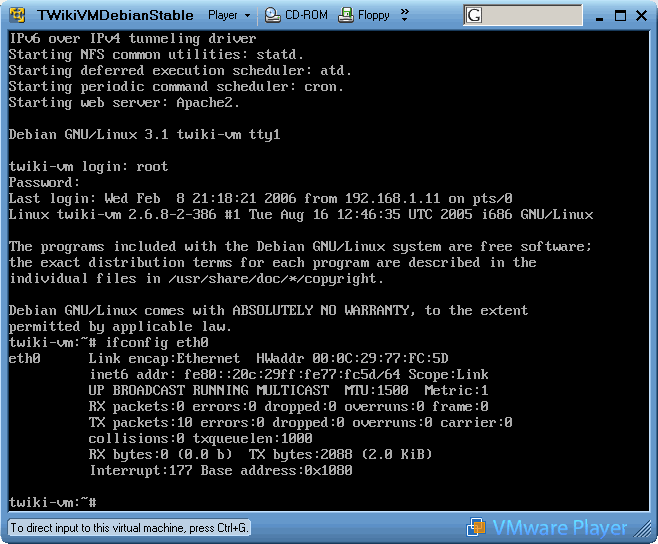
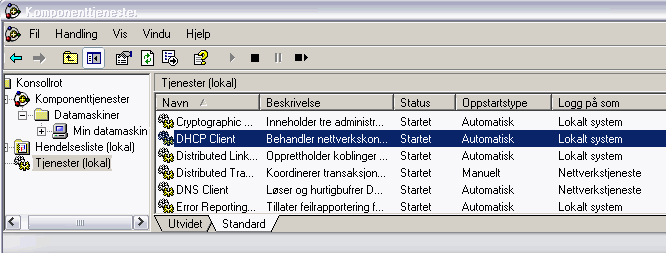


 Ideas, requests, problems regarding TWiki? Send feedback. Ask community in the support forum.
Copyright © 1999-2026 by the contributing authors. All material on this collaboration platform is the property of the contributing authors.